
从零开始的RPC(二):Protobuf
参考教程
拓展学习
- Protocol Buffer Language Guide
- 完整地关于如何编写
.proto文件;完整的字段类型 - 不包含OOP继承,Protobuf不是用来做这件事的
- 完整地关于如何编写
- Go API Reference
- Go Generated Code Guide
- 了解Protobuf生成文件的具体内容
- Encoding Reference
接下来主要参照Protobuf官方教程进行学习
Protobuf(一)
定义数据格式
To create your address book application, you’ll need to start with a
.protofile. The definitions in a.protofile are simple: you add a message for each data structure you want to serialize, then specify a name and a type for each field in the message. In our example, the.protofile that defines the messages isaddressbook.proto.
要开始搭建一个通讯录程序,你需要创建一个.proto文件。所谓的.proto文件就是一个包含结构化的可序列化的数据消息的文件,每个数据都需要指定类型和字段名称。在我们的例子中,.proto文件命名为addressbook.proto
The
.protofile starts with a package declaration, which helps to prevent naming conflicts between different projects.
.proto文件顶部需要定义包名,这能有效避免命名空间冲突。
syntax = "proto3";
package tutorial;

import "google/protobuf/timestamp.proto";
The
go_packageoption defines the import path of the package which will contain all the generated code for this file. The Go package name will be the last path component of the import path. For example, our example will use a package name of “tutorialpb”.
go_package配置定义了包含所有生成自当前文件的代码文件的导入路径。包名将会是导入路径的最后一部分。比如我们这里的包名使用tutorialpb,那么:
// 官方教程里是写死的, 编译的时候可能会尝试远程拉取导致编译失败
option go_package = "./pb/tutorialpb";
提示
gRPC API V2要求必须写option go_package,不写就爆炸
Next, you have your message definitions. A message is just an aggregate containing a set of typed fields. Many standard simple data types are available as field types, including
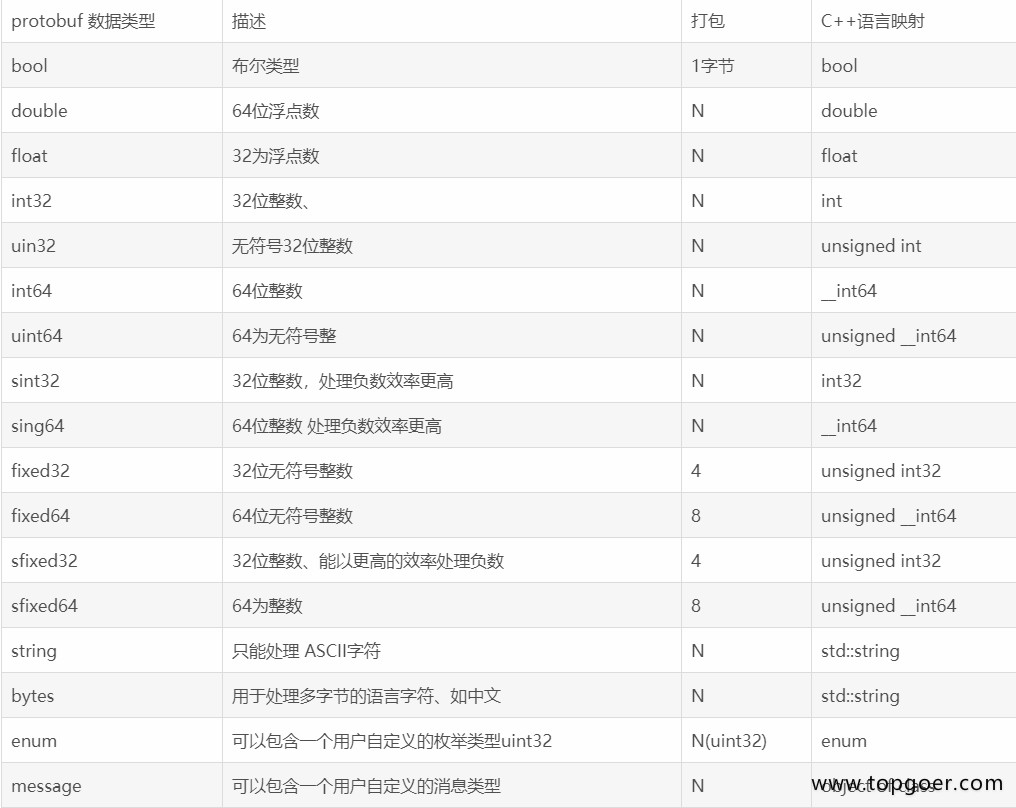
bool,int32,float,double, andstring. You can also add further structure to your messages by using other message types as field types.
接下来你需要编写消息定义。消息不过是一堆有类型的字段而已。诸如bool、int32、float、double和string之类的标准数据类型都可以直接使用。你也可以将消息类型用作字段类型
message Person {
  string name = 1;
  int32 id = 2;
  string email = 3;

  message PhoneNumber {
    string number = 1;
    PhoneType type = 2;
  }
  repeated PhoneNumber phones = 4; // repeated 表示数组类型

  google.protobuf.Timestamp last_updated = 5;
}

enum PhoneType {
  PHONE_TYPE_UNSPECIFIED = 0;
  PHONE_TYPE_MOBILE = 1;
  PHONE_TYPE_HOME = 2;
  PHONE_TYPE_WORK = 3;
}

// 通讯录会有很多个Person
message AddressBook {
  repeated Person people = 1; // Person 列表
}
In the above example, the
Personmessage containsPhoneNumbermessages, while theAddressBookmessage containsPersonmessages. You can even define message types nested inside other messages – as you can see, thePhoneNumbertype is defined insidePerson. You can also defineenumtypes if you want one of your fields to have one of a predefined list of values – here you want to specify that a phone number can be one ofPHONE_TYPE_MOBILE,PHONE_TYPE_HOME, orPHONE_TYPE_WORK.
(消息嵌套)
The " = 1", " = 2" markers on each element identify the unique “tag” that field uses in the binary encoding. Tag numbers 1-15 require one less byte to encode than higher numbers, so as an optimization you can decide to use those tags for the commonly used or repeated elements, leaving tags 16 and higher for less-commonly used optional elements. Each element in a repeated field requires re-encoding the tag number, so repeated fields are particularly good candidates for this optimization.
= 1、= 2用于标记类型ID,类型ID之后会用于二进制编码。1-15标签在编码时能比数值更高的标签少占用一个字节,所以一个优化方法是 常用类型用小标签,不常用类型用16以后的大标签。repeated列表标签字段中的每个元素都会复用同一个标签,所以repeated字段也可以用于内存优化
If a field value isn’t set, a default value is used: zero for numeric types, the empty string for strings, false for bools. For embedded messages, the default value is always the “default instance” or “prototype” of the message, which has none of its fields set. Calling the accessor to get the value of a field which has not been explicitly set always returns that field’s default value.
(字段默认值,基本类型的话是对应的空值,嵌套消息类型的话是none)
If a field is
repeated, the field may be repeated any number of times (including zero). The order of the repeated values will be preserved in the protocol buffer. Think of repeated fields as dynamically sized arrays.
(可空列表)
You’ll find a complete guide to writing
.protofiles – including all the possible field types – in the Protocol Buffer Language Guide. Don’t go looking for facilities similar to class inheritance, though – protocol buffers don’t do that.
编译 (Compiling Your Protocol Buffers)
Now that you have a
.proto, the next thing you need to do is generate the classes you’ll need to read and writeAddressBook(and hencePersonandPhoneNumber) messages. To do this, you need to run the protocol buffer compilerprotocon your.proto:
If you haven’t installed the compiler, download the package and follow the instructions in the README.
Run the following command to install the Go protocol buffers plugin:
go install google.golang.org/protobuf/cmd/protoc-gen-go@latestThe compiler plugin
protoc-gen-gowill be installed in$GOBIN, defaulting to$GOPATH/bin. It must be in your$PATHfor the protocol compilerprotocto find it.Now run the compiler, specifying the source directory (where your application’s source code lives – the current directory is used if you don’t provide a value), the destination directory (where you want the generated code to go; often the same as
$SRC_DIR), and the path to your.proto. In this case, you would invoke:protoc -I=$SRC_DIR --go_out=$DST_DIR $SRC_DIR/addressbook.proto # 或者 protoc --go_out=. --go_opt=paths=source_relative \ --go-grpc_out=. --go-grpc_opt=paths=source_relative \ addressbook.proto--go_out=.:把生成的.pb.go放在当前目录。--go-grpc_out=.:把生成的_grpc.pb.go也放在当前目录。paths=source_relative:非常重要。这告诉插件按源码的相对路径生成,不再依赖老的GOPATH逻辑。
Because you want Go code, you use the
--go_outoption – similar options are provided for other supported languages.
This generates github.com/protocolbuffers/protobuf/examples/go/tutorialpb/addressbook.pb.go in your specified destination directory.
protoc -I=internal-protobuf-tutorial/messages -I=F:/go/pkg/mod/protoc-33.4-win64/include --go_out=./internal-protobuf-tutorial/messages/out internal-protobuf-tutorial/messages/addressbook.proto-I:指定搜索路径,默认搜索当前路径下的.proto文件和库文件 ;如果.proto和protobuf库不在同一个地方,那就得写两个路径--go_out:Go类型文件导出位置;不会自动新建文件夹xxx.proto没有前导参数,直接写路径就完事了
导出目录结构如下:
    └─out
        └─pb
            └─tutorialpb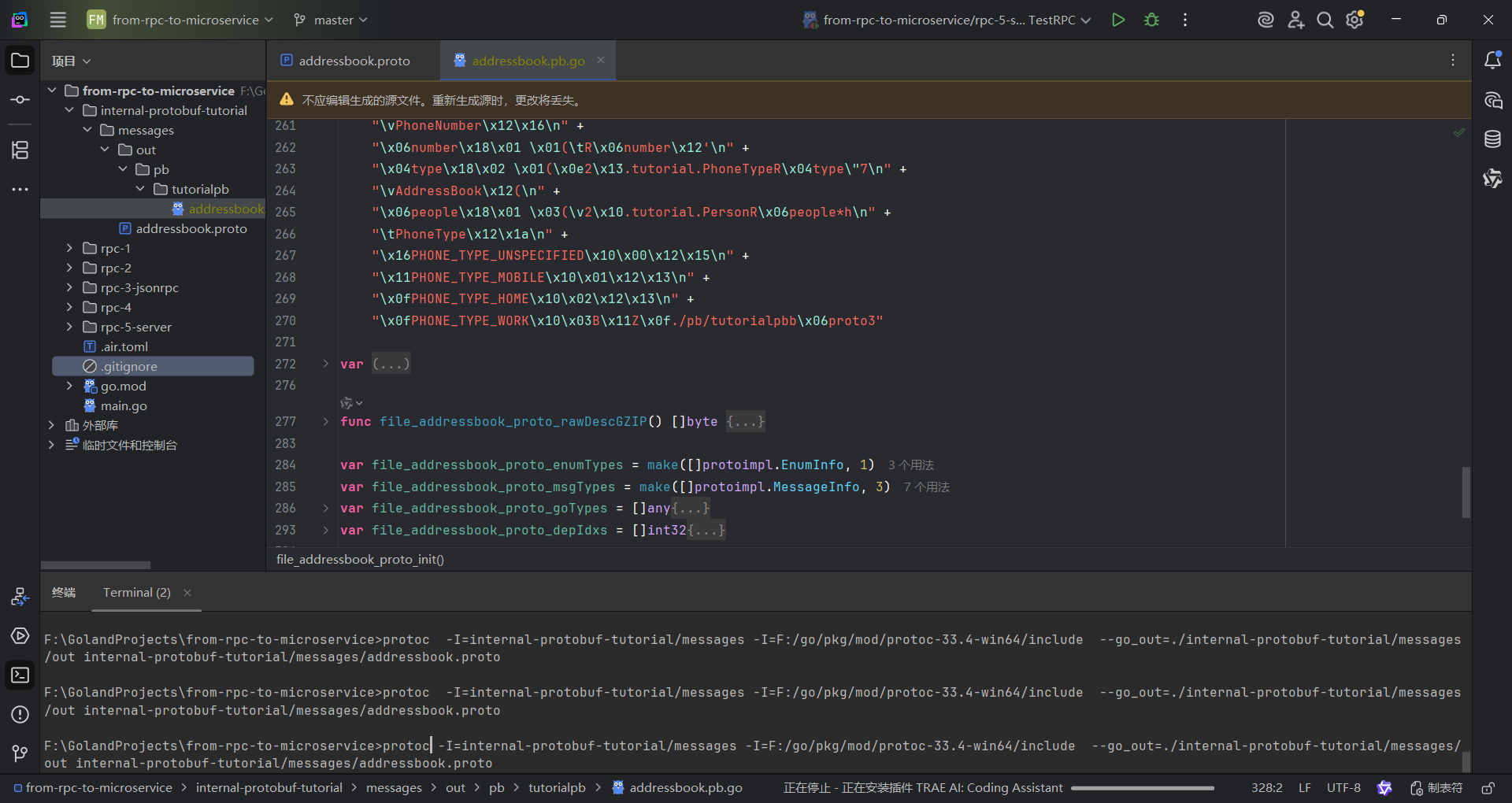
API (The Protocol Buffer API)
Generating
addressbook.pb.gogives you the following useful types:
- An
AddressBookstructure with aPeoplefield.
- A
Personstructure with fields forName,Id,EmailandPhones.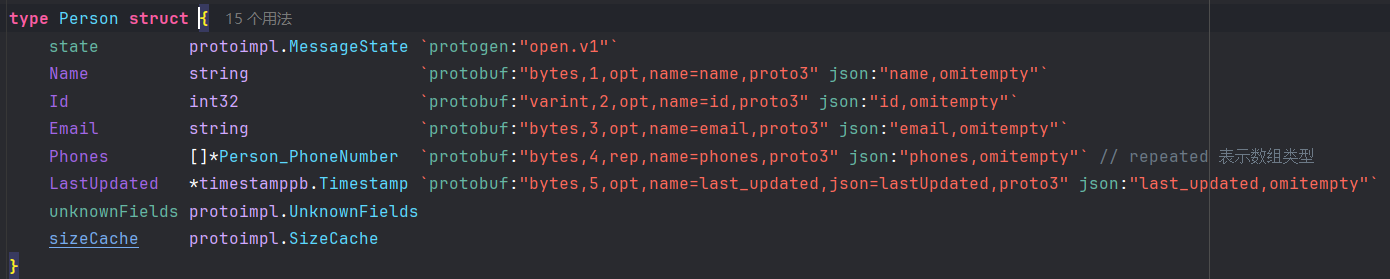
- A
Person_PhoneNumberstructure, with fields forNumberandType.
- The type
Person_PhoneTypeand a value defined for each value in thePerson.PhoneTypeenum.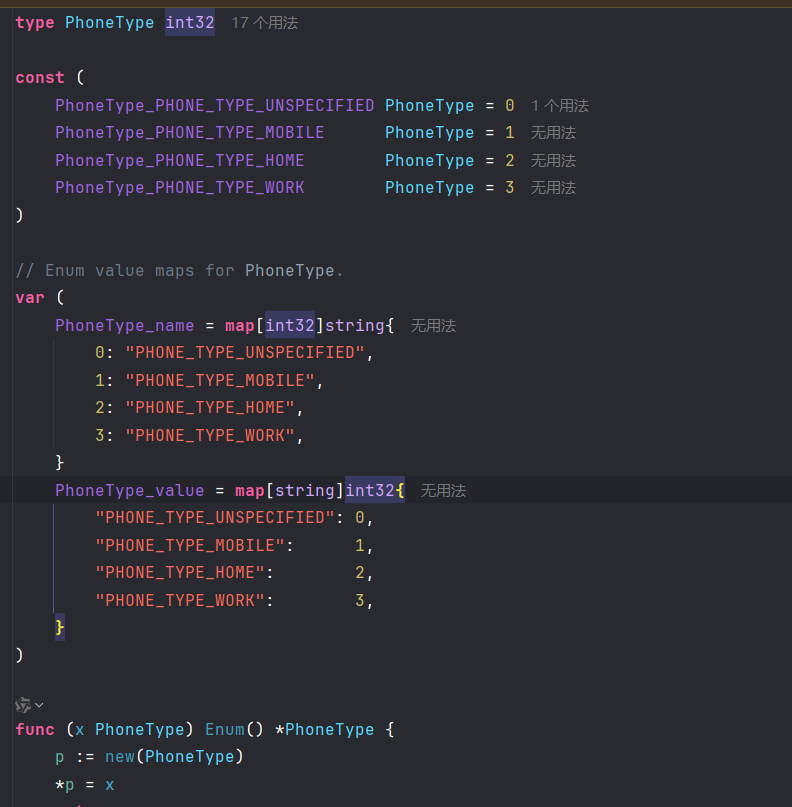
You can read more about the details of exactly what’s generated in the Go Generated Code guide, but for the most part you can treat these as perfectly ordinary Go types.
Here’s an example from the
list_peoplecommand’s unit tests of how you might create an instance of Person:
p := pb.Person{
    Id:    1234,
    Name:  "John Doe",
    Email: "jdoe@example.com",
    Phones: []*pb.Person_PhoneNumber{
        {Number: "555-4321", Type: pb.PhoneType_PHONE_TYPE_HOME},
    },
}
消息写 (Writing a Message)
The whole purpose of using protocol buffers is to serialize your data so that it can be parsed elsewhere. In Go, you use the
protolibrary’s Marshal function to serialize your protocol buffer data. A pointer to a protocol buffer message’sstructimplements theproto.Messageinterface. Callingproto.Marshalreturns the protocol buffer, encoded in its wire format. For example, we use this function in theadd_personcommand:
book := &pb.AddressBook{}
// ...

// Write the new address book back to disk.
out, err := proto.Marshal(book)
if err != nil {
    log.Fatalln("Failed to encode address book:", err)
}
if err := ioutil.WriteFile(fname, out, 0644); err != nil {
    log.Fatalln("Failed to write address book:", err)
}
消息读(Reading a Message)
To parse an encoded message, you use the
protolibrary’s Unmarshal function. Calling this parses the data ininas a protocol buffer and places the result inbook. So to parse the file in thelist_peoplecommand, we use:
// Read the existing address book.
in, err := ioutil.ReadFile(fname)
if err != nil {
    log.Fatalln("Error reading file:", err)
}
book := &pb.AddressBook{}
if err := proto.Unmarshal(in, book); err != nil {
    log.Fatalln("Failed to parse address book:", err)
}
Proto项目维护(Extending a Protocol Buffer)
Sooner or later after you release the code that uses your protocol buffer, you will undoubtedly want to “improve” the protocol buffer’s definition. If you want your new buffers to be backwards-compatible, and your old buffers to be forward-compatible – and you almost certainly do want this – then there are some rules you need to follow. In the new version of the protocol buffer:
- you must not change the tag numbers of any existing fields.
- you may delete fields.
- you may add new fields but you must use fresh tag numbers (i.e. tag numbers that were never used in this protocol buffer, not even by deleted fields).
(There are some exceptions to these rules, but they are rarely used.)
If you follow these rules, old code will happily read new messages and simply ignore any new fields. To the old code, singular fields that were deleted will simply have their default value, and deleted repeated fields will be empty. New code will also transparently read old messages.
However, keep in mind that new fields will not be present in old messages, so you will need to do something reasonable with the default value. A type-specific default value is used: for strings, the default value is the empty string. For booleans, the default value is false. For numeric types, the default value is zero.
Protobuf(二):类型进阶
定义消息类型 (Defining A Message Type)
First let’s look at a very simple example. Let’s say you want to define a search request message format, where each search request has a query string, the particular page of results you are interested in, and a number of results per page. Here’s the
.protofile you use to define the message type.
syntax = "proto3";

message SearchRequest {
  string query = 1;
  int32 page_number = 2;
  int32 results_per_page = 3;
}
The first line of the file specifies that you’re using the proto3 revision of the protobuf language spec.
- The
edition(orsyntaxfor proto2/proto3) must be the first non-empty, non-comment line of the file. - If no
editionorsyntaxis specified, the protocol buffer compiler will assume you are using proto2.
- The
The
SearchRequestmessage definition specifies three fields (name/value pairs), one for each piece of data that you want to include in this type of message. Each field has a name and a type.
指定字段类型(Specifying Field Types)
In the earlier example, all the fields are scalar types: two integers (page_number and results_per_page) and a string (query). You can also specify enumerations and composite types like other message types for your field.
字段标签范围(Assigning Field Numbers)
可用标签范围为1到5-3687-0911,但是有以下限制:
- 每个消息中的字段ID必须唯一
- ID
19000~19999用于Protobuf实现。如果你在自定义消息中用到了保留ID,编译器会抱怨 - 不可使用保留ID或拓展组件的ID
因为Protobuf采用[message wire format]](https://protobuf.dev/programming-guides/encoding),因此ID一旦使用便不可更改,否则等效于删除指定字段并创建同样类型而ID不同的新字段。请查看Deleting Fields了解如何正确修改字段。
不可复用类型ID,也不可复用reserved列表里的ID。详情请查看复用ID的后果
对于常用类型,应该使用1到15的ID。越小的ID占用的格式空间就越小。例如1到15的ID占用一字节空间,ID16到2047占用两字节空间。详情请查看Protocol Buffer编码介绍
ID复用的后果 (Consequences of Reusing Field Numbers)
复用ID可能导致解析时语义出现偏差
Protobuf Wire Format的实现比较精简,无法检测出ID复用
编码时用一个ID,解码时用另一个ID可能会导致如下后果:
- 把开发时间浪费在调试上
- 解析/合并异常(最好的情况)
- PII/SPII泄露
- 数据损坏
以下ID复用的常见情形:
- renumbering fields (sometimes done to achieve a more aesthetically pleasing number order for fields). Renumbering effectively deletes and re-adds all the fields involved in the renumbering, resulting in incompatible wire-format changes.
- 删掉某个字段后忘记标记这个ID不再可用
ID最多占用29比特而非32比特的原因是要留出3比特用于指定字段的wire format。详情请查看Encoding topic
指定字段基数 (Specifying Field Cardinality)
- 单数
Proto3语法提供两种对单数字段的修饰符:optional:推荐;optional字段有以下两种可能的状态:- 字段已确定,拥有被显式指定的值或序列化出来的值,那么是可序列化的
- 字段未确定,则会返回默认值。不是可序列化的
推荐使用optional,以确保对Protocol编辑版和Proto2的最大兼容性(因为proto3的optional修饰符是后来加上的)
- 隐式:就是不写修饰符;有如下行为:
- 如果字段是消息类型,那么默认是
optional字段 - 如果字段不是一种消息,那么有以下两种状态:
- 字段已赋值上或序列化得到非默认(非零)的值,那么是可序列化的
- 如果字段被赋值上默认值(零值),那么就是不可序列化的。事实上,你没法决定是否给予零值,还是序列化得到零值,亦或是压根不提供一个值。参见字段的本质
- 如果字段是消息类型,那么默认是
repeater:表示给定类型的动态长度数组,长度可以为0map:键值对类型,详情信息请查看Map
数组类型默认是Packed的 (Repeated Fields are Packed by Default)
n proto3, repeated fields of scalar numeric types use packed encoding by default.
You can find out more about packed encoding in Protocol Buffer Encoding.
消息类型字段集永不为空(Message Type Fields Always Have Field Presence)
In proto3, message-type fields already have field presence. Because of this, adding the
optionalmodifier doesn’t change the field presence for the field.
The definitions for
Message2andMessage3in the following code sample generate the same code for all languages, and there is no difference in representation in binary, JSON, and TextFormat:
syntax="proto3";

package foo.bar;

message Message1 {}

message Message2 {
  Message1 foo = 1;
}

message Message3 {
  optional Message1 bar = 1;
}
消息是形式良好的 (Well-formed Messages)
The term “well-formed,” when applied to protobuf messages, refers to the bytes serialized/deserialized. The protoc parser validates that a given proto definition file is parseable.
Singular fields can appear more than once in wire-format bytes. The parser will accept the input, but only the last instance of that field will be accessible through the generated bindings. See Last One Wins for more on this topic.
添加更多消息类型 (Adding More Message Types)
Multiple message types can be defined in a single
.protofile. This is useful if you are defining multiple related messages – so, for example, if you wanted to define the reply message format that corresponds to yourSearchResponsemessage type, you could add it to the same.proto:
一个.proto文件可包含多个消息类型:
message SearchRequest {
  string query = 1;
  int32 page_number = 2;
  int32 results_per_page = 3;
}

message SearchResponse {
 ...
}
Combining Messages leads to bloat While multiple message types (such as message, enum, and service) can be defined in a single
.protofile, it can also lead to dependency bloat when large numbers of messages with varying dependencies are defined in a single file. It’s recommended to include as few message types per.protofile as possible.
如果一个.proto里叠了太多消息类型,可能会造成依赖爆炸。所以最好还是把过多的类型给分出去一些
注释 (Adding Comments)
- 单行注释:
// - 行内/多行注释:
/* */
/**
 * SearchRequest represents a search query, with pagination options to
 * indicate which results to include in the response.
 */
message SearchRequest {
  string query = 1;

  // Which page number do we want?
  int32 page_number = 2;

  // Number of results to return per page.
  int32 results_per_page = 3;
}
删除字段 (Deleting Fields)
Deleting fields can cause serious problems if not done properly.
When you no longer need a field and all references have been deleted from client code, you may delete the field definition from the message. However, you must reserve the deleted field number. If you do not reserve the field number, it is possible for a developer to reuse that number in the future.
You should also reserve the field name to allow JSON and TextFormat encodings of your message to continue to parse.
标记ID为不再可用 (Reserved Field Numbers)
If you update a message type by entirely deleting a field, or commenting it out, future developers can reuse the field number when making their own updates to the type. This can cause severe issues, as described in Consequences of Reusing Field Numbers. To make sure this doesn’t happen, add your deleted field number to the
reservedlist.
message Foo {
  reserved 2, 15, 9 to 11;
}
Reserved field number ranges are inclusive (
9 to 11is the same as9, 10, 11).
标记字段名称为不再可用 (Reserved Field Names)
Reusing an old field name later is generally safe, except when using TextProto or JSON encodings where the field name is serialized. To avoid this risk, you can add the deleted field name to the
reservedlist.
Reserved names affect only the protoc compiler behavior and not runtime behavior, with one exception: TextProto implementations may discard unknown fields (without raising an error like with other unknown fields) with reserved names at parse time (only the C++ and Go implementations do so today). Runtime JSON parsing is not affected by reserved names.
message Foo {
  reserved 2, 15, 9 to 11;
  reserved "foo", "bar";
}
Note that you can’t mix field names and field numbers in the same
reservedstatement.
你的.proto生成文件里都有些什么? (What’s Generated from Your .proto?)
When you run the protocol buffer compiler on a
.proto, the compiler generates the code in your chosen language you’ll need to work with the message types you’ve described in the file, including getting and setting field values, serializing your messages to an output stream, and parsing your messages from an input stream.
- 省略其他语言
- For Go, the compiler generates a
.pb.gofile with a type for each message type in your file. - 省略其他语言
You can find out more about using the APIs for each language by following the tutorial for your chosen language. For even more API details, see the relevant API reference.