
Kotlin 进阶:库与API
前言
在 Kotlin 生态中,学会利用库(Libraries)和 API 是从“写代码的人”转变为“解决问题的人”的关键一步。
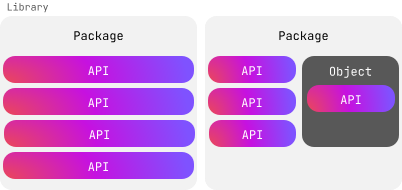
为了让你更清晰地理解这些术语的关系,我们可以把它们看作一个层级结构:
- 库 (Library):这是一个大的容器,包含了开发者为了解决特定问题(如联网、图片处理、数学运算)而编写并分享的可重用代码集合。
- 包 (Package) 与对象 (Object):这是库内部的组织方式。包通过命名空间防止名称冲突(类似于文件夹),而对象则将相关的类和函数聚合在一起。
- API (应用程序接口):这是库的“门面”。它定义了你可以调用哪些函数、访问哪些属性,而无需关心库内部复杂的实现逻辑。
💡 为什么库在 Kotlin 中如此重要?
Kotlin 设计之初就极其强调互操作性 (Interoperability)。这意味着:
双重红利:你可以无缝使用所有的 Kotlin 专用库(如 Coroutines, Ktor, Serialization)以及极其庞大的 Java 库(如 Guava, Apache Commons)。
标准库的力量:Kotlin 的标准库(
kotlin-stdlib)本身就非常强大。我们之前学到的filterNotNull、lazy、observable实际上都是标准库提供的 API。
💡 场景模拟:API 如何简化工作
假设你需要解析一段 JSON 数据:
- 不使用 API:你需要手动解析字符串、处理各种引号、逗号、大括号的嵌套逻辑。这不仅耗时,而且极易出错。
- 使用 API (例如 kotlinx.serialization):
// 仅仅调用一个 API 函数,逻辑由库在幕后完成
val user = Json.decodeFromString<User>(jsonString)
标准库
Kotlin 的设计哲学是:常用的保持简单,强大的保持有序。
- 默认导入:无需动手的便捷
Kotlin 为了保持代码简洁,会自动为每个文件导入最核心的包(主要位于kotlin.*下)。
- 内置函数:如
println()、print()、arrayOf()。 - 基础类型:如
String、Int、List。 - 扩展功能:如你示例中的
String.reversed()。
这些功能就像空气一样,随时随地可以直接使用。
fun main() {
    val text = "emosewa si niltoK"

   // Use the reversed() function from the standard library
    val reversedText = text.reversed()

    // Use the print() function from the standard library
    print(reversedText)
    // Kotlin is awesome
}
2. 按需导入:组织有序的功能模块
对于更专业化的功能(如时间测量、数学计算、正则匹配),Kotlin 要求你显式导入。这有助于:
- 避免命名冲突:不同包里可能有同名的函数。
- 代码可读性:别人一眼就能看出你的文件依赖了哪些模块(例如时间模块
kotlin.time)。
import kotlin.time.*import kotlin.time.Duration
import kotlin.time.Duration.Companion.hours
import kotlin.time.Duration.Companion.minutes
fun main() {
val thirtyMinutes: Duration = 30.minutes
val halfHour: Duration = 0.5.hours
println(thirtyMinutes == halfHour)
// true
}在这个例子这:
Companion导入:这里的hours和minutes实际上是定义在Duration类伴生对象(Companion Object)中的扩展属性。- 类型安全:
thirtyMinutes不再是一个普通的Long或Int(避免了“这个 30 到底是秒还是毫秒?”的经典 Bug),而是一个具备物理意义的Duration对象。
💡 导入的小技巧
通配符导入:使用
import kotlin.time.*可以一次性导入该包下的所有内容。但在大型项目中,通常建议明确导入具体的类,以保持代码整洁。别名导入 (As):如果两个包里有同名的类,你可以重命名:
import java.sql.Date as SqlDate
import java.util.Date as UtilDate
要致富先撸树/Search before you build
Before you decide to write your own code, check the standard library to see if what you're looking for already exists. Here's a list of areas where the standard library already provides a number of classes, functions, and properties for you:
在你开始写代码之前,请先检查一下你想找的功能是不是已经在标准库里了。下面是一些已经提供了若干类、函数和属性的标准库(文档):
To learn more about what else is in the standard library, explore its API reference.
要了解标准库的其余功能,请查看API参考文档
Kotlin库
虽然
kotlin-stdlib已经涵盖了基础需求,但对于更专业的领域(如跨平台日期处理、序列化或异步编程),你会用到由 JetBrains 维护的kotlinx系列库或第三方社区库。
kotlinx 前缀的库虽然不是语言内置的,但它们是官方推荐的标准扩展。
kotlinx-datetime:相比 Java 的java.time,它是为 Kotlin Multiplatform (KMP) 设计的,这意味着你的代码可以同时在 Android、iOS 和 Web 上运行而无需修改。- API 特点:它提供了更符合 Kotlin 习惯的类型。例如,示例中的
Clock.System.now()能够以极简的方式获取当前的“瞬间”(Instant)。
使用外部库不像导入标准库那样直接,通常需要两个步骤:
- 配置依赖 (Dependency):你需要在项目的构建文件(通常是
build.gradle.kts)中添加一行代码。这告诉编译器去哪里下载这个库。
// 示例配置(Gradle)
dependencies {
    implementation("org.jetbrains.kotlinx:kotlinx-datetime:0.6.0")
}- 导入包 (Import):配置完成后,你就可以像使用标准库一样,在代码顶部使用
import语句。
代码示例:处理时区
import kotlinx.datetime.*

fun main() {
    val now = Clock.System.now() // Get current instant
    println("Current instant: $now")

    val zone = TimeZone.of("America/New_York")
    val localDateTime = now.toLocalDateTime(zone)
    println("Local date-time in NY: $localDateTime")
}
这个例子演示了:
- 导入
kotlinx.datetime(及其下的所有包) - 使用
Clock.System.now()函数创建包含当前时间的Instant实例,并赋值给now变量 - 打印当前时间
- 使用
TimeZone.of找到纽约时区并赋值给zone变量 - 调用
now的toLocalDateTime方法,传入zone时区变量作为参数,获取本地时间 - 把结果赋值给
localDateTime变量 - 打印调整到纽约时区的时间
提示
关于这个例子中用的API,详情请见链接
💡 资源工具箱
Klibs.io:查找 Kotlin 专用库的搜索引擎。
Maven Central:托管几乎所有 Java 和 Kotlin 库的巨大仓库。
GitHub:大多数库的“说明书”和源码所在地。
💡 总结
标准库:开箱即用,满足基础。
外部库:需要配置依赖,解决专业问题(如
kotlinx-datetime)。核心思维:当标准库满足不了你时,先去搜索有没有现成的库。
选择性启用API/Opt in to APIs
当你看到
@OptIn时,这其实是库作者在对你进行“免责声明”:这个功能虽然能用,但它可能还在试验阶段(Experimental),或者它的 API 结构在未来可能会发生破坏性的改变。
当你尝试使用一个被标记为“需要 opt-in”的函数(如无符号整数操作 uintArrayOf)时,编译器会拦截你:
This declaration needs opt-in. Its usage should be marked with '@...' or '@OptIn(...)'在软件工程中,API 的稳定性至关重要。Opt-in 机制解决了两个痛点:
- 保护开发者:防止你在不知情的情况下使用了不稳定的代码,导致未来升级库时代码崩溃。
- 收集反馈:允许作者在正式定稿前,让一部分勇敢的开发者先试用。
语法规则
使用 @OptIn 注解,并传入该 API 所属的限制类(Marker Class)的引用
例如,文档里的uintArrayOf()函数会在@ExperimentalUnsignedTypes注解下抛出错误:
@ExperimentalUnsignedTypes
inline fun uintArrayOf(vararg elements: UInt): UIntArray
使用类似下面的语法启用注解特性
@OptIn(ExperimentalUnsignedTypes::class)下面是完整的例子
无符号整数(Unsigned Integers,如
UInt)在 Kotlin 中曾长期处于试验阶段,因为它们在 JVM 底层的处理比较特殊。
@OptIn(ExperimentalUnsignedTypes::class)
fun main() {
    // Create an unsigned integer array
    val unsignedArray: UIntArray = uintArrayOf(1u, 2u, 3u, 4u, 5u)

    // Modify an element
    unsignedArray[2] = 42u
    println("Updated array: ${unsignedArray.joinToString()}")
    // Updated array: 1, 2, 42, 4, 5
}
这是启用实验性API的最简单的方式,详情请见 Opt-in requirements.
💡 接受的范围:局部 vs 全局
根据你的需求,你可以在不同的层级进行 Opt-in:
| 作用范围 | 写法 | 影响 |
|---|---|---|
| 函数级 | 在函数上方加 @OptIn(...) | 仅在该函数内可以使用这些实验性 API。 |
| 类级 | 在类名上方加 @OptIn(...) | 整个类的方法和属性都可以使用。 |
| 项目级 | 在 build.gradle.kts 配置 | 最推荐方式。全项目通用,不需要在每个文件里写注解。 |
专家提示:@OptIn vs @RequiresOptIn
@RequiresOptIn:这是给库作者用的。如果你写了一个库,想让别人在使用你的某个函数时必须“选择性接受”,你就定义一个注解并打上这个标记。@OptIn:这是给使用者用的。表示“我知道这个 API 不稳定,但我愿意承担风险”。
💡 总结
看到警告不要慌:这通常意味着你正在使用前沿技术。
谨慎使用:在生产环境(Production)中使用实验性 API 时要格外小心,升级版本前务必查阅发行说明。
练习
练习一
题目描述
You are developing a financial application that helps users calculate the future value of their investments. The formula to calculate compound interest is:
Where:
Ais the amount of money accumulated after interest (principal + interest).Pis the principal amount (the initial investment).ris the annual interest rate (decimal).nis the number of times interest is compounded per year.tis the time the money is invested for (in years).
Update the code to:
- Import the necessary functions from the
kotlin.mathpackage. - Add a body to the
calculateCompoundInterest()function that calculates the final amount after applying compound interest.
API附录
- 指数运算:
Double.pow和Float.pow
原题代码
// Write your code here

fun calculateCompoundInterest(P: Double, r: Double, n: Int, t: Int): Double {
    // Write your code here
}

fun main() {
    val principal = 1000.0
    val rate = 0.05
    val timesCompounded = 4
    val years = 5
    val amount = calculateCompoundInterest(principal, rate, timesCompounded, years)
    println("The accumulated amount is: $amount")
    // The accumulated amount is: 1282.0372317085844
}
解法
// Write your code here
import kotlin.math.pow

fun calculateCompoundInterest(P: Double, r: Double, n: Int, t: Int): Double {
    // Write your code here

    return P * (1 + (r / n)).pow(n * t)
}
练习二
题目描述
You want to measure the time it takes to perform multiple data processing tasks in your program. Update the code to add the correct import statements and functions from the kotlin.time package:
API附录
- 获取当前时间:
kotlin.time.Instant.Companion的now()函数,已标记为废弃- 自Kotlin 2.3之后,
kotlin.time.Clock.System.now函数
- 计算自某时间戳以来的时间跨度
来自kotlin.time.Instant.Companion包 - 测量给定代码块的运行耗时:
kotlin.time.measureTime()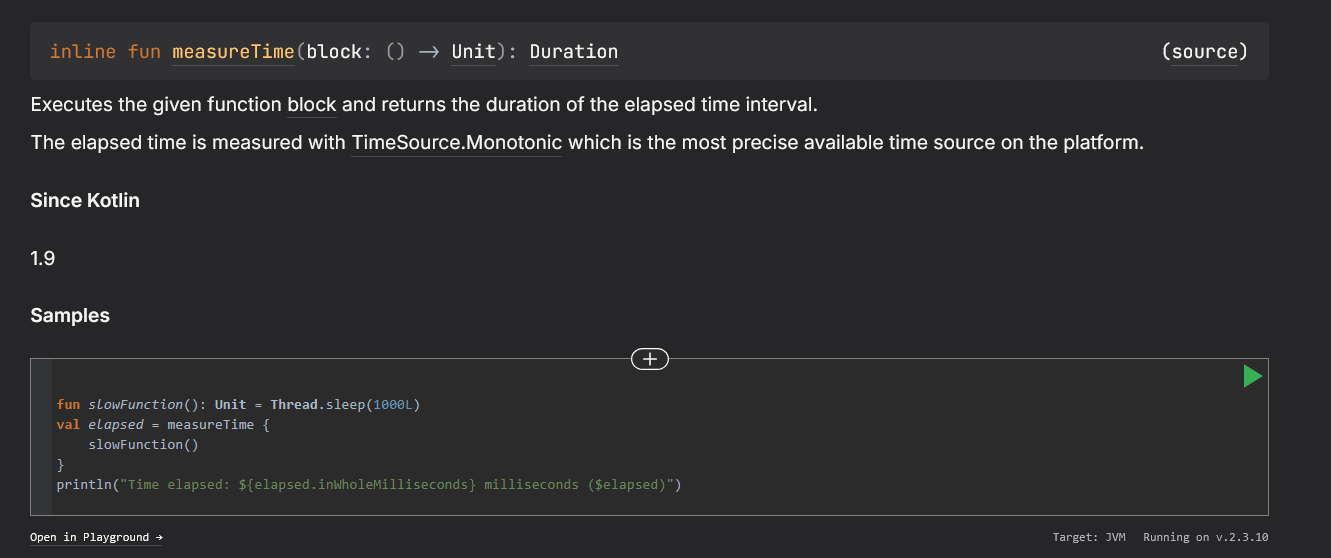
原题代码
// Write your code here

fun main() {
    val timeTaken = /* Write your code here */ {
        // Simulate some data processing
        val data = List(1000) { it * 2 }
        val filteredData = data.filter { it % 3 == 0 }

        // Simulate processing the filtered data
        val processedData = filteredData.map { it / 2 }
        println("Processed data")
    }

    println("Time taken: $timeTaken") // e.g. 16 ms
}
解法
本人解法
val timeTaken = /* Write your code here */ {
    val start = Instant.fromEpochMilliseconds(0)
    // Simulate some data processing
    val data = List(1000) { it * 2 }
    val filteredData = data.filter { it % 3 == 0 }

    // Simulate processing the filtered data
    val processedData = filteredData.map { it / 2 }
    println("Processed data")

    val end = Instant.fromEpochMilliseconds(0)
    val cost = (end - start).inWholeMilliseconds
}
一直出Lambda类型……
官方解法
import kotlin.time.measureTime

fun main() {
    val timeTaken = measureTime {
        // Simulate some data processing
        val data = List(1000) { it * 2 }
        val filteredData = data.filter { it % 3 == 0 }

        // Simulate processing the filtered data
        val processedData = filteredData.map { it / 2 }
        println("Processed data")
    }

    println("Time taken: $timeTaken") // e.g. 16 ms
}
练习三
题目描述
There's a new feature in the standard library available in the latest Kotlin release. You want to try it out, but it requires opt-in. The feature falls under @ExperimentalStdlibApi. What should the opt-in look like in your code?
API附录
原题代码
没有代码
解法
本人解法
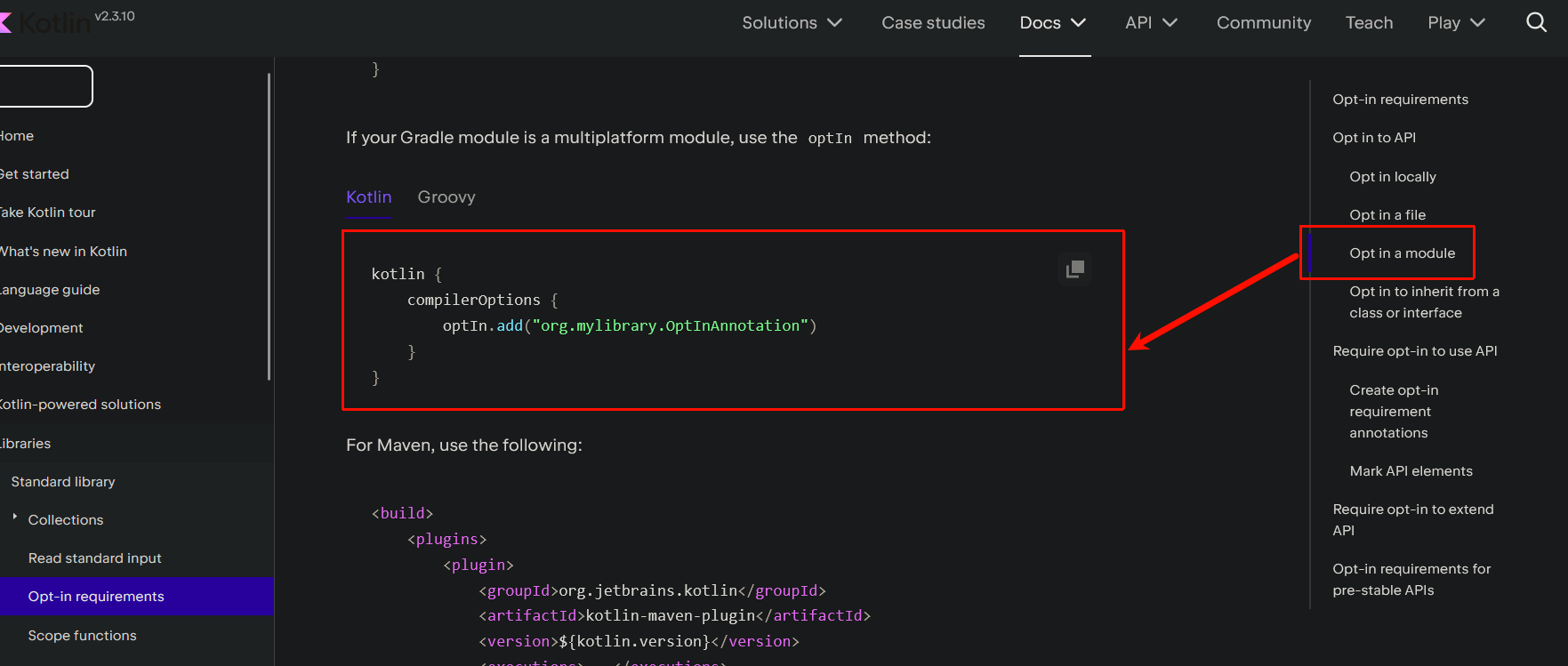
kotlin {
    compilerOptions {
        optIn.add("org.xxx.yyy.zzz.ExperimentalStdlibApi")
    }
}
官方解法
@OptIn(ExperimentalStdlibApi::class)