
Dart 特性一览
字符串模板 String interpolation
To put the value of an expression inside a string, use
${expression}. If the expression is an identifier, you can omit the{}.
使用${expression}在字符串中间插入表达式的值,如果 表达式 是一个变量,你可以省略 {}
Here are some examples of using string interpolation:
以下是一些字符串模板语法的示例
| String | Result |
|---|---|
'${3 + 2}' | '5' |
'${"word".toUpperCase()}' | 'WORD' |
'$myObject' | The value of myObject.toString() |
Exercise
String stringify(int x, int y) {
	// TODO('Return a formatted string here');
	  return '$x $y';  // 别漏了分号
}


// Tests your solution (Don't edit!):
void main() {
  assert(stringify(2, 3) == '2 3',
  "Your stringify method returned '${stringify(2, 3)}' instead of '2 3'");
  print('Success!');
}
可空变量
Dart enforces sound null safety. This means values can't be null unless you say they can be. In other words, types default to non-nullable.
Dart加强了健全空检查 (sound null safety )。这意味着变量不可为null,除非你显式声明了一个可空的变量。换句话说,类型默认不可空
For example, consider the following code. With null safety, this code returns an error. A variable of type
intcan't have the valuenull:
以下面的代码为例子,代码会因为空值检查而抛出错误。int类型的变量不允许为null
int a = null; // INVALID.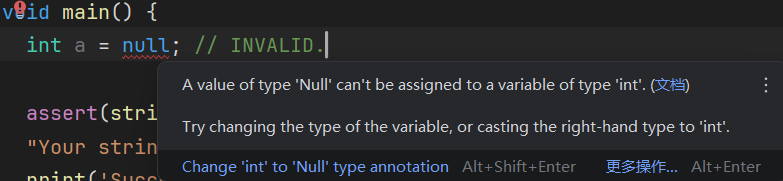
When creating a variable, add
?to the type to indicate that the variable can benull:
声明变量时,在类型标识符后面加上?,表示这个变量可以为null:
int? a = null; // Valid.You can simplify that code a bit because, in all versions of Dart,
nullis the default value for uninitialized variables:
你可以稍微简化一下代码,毕竟,在Dart的所有版本中,可空类型的默认值是null:
int? a; // The initial value of a is null.To learn more about null safety in Dart, read the sound null safety guide.
Exercise
// TODO: Declare the two variables here
String? name = "Jane";
String? address;


// Tests your solution (Don't edit!):
void main() {
  try {
    if (name == 'Jane' && address == null) {
      // Verify that "name" is nullable.
      name = null;
      print('Success!');
    } else {
      print('Not quite right, try again!');
    }
  } catch (e) {
    print('Exception: ${e.runtimeType}');
  }
}
空检查操作符 Null-aware operators
Dart offers some handy operators for dealing with values that might be null. One is the
??=assignment operator, which assigns a value to a variable only if that variable is currently null:
Dart 提供了一些趁手的操作符,用于处理可能为空的值。其中一个是 为空则赋值操作符 ??=,仅当变量为空时才赋值给这个变量
int? a; // = null
a ??= 3;
print(a); // <-- Prints 3.

a ??= 5;
print(a); // <-- Still prints 3.
Another null-aware operator is
??, which returns the expression on its left unless that expression's value is null, in which case it evaluates and returns the expression on its right:
另一个空类型检查操作符是 ??,当左值不为空时返回左值,左值为空时(计算并)返回右值:
print(1 ?? 3); // <-- Prints 1.
print(null ?? 12); // <-- Prints 12.
Exercise
String? foo = 'a string';
String? bar; // = null

// Substitute an operator that makes 'a string' be assigned to baz.
String? baz = foo /* TODO */ bar;

void updateSomeVars() {
  // Substitute an operator that makes 'a string' be assigned to bar.
  bar /* TODO */ 'a string';
}


// Tests your solution (Don't edit!):
void main() {
  try {
    updateSomeVars();

    if (foo != 'a string') {
      print('Looks like foo somehow ended up with the wrong value.');
    } else if (bar != 'a string') {
      print('Looks like bar ended up with the wrong value.');
    } else if (baz != 'a string') {
      print('Looks like baz ended up with the wrong value.');
    } else {
      print('Success!');
    }
  } catch (e) {
    print('Exception: ${e.runtimeType}.');
  }
}String? foo = 'a string';
String? bar; // = null
// Substitute an operator that makes 'a string' be assigned to baz.
String? baz = foo ?? bar;
void updateSomeVars() {
// Substitute an operator that makes 'a string' be assigned to bar.
bar ??= 'a string';
}
// Tests your solution (Don't edit!):
void main() {
try {
updateSomeVars();
if (foo != 'a string') {
print('Looks like foo somehow ended up with the wrong value.');
} else if (bar != 'a string') {
print('Looks like bar ended up with the wrong value.');
} else if (baz != 'a string') {
print('Looks like baz ended up with the wrong value.');
} else {
print('Success!');
}
} catch (e) {
print('Exception: ${e.runtimeType}.');
}
}条件字段访问
To guard access to a property or method of an object that might be null, put a question mark (
?) before the dot (.):
要访问一个可能为空的对象的属性或方法时,请在.点号前面加一个问号?
myObject?.somePropertyThe preceding code is equivalent to the following:
等同于下面的代码
(myObject != null) ? myObject.someProperty : nullYou can chain multiple uses of
?.together in a single expression:
你可以在一行语句中连续使用多个?.
myObject?.someProperty?.someMethod()The preceding code returns null (and never calls
someMethod()) if eithermyObjectormyObject.somePropertyis null.
上面的代码会返回null(并且永远不会调用someMethod()),只要myObject或myObject.someProperty有一为空
Exercise
String? upperCaseIt(String? str) {
  // TODO: Try conditionally accessing the `toUpperCase` method here.
}


// Tests your solution (Don't edit!):
void main() {
  try {
    String? one = upperCaseIt(null);
    if (one != null) {
      print('Looks like you\'re not returning null for null inputs.');
    } else {
      print('Success when str is null!');
    }
  } catch (e) {
    print('Tried calling upperCaseIt(null) and got an exception: \n ${e.runtimeType}.');
  }

  try {
    String? two = upperCaseIt('a string');
    if (two == null) {
      print('Looks like you\'re returning null even when str has a value.');
    } else if (two != 'A STRING') {
      print('Tried upperCaseIt(\'a string\'), but didn\'t get \'A STRING\' in response.');
    } else {
      print('Success when str is not null!');
    }
  } catch (e) {
    print('Tried calling upperCaseIt(\'a string\') and got an exception: \n ${e.runtimeType}.');
  }
}String? upperCaseIt(String? str) {
// TODO: Try conditionally accessing the `toUpperCase` method here.
return str?.toUpperCase();
}集合字面量
Dart has built-in support for lists, maps, and sets. You can create them using literals:
Dart内置列表、键值对和集合,你可以直接创建它们的字面量:
final aListOfStrings = ['one', 'two', 'three'];
final aSetOfStrings = {'one', 'two', 'three'};
final aMapOfStringsToInts = {'one': 1, 'two': 2, 'three': 3};
Dart's type inference can assign types to these variables for you. In this case, the inferred types are
List<String>,Set<String>, andMap<String, int>.
Dart可以自动为你推导这些字面量的类型。在上面的例子中,三个字面量会分别被推导为List<String>、Set<String>和Map<String, int>类型
Or you can specify the type yourself:
或者你也可以自己指定(集合)类型:
final aListOfInts = <int>[];
final aSetOfInts = <int>{};
final aMapOfIntToDouble = <int, double>{};
Specifying types is handy when you initialize a list with contents of a subtype, but still want the list to be
List<BaseType>:
当你想要创建包含一堆子类型的列表,但要保留列表时,你可以直接创建List<BaseType>:
final aListOfBaseType = <BaseType>[SubType(), SubType()];注
没看懂这里想表达什么
Exercise
// Assign this a list containing 'a', 'b', and 'c' in that order:
final aListOfStrings = null;

// Assign this a set containing 3, 4, and 5:
final aSetOfInts = null;

// Assign this a map of String to int so that aMapOfStringsToInts['myKey'] returns 12:
final aMapOfStringsToInts = null;

// Assign this an empty List<double>:
final anEmptyListOfDouble = null;

// Assign this an empty Set<String>:
final anEmptySetOfString = null;

// Assign this an empty Map of double to int:
final anEmptyMapOfDoublesToInts = null;


// Tests your solution (Don't edit!):
void main() {
  final errs = <String>[];

  if (aListOfStrings is! List<String>) {
    errs.add('aListOfStrings should have the type List<String>.');
  } else if (aListOfStrings.length != 3) {
    errs.add('aListOfStrings has ${aListOfStrings.length} items in it, \n rather than the expected 3.');
  } else if (aListOfStrings[0] != 'a' || aListOfStrings[1] != 'b' || aListOfStrings[2] != 'c') {
    errs.add('aListOfStrings doesn\'t contain the correct values (\'a\', \'b\', \'c\').');
  }

  if (aSetOfInts is! Set<int>) {
    errs.add('aSetOfInts should have the type Set<int>.');
  } else if (aSetOfInts.length != 3) {
    errs.add('aSetOfInts has ${aSetOfInts.length} items in it, \n rather than the expected 3.');
  } else if (!aSetOfInts.contains(3) || !aSetOfInts.contains(4) || !aSetOfInts.contains(5)) {
    errs.add('aSetOfInts doesn\'t contain the correct values (3, 4, 5).');
  }

  if (aMapOfStringsToInts is! Map<String, int>) {
    errs.add('aMapOfStringsToInts should have the type Map<String, int>.');
  } else if (aMapOfStringsToInts['myKey'] != 12) {
    errs.add('aMapOfStringsToInts doesn\'t contain the correct values (\'myKey\': 12).');
  }

  if (anEmptyListOfDouble is! List<double>) {
    errs.add('anEmptyListOfDouble should have the type List<double>.');
  } else if (anEmptyListOfDouble.isNotEmpty) {
    errs.add('anEmptyListOfDouble should be empty.');
  }

  if (anEmptySetOfString is! Set<String>) {
    errs.add('anEmptySetOfString should have the type Set<String>.');
  } else if (anEmptySetOfString.isNotEmpty) {
    errs.add('anEmptySetOfString should be empty.');
  }

  if (anEmptyMapOfDoublesToInts is! Map<double, int>) {
    errs.add('anEmptyMapOfDoublesToInts should have the type Map<double, int>.');
  } else if (anEmptyMapOfDoublesToInts.isNotEmpty) {
    errs.add('anEmptyMapOfDoublesToInts should be empty.');
  }

  if (errs.isEmpty) {
    print('Success!');
  } else {
    errs.forEach(print);
  }

  // ignore_for_file: unnecessary_type_check
}
// Assign this a list containing 'a', 'b', and 'c' in that order:
final aListOfStrings = ['a', 'b', 'c'];
// Assign this a set containing 3, 4, and 5:
final aSetOfInts = {3, 4, 5};
// Assign this a map of String to int so that aMapOfStringsToInts['myKey'] returns 12:
final aMapOfStringsToInts = {'myKey': 12};
// Assign this an empty List<double>:
final anEmptyListOfDouble = <double>[];
// Assign this an empty Set<String>:
final anEmptySetOfString = <String>{};
// Assign this an empty Map of double to int:
final anEmptyMapOfDoublesToInts = <double, int>{};箭头语法
You might have seen the
=>symbol in Dart code. This arrow syntax is a way to define a function that executes the expression to its right and returns its value.
你可能已经在Dart代码里见过=>符号了。箭头符号可用于定义一个计算并返回值的表达式
提示
就是用来写一行流的操作符
=> 箭头表达式的示例
switch-case表达式语句块
void main() {
  const statusCode = 404;
  final status = switch (statusCode) {
    200 => "OK",
    404 => "Not Found",
    _ => "Unknown"
  };

  print(status);
}
For example, consider this call to the
Listclass'sany()method:
考虑下面的代码,看它如何调用List类的any()方法:
bool hasEmpty = aListOfStrings.any((s) {
  return s.isEmpty;
});
Here's a simpler way to write that code:
你可以这样简化代码
bool hasEmpty = aListOfStrings.any((s) => s.isEmpty);Exercise
class MyClass {
  int value1 = 2;
  int value2 = 3;
  int value3 = 5;

  // Returns the product of the above values:
  int get product => TODO();

  // Adds 1 to value1:
  void incrementValue1() => TODO();

  // Returns a string containing each item in the
  // list, separated by commas (e.g. 'a,b,c'):
  String joinWithCommas(List<String> strings) => TODO();
}


// Tests your solution (Don't edit!):
void main() {
  final obj = MyClass();
  final errs = <String>[];

  try {
    final product = obj.product;

    if (product != 30) {
      errs.add('The product property returned $product \n instead of the expected value (30).');
    }
  } catch (e) {
    print('Tried to use MyClass.product, but encountered an exception: \n ${e.runtimeType}.');
    return;
  }

  try {
    obj.incrementValue1();

    if (obj.value1 != 3) {
      errs.add('After calling incrementValue, value1 was ${obj.value1} \n instead of the expected value (3).');
    }
  } catch (e) {
    print('Tried to use MyClass.incrementValue1, but encountered an exception: \n ${e.runtimeType}.');
    return;
  }

  try {
    final joined = obj.joinWithCommas(['one', 'two', 'three']);

    if (joined != 'one,two,three') {
      errs.add('Tried calling joinWithCommas([\'one\', \'two\', \'three\']) \n and received $joined instead of the expected value (\'one,two,three\').');
    }
  } catch (e) {
    print('Tried to use MyClass.joinWithCommas, but encountered an exception: \n ${e.runtimeType}.');
    return;
  }

  if (errs.isEmpty) {
    print('Success!');
  } else {
    errs.forEach(print);
  }
}
class MyClass {
int value1 = 2;
int value2 = 3;
int value3 = 5;
// Returns the product of the above values:
int get product => value1 * value2 * value3;
// Adds 1 to value1:
void incrementValue1() => this.value1++;
// Returns a string containing each item in the
// list, separated by commas (e.g. 'a,b,c'):
String joinWithCommas(List<String> strings) => strings.join(',');
}级联操作符
To perform a sequence of operations on the same object, use cascades (
..). We've all seen an expression like this:
要对同一个对象进行一系列操作,请使用级联操作符 (..)。我们一般见到的方法调用是这样的:
myObject.someMethod()It invokes
someMethod()onmyObject, and the result of the expression is the return value ofsomeMethod().
它会调用myObject的someMethod()方法,并返回someMethod的返回值
Here's the same expression with a cascade:
你可以用级联操作符改写这段代码
myObject..someMethod()Although it still invokes
someMethod()onmyObject, the result of the expression isn't the return value—it's a reference tomyObject!
尽管它还是会调用myObject的someMethod()方法,但这一次表达式的返回值不是函数的返回值,而是一个指向myObject的引用!
Using cascades, you can chain together operations that would otherwise require separate statements. For example, consider the following code, which uses the conditional member access operator (
?.) to read properties ofbuttonif it isn'tnull:
使用级联操作符,你可以把一系列分散在多行的表达式连在一起。例如,考虑下面的代码,使用?.操作符读取button的属性,如果button不为空的话:
final button = web.document.querySelector('#confirm');
button?.textContent = 'Confirm';
button?.classList.add('important');
button?.onClick.listen((e) => web.window.alert('Confirmed!'));
button?.scrollIntoView();
To instead use cascades, you can start with the null-shorting cascade (
?..), which guarantees that none of the cascade operations are attempted on anullobject. Using cascades shortens the code and makes thebuttonvariable unnecessary:
要改成使用级联操作符的版本,你可以把第一个.号改成 空检查级联操作符 ?..,允许对一个null对象使用级联操作符。使用级联操作符不仅可以缩短代码,还可以连button变量不需要了:
web.document.querySelector('#confirm')
  ?..textContent = 'Confirm'
  ..classList.add('important')
  ..onClick.listen((e) => web.window.alert('Confirmed!'))
  ..scrollIntoView();
Exercise
Use cascades to create a single statement that sets the
anInt,aString, andaListproperties of aBigObjectto1,'String!', and[3.0](respectively) and then callsallDone().
class BigObject {
  int anInt = 0;
  String aString = '';
  List<double> aList = [];
  bool _done = false;

  void allDone() {
    _done = true;
  }
}

BigObject fillBigObject(BigObject obj) {
  // Create a single statement that will update and return obj:
  return TODO('obj..');
}


// Tests your solution (Don't edit!):
void main() {
  BigObject obj;

  try {
    obj = fillBigObject(BigObject());
  } catch (e) {
    print('Caught an exception of type ${e.runtimeType} \n while running fillBigObject');
    return;
  }

  final errs = <String>[];

  if (obj.anInt != 1) {
    errs.add(
        'The value of anInt was ${obj.anInt} \n rather than the expected (1).');
  }

  if (obj.aString != 'String!') {
    errs.add(
        'The value of aString was \'${obj.aString}\' \n rather than the expected (\'String!\').');
  }

  if (obj.aList.length != 1) {
    errs.add(
        'The length of aList was ${obj.aList.length} \n rather than the expected value (1).');
  } else {
    if (obj.aList[0] != 3.0) {
      errs.add(
          'The value found in aList was ${obj.aList[0]} \n rather than the expected (3.0).');
    }
  }

  if (!obj._done) {
    errs.add('It looks like allDone() wasn\'t called.');
  }

  if (errs.isEmpty) {
    print('Success!');
  } else {
    errs.forEach(print);
  }
}
class BigObject {
int anInt = 0;
String aString = '';
List<double> aList = [];
bool _done = false;
void allDone() {
_done = true;
}
}
BigObject fillBigObject(BigObject obj) {
// Create a single statement that will update and return obj:
return obj
..anInt=1
..aString='String!'
..aList=[3.0]
..allDone();
}Getters与Setters
You can define getters and setters whenever you need more control over a property than a simple field allows.
你可以随时给一个类添加Getters和Setters,当你想要增加属性访问的细粒度时
For example, you can make sure a property's value is valid:
比如,你可以确保属性的值是有效的
class MyClass {
  int _aProperty = 0;

  int get aProperty => _aProperty;

  set aProperty(int value) {
    if (value >= 0) {
      _aProperty = value;
    }
  }
}
You can also use a getter to define a computed property:
你也可以使用getter定义一个计算属性:
class MyClass {
  final List<int> _values = [];

  void addValue(int value) {
    _values.add(value);
  }

  // A computed property.
  int get count {
    return _values.length;
  }
}
Exercise
Imagine you have a shopping cart class that keeps a private List<double> of prices. Add the following:
- A getter called
totalthat returns the sum of the prices - A setter that replaces the list with a new one, as long as the new list doesn't contain any negative prices (in which case the setter should throw an
InvalidPriceException).
class InvalidPriceException {}

class ShoppingCart {
  List<double> _prices = [];

  // TODO: Add a "total" getter here:

  // TODO: Add a "prices" setter here:
}


// Tests your solution (Don't edit!):
void main() {
  var foundException = false;

  try {
    final cart = ShoppingCart();
    cart.prices = [12.0, 12.0, -23.0];
  } on InvalidPriceException {
    foundException = true;
  } catch (e) {
    print('Tried setting a negative price and received a ${e.runtimeType} \n instead of an InvalidPriceException.');
    return;
  }

  if (!foundException) {
    print('Tried setting a negative price \n and didn\'t get an InvalidPriceException.');
    return;
  }

  final secondCart = ShoppingCart();

  try {
    secondCart.prices = [1.0, 2.0, 3.0];
  } catch(e) {
    print('Tried setting prices with a valid list, \n but received an exception: ${e.runtimeType}.');
    return;
  }

  if (secondCart._prices.length != 3) {
    print('Tried setting prices with a list of three values, \n but _prices ended up having length ${secondCart._prices.length}.');
    return;
  }

  if (secondCart._prices[0] != 1.0 || secondCart._prices[1] != 2.0 || secondCart._prices[2] != 3.0) {
    final vals = secondCart._prices.map((p) => p.toString()).join(', ');
    print('Tried setting prices with a list of three values (1, 2, 3), \n but incorrect ones ended up in the price list ($vals) .');
    return;
  }

  var sum = 0.0;

  try {
    sum = secondCart.total;
  } catch (e) {
    print('Tried to get total, but received an exception: ${e.runtimeType}.');
    return;
  }

  if (sum != 6.0) {
    print('After setting prices to (1, 2, 3), total returned $sum instead of 6.');
    return;
  }

  print('Success!');
}
class InvalidPriceException {}
class ShoppingCart {
List<double> _prices = [];
// TODO: Add a "total" getter here:
double get total {
return _prices.reduce((a, b) => a + b);
}
// TODO: Add a "prices" setter here:
set prices(List<double> prices) {
for (var price in prices) {
if (price < 0) {
throw InvalidPriceException();
}
}
_prices = prices;
}可选位置相关参数 Optional positional parameters
Dart has two kinds of function parameters: positional and named. Positional parameters are the kind you're likely familiar with:
Dart 有两种函数参数:位置相关参数和具名参数,位置相关参数也许是你比较熟悉的那一种
int sumUp(int a, int b, int c) {
  return a + b + c;
}
  // ···
  int total = sumUp(1, 2, 3);
With Dart, you can make these positional parameters optional by wrapping them in brackets:
在Dart里,你可以通过使用[]中括号包裹参数,使这些位置相关的参数变成可选参数
int sumUpToFive(int a, [int? b, int? c, int? d, int? e]) {
  int sum = a;
  if (b != null) sum += b;
  if (c != null) sum += c;
  if (d != null) sum += d;
  if (e != null) sum += e;
  return sum;
}
  // ···
  int total = sumUpToFive(1, 2);
  int otherTotal = sumUpToFive(1, 2, 3, 4, 5);
注
由于可选的位置参数的默认值是null,所以它们的类型必须是可空的
详情请见
Optional positional parameters are always last in a function's parameter list. Their default value is null unless you provide another default value:
可选的位置参数必须位于函数参数列表末尾,它们的默认值是null,除非额外设置默认值:
int sumUpToFive(int a, [int b = 2, int c = 3, int d = 4, int e = 5]) {
  // ···
}

void main() {
  int newTotal = sumUpToFive(1);
  print(newTotal); // <-- prints 15
}
Exercise
Implement a function called joinWithCommas() that accepts one to five integers, then returns a string of those numbers separated by commas. Here are some examples of function calls and returned values:
| Function call | Returned value |
|---|---|
joinWithCommas(1) | '1' |
joinWithCommas(1, 2, 3) | '1,2,3' |
joinWithCommas(1, 1, 1, 1, 1) | '1,1,1,1,1' |
String joinWithCommas(int a, [int? b, int? c, int? d, int? e]) {
  return TODO();
}


// Tests your solution (Don't edit!):
void main() {
  final errs = <String>[];

  try {
    final value = joinWithCommas(1);

    if (value != '1') {
      errs.add('Tried calling joinWithCommas(1) \n and got $value instead of the expected (\'1\').');
    }
  } on UnimplementedError {
    print('Tried to call joinWithCommas but failed. \n Did you implement the method?');
    return;
  } catch (e) {
    print('Tried calling joinWithCommas(1), \n but encountered an exception: ${e.runtimeType}.');
    return;
  }

  try {
    final value = joinWithCommas(1, 2, 3);

    if (value != '1,2,3') {
      errs.add('Tried calling joinWithCommas(1, 2, 3) \n and got $value instead of the expected (\'1,2,3\').');
    }
  } on UnimplementedError {
    print('Tried to call joinWithCommas but failed. \n Did you implement the method?');
    return;
  } catch (e) {
    print('Tried calling joinWithCommas(1, 2 ,3), \n but encountered an exception: ${e.runtimeType}.');
    return;
  }

  try {
    final value = joinWithCommas(1, 2, 3, 4, 5);

    if (value != '1,2,3,4,5') {
      errs.add('Tried calling joinWithCommas(1, 2, 3, 4, 5) \n and got $value instead of the expected (\'1,2,3,4,5\').');
    }
  } on UnimplementedError {
    print('Tried to call joinWithCommas but failed. \n Did you implement the method?');
    return;
  } catch (e) {
    print('Tried calling stringify(1, 2, 3, 4 ,5), \n but encountered an exception: ${e.runtimeType}.');
    return;
  }

  if (errs.isEmpty) {
    print('Success!');
  } else {
    errs.forEach(print);
  }
}
String joinWithCommas(int a, [int? b, int? c, int? d, int? e]) {
var nums = [a];
if (b != null) {
nums.add(b);
}
if (c != null) {
nums.add(c);
}
if (d != null) {
nums.add(d);
}
if (e != null) {
nums.add(e);
}
return nums.join(','); // join方法是Iterable类型的方法, 返回值为String
}具名参数 Named parameters
注
Using a curly brace syntax at the end of the parameter list, you can define parameters that have names.
使用{}大括号包裹函数参数列表尾部的若干个参数,你会得到具名参数
Named parameters are optional unless they're explicitly marked as
required.
具名参数都是可选的,除非用required显式标记
void printName(String firstName, String lastName, {String? middleName}) {
  print('$firstName ${middleName ?? ''} $lastName');
}

void main() {
  printName('Dash', 'Dartisan');
  printName('John', 'Smith', middleName: 'Who');
  // Named arguments can be placed anywhere in the argument list.
  printName('John', middleName: 'Who', 'Smith');
}
As you might expect, the default value of a nullable named parameter is
null, but you can provide a custom default value.
你可能已经猜到,可空的具名参数的默认值会是null,但你仍然可以另外设置默认值
If the type of a parameter is non-nullable, then you must either provide a default value (as shown in the following code) or mark the parameter as
required(as shown in the constructor section).
如果(具名)参数的类型是不可空的,那么你需要设置默认值(如下所示),或者用required显式标记(示例请见构造函数 章节)
void printName(String firstName, String lastName, {String middleName = ''}) {
  print('$firstName $middleName $lastName');
}
A function can't have both optional positional and named parameters.
函数不能既有可选的位置参数,又有具名参数
Exercise
Add a copyWith() instance method to the MyDataObject class. It should take three named, nullable parameters:
int? newIntString? newStringdouble? newDouble
Your copyWith() method should return a new MyDataObject based on the current instance, with data from the preceding parameters (if any) copied into the object's properties. For example, if newInt is non-null, then copy its value into anInt.
class MyDataObject {
  final int anInt;
  final String aString;
  final double aDouble;

  MyDataObject({
     this.anInt = 1,
     this.aString = 'Old!',
     this.aDouble = 2.0,
  });

  // TODO: Add your copyWith method here:
}


// Tests your solution (Don't edit!):
void main() {
  final source = MyDataObject();
  final errs = <String>[];

  try {
    final copy = source.copyWith(newInt: 12, newString: 'New!', newDouble: 3.0);

    if (copy.anInt != 12) {
      errs.add('Called copyWith(newInt: 12, newString: \'New!\', newDouble: 3.0), \n and the new object\'s anInt was ${copy.anInt} rather than the expected value (12).');
    }

    if (copy.aString != 'New!') {
      errs.add('Called copyWith(newInt: 12, newString: \'New!\', newDouble: 3.0), \n and the new object\'s aString was ${copy.aString} rather than the expected value (\'New!\').');
    }

    if (copy.aDouble != 3) {
      errs.add('Called copyWith(newInt: 12, newString: \'New!\', newDouble: 3.0), \n and the new object\'s aDouble was ${copy.aDouble} rather than the expected value (3).');
    }
  } catch (e) {
    print('Called copyWith(newInt: 12, newString: \'New!\', newDouble: 3.0) \n and got an exception: ${e.runtimeType}');
  }

  try {
    final copy = source.copyWith();

    if (copy.anInt != 1) {
      errs.add('Called copyWith(), and the new object\'s anInt was ${copy.anInt} \n rather than the expected value (1).');
    }

    if (copy.aString != 'Old!') {
      errs.add('Called copyWith(), and the new object\'s aString was ${copy.aString} \n rather than the expected value (\'Old!\').');
    }

    if (copy.aDouble != 2) {
      errs.add('Called copyWith(), and the new object\'s aDouble was ${copy.aDouble} \n rather than the expected value (2).');
    }
  } catch (e) {
    print('Called copyWith() and got an exception: ${e.runtimeType}');
  }

  try {
    final sourceWithoutDefaults = MyDataObject(
      anInt: 520,
      aString: 'Custom!',
      aDouble: 20.25,
    );
    final copy = sourceWithoutDefaults.copyWith();

    if (copy.anInt == 1) {
      errs.add('Called `copyWith()` on an object with a non-default `anInt` value (${sourceWithoutDefaults.anInt}), but the new object\'s `anInt` was the default value of ${copy.anInt}.');
    }

    if (copy.aString == 'Old!') {
      errs.add('Called `copyWith()` on an object with a non-default `aString` value (\'${sourceWithoutDefaults.aString}\'), but the new object\'s `aString` was the default value of \'${copy.aString}\'.');
    }

    if (copy.aDouble == 2.0) {
      errs.add('Called copyWith() on an object with a non-default `aDouble` value (${sourceWithoutDefaults.aDouble}), but the new object\'s `aDouble` was the default value of ${copy.aDouble}.');
    }
  } catch (e) {
    print('Called copyWith() and got an exception: ${e.runtimeType}');
  }

  if (errs.isEmpty) {
    print('Success!');
  } else {
    errs.forEach(print);
  }
}
class MyDataObject {
final int anInt;
final String aString;
final double aDouble;
MyDataObject({
this.anInt = 1,
this.aString = 'Old!',
this.aDouble = 2.0,
});
// TODO: Add your copyWith method here:
MyDataObject copyWith({
int? newInt,
String? newString,
double? newDouble,
}) => MyDataObject(
anInt: newInt ?? anInt,
aString: newString ?? aString,
aDouble: newDouble ?? aDouble,
);
}异常
Dart code can throw and catch exceptions. In contrast to Java, all of Dart's exceptions are unchecked. Methods don't declare which exceptions they might throw and you aren't required to catch any exceptions.
Dart可以抛出和捕获异常。但和Java不同的是,Dart的所有异常都是 unchecked 的,方法不需要声明它们可能会抛出的异常,而你也不必要捕获每一个错误
注
没太看得懂
Dart provides
ExceptionandErrortypes, but you're allowed to throw any non-null object:
Dart提供Exception和Error类型,但你可以抛出任何非空对象:
throw Exception('Something bad happened.');
throw 'Waaaaaaah!';
Use the
try,on, andcatchkeywords when handling exceptions:
使用try、on和catch处理异常:
try {
  breedMoreLlamas();
} on OutOfLlamasException {
  // A specific exception
  buyMoreLlamas();
} on Exception catch (e) {
  // Anything else that is an exception
  print('Unknown exception: $e');
} catch (e) {
  // No specified type, handles all
  print('Something really unknown: $e');
}
The
trykeyword works as it does in most other languages. Use theonkeyword to filter for specific exceptions by type, and thecatchkeyword to get a reference to the exception object.
try的功能和大多数语言一样。on关键字用于按类型过滤异常,而catch关键字用于获取异常值的引用
If you can't completely handle the exception, use the
rethrowkeyword to propagate the exception:
如果你不能处理完所有异常,可以使用rethrow关键字传递异常:
try {
  breedMoreLlamas();
} catch (e) {
  print('I was just trying to breed llamas!');
  rethrow;
}
To execute code whether or not an exception is thrown, use
finally:
要执行不论是否抛出错误都要执行的代码,请使用finally关键字:
try {
  breedMoreLlamas();
} catch (e) {
  // ... handle exception ...
} finally {
  // Always clean up, even if an exception is thrown.
  cleanLlamaStalls();
}
Exercise
Implement tryFunction() below. It should execute an untrustworthy method and then do the following:
- If
untrustworthy()throws anExceptionWithMessage, calllogger.logExceptionwith the exception type and message (try usingonandcatch). - If
untrustworthy()throws anException, calllogger.logExceptionwith the exception type (try usingonfor this one). - If
untrustworthy()throws any other object, don't catch the exception. - After everything's caught and handled, call
logger.doneLogging(try usingfinally).
typedef VoidFunction = void Function();

class ExceptionWithMessage {
  final String message;
  const ExceptionWithMessage(this.message);
}

// Call logException to log an exception, and doneLogging when finished.
abstract class Logger {
  void logException(Type t, [String? msg]);
  void doneLogging();
}

void tryFunction(VoidFunction untrustworthy, Logger logger) {
  try {
    untrustworthy();
  } // Write your logic here
}

// Tests your solution (Don't edit!):
class MyLogger extends Logger {
  Type? lastType;
  String lastMessage = '';
  bool done = false;

  void logException(Type t, [String? message]) {
    lastType = t;
    lastMessage = message ?? lastMessage;
  }

  void doneLogging() => done = true;
}

void main() {
  final errs = <String>[];
  var logger = MyLogger();

  try {
    tryFunction(() => throw Exception(), logger);

    if ('${logger.lastType}' != 'Exception' && '${logger.lastType}' != '_Exception') {
      errs.add('Untrustworthy threw an Exception, but a different type was logged: \n ${logger.lastType}.');
    }

    if (logger.lastMessage != '') {
      errs.add('Untrustworthy threw an Exception with no message, but a message \n was logged anyway: \'${logger.lastMessage}\'.');
    }

    if (!logger.done) {
      errs.add('Untrustworthy threw an Exception, \n and doneLogging() wasn\'t called afterward.');
    }
  } catch (e) {
    print('Untrustworthy threw an exception, and an exception of type \n ${e.runtimeType} was unhandled by tryFunction.');
  }

  logger = MyLogger();

  try {
    tryFunction(() => throw ExceptionWithMessage('Hey!'), logger);

    if (logger.lastType != ExceptionWithMessage) {
      errs.add('Untrustworthy threw an ExceptionWithMessage(\'Hey!\'), but a \n different type was logged: ${logger.lastType}.');
    }

    if (logger.lastMessage != 'Hey!') {
      errs.add('Untrustworthy threw an ExceptionWithMessage(\'Hey!\'), but a \n different message was logged: \'${logger.lastMessage}\'.');
    }

    if (!logger.done) {
      errs.add('Untrustworthy threw an ExceptionWithMessage(\'Hey!\'), \n and doneLogging() wasn\'t called afterward.');
    }
  } catch (e) {
    print('Untrustworthy threw an ExceptionWithMessage(\'Hey!\'), \n and an exception of type ${e.runtimeType} was unhandled by tryFunction.');
  }

  logger = MyLogger();
  bool caughtStringException = false;

  try {
    tryFunction(() => throw 'A String', logger);
  } on String {
    caughtStringException = true;
  }

  if (!caughtStringException) {
    errs.add('Untrustworthy threw a string, and it was incorrectly handled inside tryFunction().');
  }

  logger = MyLogger();

  try {
    tryFunction(() {}, logger);

    if (logger.lastType != null) {
      errs.add('Untrustworthy didn\'t throw an Exception, \n but one was logged anyway: ${logger.lastType}.');
    }

    if (logger.lastMessage != '') {
      errs.add('Untrustworthy didn\'t throw an Exception with no message, \n but a message was logged anyway: \'${logger.lastMessage}\'.');
    }

    if (!logger.done) {
      errs.add('Untrustworthy didn\'t throw an Exception, \n but doneLogging() wasn\'t called afterward.');
    }
  } catch (e) {
    print('Untrustworthy didn\'t throw an exception, \n but an exception of type ${e.runtimeType} was unhandled by tryFunction anyway.');
  }

  if (errs.isEmpty) {
    print('Success!');
  } else {
    errs.forEach(print);
  }
}
void tryFunction(VoidFunction untrustworthy, Logger logger) {
try {
untrustworthy();
} // Write your logic here
on ExceptionWithMessage catch (e) {
logger.logException(e.runtimeType, e.message);
}
on Exception catch (e) {
logger.logException(e.runtimeType);
}
// on Object // 不捕获Object对象
finally {
logger.doneLogging();
}
}在构造函数中使用this
Dart provides a handy shortcut for assigning values to properties in a constructor: use
this.propertyNamewhen declaring the constructor:
Dart提供了一种类赋值的便捷方法:在声明构造函数时使用this.propertyName:
class MyColor {
  int red;
  int green;
  int blue;

  MyColor(this.red, this.green, this.blue);
}

final color = MyColor(80, 80, 128);
This technique works for named parameters, too. Property names become the names of the parameters:
这个技巧也可适用具名参数,字段名将自动变成具名参数的名称:
class MyColor {
  // ...

  MyColor({required this.red, required this.green, required this.blue});
}

final color = MyColor(red: 80, green: 80, blue: 80);
In the preceding code,
red,green, andblueare marked asrequiredbecause theseintvalues can't be null. If you add default values, you can omitrequired:
在先前的代码中,由于int类型不可为null,所以red、green和blue被标记为了required。如果你额外设置了默认值,你可以删去required:
MyColor([this.red = 0, this.green = 0, this.blue = 0]);
// or
MyColor({this.red = 0, this.green = 0, this.blue = 0});
Exercise
Add a one-line constructor to MyClass that uses this. syntax to receive and assign values for all three properties of the class.
class MyClass {
  final int anInt;
  final String aString;
  final double aDouble;

  // TODO: Create the constructor here.
}


// Tests your solution (Don't edit!):
void main() {
  final errs = <String>[];

  try {
    final obj = MyClass(1, 'two', 3);

    if (obj.anInt != 1) {
      errs.add('Called MyClass(1, \'two\', 3) and got an object with anInt of ${obj.anInt} \n instead of the expected value (1).');
    }

    if (obj.anInt != 1) {
      errs.add('Called MyClass(1, \'two\', 3) and got an object with aString of \'${obj.aString}\' \n instead of the expected value (\'two\').');
    }

    if (obj.anInt != 1) {
      errs.add('Called MyClass(1, \'two\', 3) and got an object with aDouble of ${obj.aDouble} \n instead of the expected value (3).');
    }
  } catch (e) {
    print('Called MyClass(1, \'two\', 3) and got an exception \n of type ${e.runtimeType}.');
  }

  if (errs.isEmpty) {
    print('Success!');
  } else {
    errs.forEach(print);
  }
}
class MyClass {
final int anInt;
final String aString;
final double aDouble;
// TODO: Create the constructor here.
MyClass(this.anInt, this.aString, this.aDouble);
}初始化列表 Initializer lists
Sometimes when you implement a constructor, you need to do some setup before the constructor body executes. For example, final fields must have values before the constructor body executes. Do this work in an initializer list, which goes between the constructor's signature and its body:
有时你在写构造函数的时候,你需要在构造函数体执行之前执行一些设置操作。例如,final修饰的字段必须在构造函数之前就已赋值。你可以在位于构造函数签名和构造函数体之间的初始化列表里执行这种操作
Point.fromJson(Map<String, double> json) : x = json['x']!, y = json['y']! {
  print('In Point.fromJson(): ($x, $y)');
}
The initializer list is also a handy place to put asserts, which run only during development:
NonNegativePoint(this.x, this.y) : assert(x >= 0), assert(y >= 0) {
  print('I just made a NonNegativePoint: ($x, $y)');
}
非空断言操作符 Null assertion operator !
Dart的非空断言操作符!,也被称作非空检查操作符 Null check operator,用于断言给定变量的值不为null,若确实为null,Dart会抛出TypeError (确切地说是 NullThrownError)
Exercise
Complete the FirstTwoLetters constructor below. Use an initializer list to assign the first two characters in word to the letterOne and LetterTwo properties. For extra credit, add an assert to catch words of less than two characters.
class FirstTwoLetters {
  final String letterOne;
  final String letterTwo;

  // TODO: Create a constructor with an initializer list here:
  FirstTwoLetters(String word)

}


// Tests your solution (Don't edit!):
void main() {
  final errs = <String>[];

  try {
    final result = FirstTwoLetters('My String');

    if (result.letterOne != 'M') {
      errs.add('Called FirstTwoLetters(\'My String\') and got an object with \n letterOne equal to \'${result.letterOne}\' instead of the expected value (\'M\').');
    }

    if (result.letterTwo != 'y') {
      errs.add('Called FirstTwoLetters(\'My String\') and got an object with \n letterTwo equal to \'${result.letterTwo}\' instead of the expected value (\'y\').');
    }
  } catch (e) {
    errs.add('Called FirstTwoLetters(\'My String\') and got an exception \n of type ${e.runtimeType}.');
  }

  bool caughtException = false;

  try {
    FirstTwoLetters('');
  } catch (e) {
    caughtException = true;
  }

  if (!caughtException) {
    errs.add('Called FirstTwoLetters(\'\') and didn\'t get an exception \n from the failed assertion.');
  }

  if (errs.isEmpty) {
    print('Success!');
  } else {
    errs.forEach(print);
  }
}
class FirstTwoLetters {
final String letterOne;
final String letterTwo;
// TODO: Create a constructor with an initializer list here:
FirstTwoLetters(String word) :
assert(word.length >= 2),
letterOne = word[0], letterTwo = word[1] // 这俩是final字段, 不能在函数体里赋值
{
}
}额外构造函数 Named constructors
To allow classes to have multiple constructors, Dart supports named constructors:
Dart允许类有多个构造函数:
class Point {
  double x, y;

  Point(this.x, this.y);

  Point.origin() : x = 0, y = 0;
}
To use a named constructor, invoke it using its full name:
要调用一个具名构造函数,请用它的全名调用它:
final myPoint = Point.origin();Exercise
Give the Color class a constructor named Color.black that sets all three properties to zero.
class Color {
  int red;
  int green;
  int blue;

  Color(this.red, this.green, this.blue);

  // TODO: Create a named constructor called "Color.black" here:
}


// Tests your solution (Don't edit!):
void main() {
  final errs = <String>[];

  try {
    final result = Color.black();

    if (result.red != 0) {
      errs.add('Called Color.black() and got a Color with red equal to \n ${result.red} instead of the expected value (0).');
    }

    if (result.green != 0) {
      errs.add('Called Color.black() and got a Color with green equal to \n ${result.green} instead of the expected value (0).');
    }

    if (result.blue != 0) {
  errs.add('Called Color.black() and got a Color with blue equal to \n ${result.blue} instead of the expected value (0).');
    }
  } catch (e) {
    print('Called Color.black() and got an exception of type \n ${e.runtimeType}.');
    return;
  }

  if (errs.isEmpty) {
    print('Success!');
  } else {
    errs.forEach(print);
  }
}
class Color {
int red;
int green;
int blue;
Color(this.red, this.green, this.blue);
// TODO: Create a named constructor called "Color.black" here:
Color.black(): red = 0, green = 0, blue = 0;
}子类构造函数 Factory constructors
Dart supports factory constructors, which can return subtypes or even null. To create a factory constructor, use the
factorykeyword:
Dart支持子类构造函数 Factory constructors,可以返回子类型,甚至可以返回null。使用factory关键字修饰一个子类构造函数
class Square extends Shape {}

class Circle extends Shape {}

class Shape {
  Shape();

  factory Shape.fromTypeName(String typeName) {
    if (typeName == 'square') return Square();
    if (typeName == 'circle') return Circle();

    throw ArgumentError('Unrecognized $typeName');
  }
}
Exercise
Replace the line TODO(); in the factory constructor named IntegerHolder.fromList to return the following:
- If the list has one value, create an
IntegerSingleinstance using that value. - If the list has two values, create an
IntegerDoubleinstance using the values in order. - If the list has three values, create an
IntegerTripleinstance using the values in order. - Otherwise, throw an
Error.
class IntegerHolder {
  IntegerHolder();

  // Implement this factory constructor.
  factory IntegerHolder.fromList(List<int> list) {
    TODO();
  }
}

class IntegerSingle extends IntegerHolder {
  final int a;

  IntegerSingle(this.a);
}

class IntegerDouble extends IntegerHolder {
  final int a;
  final int b;

  IntegerDouble(this.a, this.b);
}

class IntegerTriple extends IntegerHolder {
  final int a;
  final int b;
  final int c;

  IntegerTriple(this.a, this.b, this.c);
}

// Tests your solution (Don't edit from this point to end of file):
void main() {
  final errs = <String>[];

  // Run 5 tests to see which values have valid integer holders.
  for (var tests = 0; tests < 5; tests++) {
    if (!testNumberOfArgs(errs, tests)) return;
  }

  // The goal is no errors with values 1 to 3,
  // but have errors with values 0 and 4.
  // The testNumberOfArgs method adds to the errs array if
  // the values 1 to 3 have an error and
  // the values 0 and 4 don't have an error.
  if (errs.isEmpty) {
    print('Success!');
  } else {
    errs.forEach(print);
  }
}

bool testNumberOfArgs(List<String> errs, int count) {
  bool _threw = false;
  final ex = List.generate(count, (index) => index + 1);
  final callTxt = "IntegerHolder.fromList(${ex})";
  try {
    final obj = IntegerHolder.fromList(ex);
    final String vals = count == 1 ? "value" : "values";
    // Uncomment the next line if you want to see the results realtime
    // print("Testing with ${count} ${vals} using ${obj.runtimeType}.");
    testValues(errs, ex, obj, callTxt);
  } on Error {
    _threw = true;
  } catch (e) {
    switch (count) {
      case (< 1 && > 3):
        if (!_threw) {
          errs.add('Called ${callTxt} and it didn\'t throw an Error.');
        }
      default:
        errs.add('Called $callTxt and received an Error.');
    }
  }
  return true;
}

void testValues(List<String> errs, List<int> expectedValues, IntegerHolder obj,
    String callText) {
  for (var i = 0; i < expectedValues.length; i++) {
    int found;
    if (obj is IntegerSingle) {
      found = obj.a;
    } else if (obj is IntegerDouble) {
      found = i == 0 ? obj.a : obj.b;
    } else if (obj is IntegerTriple) {
      found = i == 0
          ? obj.a
          : i == 1
              ? obj.b
              : obj.c;
    } else {
      throw ArgumentError(
          "This IntegerHolder type (${obj.runtimeType}) is unsupported.");
    }

    if (found != expectedValues[i]) {
      errs.add(
          "Called $callText and got a ${obj.runtimeType} " +
          "with a property at index $i value of $found " +
          "instead of the expected (${expectedValues[i]}).");
    }
  }
}
class IntegerHolder {
IntegerHolder();
// Implement this factory constructor.
factory IntegerHolder.fromList(List<int> list) {
return switch(list.length) {
1 => IntegerSingle(list[0]),
2 => IntegerDouble(list[0], list[1]),
3 => IntegerTriple(list[0], list[1], list[2]),
_ => throw ArgumentError("Invalid number of arguments."),
};
}
}构造函数重定向
Sometimes a constructor's only purpose is to redirect to another constructor in the same class. A redirecting constructor's body is empty, with the constructor call appearing after a colon (
:).
有时候构造函数的唯一用途就是重定向程序流到其他构造函数上。重定向构造函数的函数体是空的,并在其函数签名后加上一个冒号:来调用其他构造函数:
class Automobile {
  String make;
  String model;
  int mpg;

  // The main constructor for this class.
  Automobile(this.make, this.model, this.mpg);

  // Delegates to the main constructor.
  Automobile.hybrid(String make, String model) : this(make, model, 60);

  // Delegates to a named constructor
  Automobile.fancyHybrid() : this.hybrid('Futurecar', 'Mark 2');
}
Exercise
Remember the Color class from above? Create a named constructor called black, but rather than manually assigning the properties, redirect it to the default constructor with zeros as the arguments.
class Color {
  int red;
  int green;
  int blue;

  Color(this.red, this.green, this.blue);

  // TODO: Create a named constructor called "black" here
  // and redirect it to call the existing constructor
}


// Tests your solution (Don't edit!):
void main() {
  final errs = <String>[];

  try {
    final result = Color.black();

    if (result.red != 0) {
      errs.add('Called Color.black() and got a Color with red equal to \n ${result.red} instead of the expected value (0).');
    }

    if (result.green != 0) {
      errs.add('Called Color.black() and got a Color with green equal to \n ${result.green} instead of the expected value (0).');
    }

    if (result.blue != 0) {
  errs.add('Called Color.black() and got a Color with blue equal to \n ${result.blue} instead of the expected value (0).');
    }
  } catch (e) {
    print('Called Color.black() and got an exception of type ${e.runtimeType}.');
    return;
  }

  if (errs.isEmpty) {
    print('Success!');
  } else {
    errs.forEach(print);
  }
}
class Color {
int red;
int green;
int blue;
Color(this.red, this.green, this.blue);
// TODO: Create a named constructor called "black" here
// and redirect it to call the existing constructor
Color.black() : this(0, 0, 0);
}常量对象构造函数 Const constructor
If your class produces objects that never change, you can make these objects compile-time constants. To do this, define a
constconstructor and make sure that all instance variables are final.
如果你的类返回的对象是永远都不会改变的,你可以把这些对象都变成编译期常量。你需要使用定义一个const构造函数并确保实例的所有字段都是final的
class ImmutablePoint {
  static const ImmutablePoint origin = ImmutablePoint(0, 0);

  final int x;
  final int y;

  const ImmutablePoint(this.x, this.y);
}
Exercise
Modify the Recipe class so its instances can be constants, and create a constant constructor that does the following:
- Has three parameters:
ingredients,calories, andmilligramsOfSodium(in that order). - Uses
this.syntax to automatically assign the parameter values to the object properties of the same name. - Is constant, with the
constkeyword just beforeRecipein the constructor declaration.
class Recipe {
  List<String> ingredients;
  int calories;
  double milligramsOfSodium;

  // TODO: Create a const constructor here.

}


// Tests your solution (Don't edit!):
void main() {
  final errs = <String>[];

  try {
    const obj = Recipe(['1 egg', 'Pat of butter', 'Pinch salt'], 120, 200);

    if (obj.ingredients.length != 3) {
      errs.add('Called Recipe([\'1 egg\', \'Pat of butter\', \'Pinch salt\'], 120, 200) \n and got an object with ingredient list of length ${obj.ingredients.length} rather than the expected length (3).');
    }

    if (obj.calories != 120) {
      errs.add('Called Recipe([\'1 egg\', \'Pat of butter\', \'Pinch salt\'], 120, 200) \n and got an object with a calorie value of ${obj.calories} rather than the expected value (120).');
    }

    if (obj.milligramsOfSodium != 200) {
      errs.add('Called Recipe([\'1 egg\', \'Pat of butter\', \'Pinch salt\'], 120, 200) \n and got an object with a milligramsOfSodium value of ${obj.milligramsOfSodium} rather than the expected value (200).');
    }

    try {
      obj.ingredients.add('Sugar to taste');
      errs.add('Tried adding an item to the \'ingredients\' list of a const Recipe and didn\'t get an error due to it being unmodifiable.');
    } on UnsupportedError catch (_) {
      // We expect an `UnsupportedError` due to
      // `ingredients` being a const, unmodifiable list.
    }
  } catch (e) {
    print('Tried calling Recipe([\'1 egg\', \'Pat of butter\', \'Pinch salt\'], 120, 200) \n and received a null.');
  }

  if (errs.isEmpty) {
    print('Success!');
  } else {
    errs.forEach(print);
  }
}
class Recipe {
final List<String> ingredients;
final int calories;
final double milligramsOfSodium;
// TODO: Create a const constructor here.
const Recipe(this.ingredients, this.calories, this.milligramsOfSodium);
}