
Dart Flutter框架速成
2026/4/27大约 7 分钟
Hello World
环境配置
SDK下载
- Dart SDK下载页面
- Flutter SDK 下载页面
Flutter SDK 包含完整Dart SDK,不需要额外配置Dart SDK- 手动安装Flutter (VSC有一站式Flutter插件)
- 南京大学软件镜像仓库,以防下载失败
手动安装 Flutter SDK
- 下载捆绑包
- 找一个文件夹存放SDK
- 提取SDK
Expand-Archive –Path <sdk_zip_path> -Destination <destination_directory_path><sdk_zip_path>:捆绑包的下载路径<destination_directory_path>:目标解压路径
比如说你把捆绑包下载到了%USERPROFILE%\Downloads,想把它解压缩到%USERPROFILE%\develop目录,你可以运行:
Expand-Archive `
  -Path $env:USERPROFILE\Downloads\flutter_windows_3.29.3-stable.zip `
  -Destination $env:USERPROFILE\develop\
添加Flutter CLI工具到环境变量
第一个Dart程序
- dart源代码文件的后缀是
.dart - Dart官方Jet Brains插件的运行配置是
dart.exe --enable-asserts --no-serve-devtools main.dart主函数
每个项目都需要有一个main函数;无返回值时函数返回值类型应为void
void main() {
  print('Hello, World!');
}
注意
写代码不要漏了分号
语法
变量声明
类型推导:嗨嗨嗨我又来了
var 变量名称 = 变量值; // 类型推导
final 变量名称 = 值; // 运行时 引用不可变; 运行时确定内容且一经赋值则不再可变
const 常量名称 = 值; // 编译期 值不可变

类型名称 变量名称 [= 变量值]; // 显式类型声明
var name = 'Voyager I';
var year = 1977;
var antennaDiameter = 3.7;
var flybyObjects = ['Jupiter', 'Saturn', 'Uranus', 'Neptune'];
var image = {
'tags': ['saturn'],
'url': '//path/to/saturn.jpg',
};Dart的类型通常是不允许变量为null的
int a = null; // INVALID.要使用可空类型,可以在类型后面加个?:
int? a = null; // Valid.可空类型没有显式赋值时,默认初始化为null:
int? a; // The initial value of a is null.void main() {
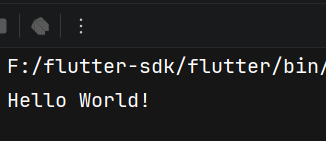
final name = 'World';
print('Hello $name!');
}
- 字符串模板语法:
'${表达式}',只有变量名称时可以省略{}
控制结构(循环)
if (year >= 2001) {
  print('21st century');
} else if (year >= 1901) {
  print('20th century');
}

for (final object in flybyObjects) {
  print(object);
}

for (int month = 1; month <= 12; month++) {
  print(month);
}

while (year < 2016) {
  year += 1;
}for循环
void main() {
  final fruits = ['apple', 'banana', 'orange'];
  for (final fruit in fruits) {
    print(fruit);
  }

  /*
  apple
  banana
  orange
  */
}
void main() {
var sum = 0;
for (var i = 1; i <= 100; i++) {
sum += i;
}
print(sum);
// 5050
}特性
- 详情请见
for循环中的闭包函数可捕获索引的值
void main() {
  var callbacks = [];
  for (var i = 0; i < 3; i++) {
    callbacks.add(() => print(i));
  }

  for (var callback in callbacks) {
    callback();
  }

  // 0
  // 1
  // 2
}
提示
文档指出JS有这个问题;而Go 1.22 没优化for range前也有相似的问题
【来自Iterable类】 forEach方法
forEach方法可接受一个函数用来处理可遍历类型中的值
var collection = [1, 2, 3];
collection.forEach(print); // 1 2 3while和do-while循环
// while循环
while (!isDone()) {
  doSomething();
}

// do-while循环
do {
  printLine();
} while (!atEndOfPage());break和continue
// 使用break中断循环
while (true) {
  if (shutDownRequested()) break;
  processIncomingRequests();
}

// 使用continue跳入下一次循环
for (int i = 0; i < candidates.length; i++) {
  var candidate = candidates[i];
  if (candidate.yearsExperience < 5) {
    continue;
  }
  candidate.interview();
}如果使用的是集合类型,那么Dart有另一套写法:
candidates
    .where((c) => c.yearsExperience >= 5)
    .forEach((c) => c.interview());
带标签跳转
这部分内容不太直观,先放个传送门
控制结构(switch-case模式匹配)
if-else
if (isRaining()) {
  you.bringRainCoat();
} else if (isSnowing()) {
  you.wearJacket();
} else {
  car.putTopDown();
}
【Dart 3.0+】 if-case
if (pair case [int x, int y]) return Point(x, y);switch-case
- 自动
break分支,不会fallthrough
var command = 'OPEN';
switch (command) {
  case 'CLOSED':
    executeClosed(); // 注意是用分号 分隔
  case 'PENDING':
    executePending();
  case 'APPROVED':
    executeApproved();
  case 'DENIED':
    executeDenied();
  case 'OPEN':
    executeOpen();
  default: // 允许使用 _ :
    executeUnknown();
}在表达式块中,可以使用=>语法并不使用case关键字:
void main() {
  final statusCode = 200;
  final response = switch(statusCode) {
    200 => 'OK',  // 注意是用逗号 分隔
    404 => 'Not Found',
    _ => 'Error'  // 默认分支只能使用 _ , 而不能使用default
  };

  print(response);
  // OK
}
特性
表达式语法
void main() {
  final statusCode = 200;
  final response = switch(statusCode) {
    200 => 'OK',  // 注意是用逗号 分隔
    404 => 'Not Found',
    _ => 'Error'  // 默认分支只能使用 _ , 而不能使用default
  };

  print(response);
  // OK
}
穷举检查
编译器会检查switch分支是否检查了值的所有可能情况
// Non-exhaustive switch on bool?, missing case to match null possibility:
switch (nullableBool) {
  case true:
    print('yes');
  case false:
    print('no');
}可以使用默认分支来涵盖所有可能的值
穷举检查特性对密封类同样适用:
sealed class Shape {}

class Square implements Shape {
  final double length;
  Square(this.length);
}

class Circle implements Shape {
  final double radius;
  Circle(this.radius);
}

double calculateArea(Shape shape) => switch (shape) {
  Square(length: var l) => l * l,
  Circle(radius: var r) => math.pi * r * r,
};
守卫子句
要在 case 子句之后设置一个可选的 guard 子句,请使用关键字 when 。Guard 子句可以跟随 if case ,并且可以包含 switch 语句和表达式
// Switch statement:
switch (something) {
  case somePattern when some || boolean || expression:
    //             ^^^^^^^^^^^^^^^^^^^^^^^^^^^^^^^^^^ Guard clause.
    body;
}

// Switch expression:
var value = switch (something) {
  somePattern when some || boolean || expression => body,
  //               ^^^^^^^^^^^^^^^^^^^^^^^^^^^^^ Guard clause.
}

// If-case statement:
if (something case somePattern when some || boolean || expression) {
  //                           ^^^^^^^^^^^^^^^^^^^^^^^^^^^^^^^^^^ Guard clause.
  body;
}
控制结构(断言)
函数
茴字的四种写法
格式:
返回值类型 函数名称(参数类型 参数名称, ...) {
	// 函数体
}
花絮一
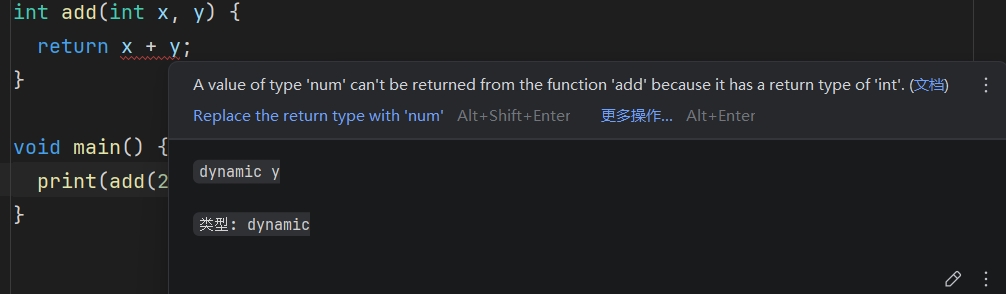
这里y被推导为了num,int+num触发保守的类型自动升级
- 【代码风格不太好】即便省略参数类型,函数也可以工作
isNoble(atomicNumber) {
  return _nobleGases[atomicNumber] != null;
}- 对于单行函数,可以省略大括号:
bool isNoble(int atomicNumber) => _nobleGases[atomicNumber] != null;参数
具名参数
- 命名参数是可选的,除非它们被明确标记为
required - 在定义函数时,使用
{_param1_, _param2_, …}来指定命名参数。如果你不提供默认值或将命名参数标记为required,它们的类型必须是可空的,因为它们的默认值将是null
/// Sets the [bold] and [hidden] flags ...
void enableFlags({bool? bold, bool? hidden}) {
  ...
}
在调用函数时,你可以使用 _paramName_: _value_ 来指定命名参数。例如
enableFlags(bold: true, hidden: false);要在命名参数之外为 null 定义默认值,请使用 = 指定默认值。指定的值必须是编译时常量。例如
/// Sets the [bold] and [hidden] flags ...
void enableFlags({bool bold = false, bool hidden = false}) {
  ...
}

// bold will be true; hidden will be false.
enableFlags(bold: true);
如果您希望命名参数是强制的,需要调用者提供参数的值,请用 required 注释它们
const Scrollbar({super.key, required Widget? child});你可能希望先放置位置参数,但 Dart 并不要求这样做。当它适合你的 API 时,Dart 允许命名参数放置在参数列表的任何位置
repeat(times: 2, () {
  ...
});
可选的位置参数
未完待续
注释
// 单行注释

/*
多行注释
*/
导入模块
// Importing core libraries
import 'dart:math';

// Importing libraries from external packages
import 'package:test/test.dart';

// Importing files
import 'path/to/my_other_file.dart';
类
class Spacecraft {
  String name;
  DateTime? launchDate;

  // Read-only non-final property
  int? get launchYear => launchDate?.year;

  // Constructor, with syntactic sugar for assignment to members.
  Spacecraft(this.name, this.launchDate) {
    // Initialization code goes here.
  }

  // Named constructor that forwards to the default one.
  Spacecraft.unlaunched(String name) : this(name, null);

  // Method.
  void describe() {
    print('Spacecraft: $name');
    // Type promotion doesn't work on getters.
    var launchDate = this.launchDate;
    if (launchDate != null) {
      int years = DateTime.now().difference(launchDate).inDays ~/ 365;
      print('Launched: $launchYear ($years years ago)');
    } else {
      print('Unlaunched');
    }
  }
}