
Dart 从零开始编写应用程序 (下)
测试你的程序和代码 Test your app & code
In this chapter, you will add tests to the
wikipediapackage, ensuring that the JSON deserialization logic for your data models is working correctly.
增加test依赖 Add the test dependency
First, you need to confirm that the
testpackage is already a development dependency in your project.
- Open the
wikipedia/pubspec.yamlfile within your project.- Locate the
dev_dependenciessection.- Verify that
test: ^1.24.0(or the latest stable version) is present underdev_dependencies.
dev_dependencies:
  lints: ^5.0.0
  test: ^1.24.0
If the
testdependency is missing, add it to yourpubspec.yamlfile. The^symbol allows compatible versions to be used.
- If you made any changes to the file, save
pubspec.yamland rundart pub getin your terminal from thewikipediadirectory. This command fetches any newly added dependencies and makes them available for use in your project.
You should see output similar to this:
Resolving dependencies...
Downloading packages...
+ test 1.25.1
Changed 2 dependencies!
创建一个测试文件并添加导入语句 Create a test file and add imports
Next, create a test file for your data models and add the necessary imports to it.
- Navigate to the
wikipedia/testdirectory.- Create a new file named
model_test.dartin this directory.- Open the
wikipedia/test/model_test.dartfile and add the followingimportstatements at the top of the file:
import 'dart:convert';
import 'dart:io';

import 'package:test/test.dart';
import 'package:wikipedia/src/model/article.dart';
import 'package:wikipedia/src/model/search_results.dart';
import 'package:wikipedia/src/model/summary.dart';

const String dartLangSummaryJson = './test/test_data/dart_lang_summary.json';
const String catExtractJson = './test/test_data/cat_extract.json';
const String openSearchResponse = './test/test_data/open_search_response.json';
These lines import the
testpackage, which provides the testing framework and the data model files you want to test. The constant strings declare the location of your sample data.
创建测试数据文件 Create the test data files
The tests you need to write rely on local JSON files that mimic the responses from the Wikipedia API. You need to create a
test_datadirectory and populate it with three files.
- Navigate to the
wikipedia/testdirectory.- Create a new directory named
test_data.- Inside the
test_datadirectory, create a new file nameddart_lang_summary.jsonand paste the following content into it:
{
  "type": "standard",
  "title": "Dart (programming language)",
  "displaytitle": "<span class=\"mw-page-title-main\">Dart (programming language)</span>",
  "namespace": {
      "id": 0,
      "text": ""
  },
  "wikibase_item": "Q406009",
  "titles": {
    "canonical": "Dart_(programming_language)",
    "normalized": "Dart (programming language)",
    "display": "<span class=\"mw-page-title-main\">Dart (programming language)</span>"
  },
  "pageid": 33033735,
  "lang": "en",
  "dir": "ltr",
  "revision": "1259309990",
  "tid": "671bc7c6-aa67-11ef-aa2a-7c1da4fbe8fb",
  "timestamp": "2024-11-24T13:24:16Z",
  "description": "Programming language",
  "description_source": "local",
  "content_urls": {
    "desktop": {
      "page": "https://en.wikipedia.org/wiki/Dart_(programming_language)",
      "revisions": "https://en.wikipedia.org/wiki/Dart_(programming_language)?action=history",
      "edit": "https://en.wikipedia.org/wiki/Dart_(programming_language)?action=edit",
      "talk": "https://en.wikipedia.org/wiki/Talk:Dart_(programming_language)"
    },
    "mobile": {
      "page": "https://en.m.wikipedia.org/wiki/Dart_(programming_language)",
      "revisions": "https://en.m.wikipedia.org/wiki/Special:History/Dart_(programming_language)",
      "edit": "https://en.m.wikipedia.org/wiki/Dart_(programming_language)?action=edit",
      "talk": "https://en.m.wikipedia.org/wiki/Talk:Dart_(programming_language)"
    }
  },
  "extract": "Dart is a programming language designed by Lars Bak and Kasper Lund and developed by Google. It can be used to develop web and mobile apps as well as server and desktop applications.",
  "extract_html": "<p><b>Dart</b> is a programming language designed by Lars Bak and Kasper Lund and developed by Google. It can be used to develop web and mobile apps as well as server and desktop applications.</p>"
}
- Next, create a file named
cat_extract.json. This file is very long, so copy the contents from this link: https://github.com/ericwindmill/dash_getting_started/blob/main/dart_step_by_step/step_10/wikipedia/test/test_data/cat_extract.json
5.Next, create a file named
open_search_response.jsonand paste this content into it:
[
    "dart",
    [
        "Dart",
        "Darth Vader",
        "Dartmouth College",
        "Darts",
        "Darth Maul",
        "Dartford Crossing",
        "Dart (programming language)",
        "Dartmouth College fraternities and sororities",
        "Dartmoor",
        "Dartmouth, Massachusetts"
    ],
    [
        "",
        "",
        "",
        "",
        "",
        "",
        "",
        "",
        "",
        ""
    ],
    [
        "https://en.wikipedia.org/wiki/Dart",
        "https://en.wikipedia.org/wiki/Darth_Vader",
        "https://en.wikipedia.org/wiki/Dartmouth_College",
        "https://en.wikipedia.org/wiki/Darts",
        "https://en.wikipedia.org/wiki/Darth_Maul",
        "https://en.wikipedia.org/wiki/Dartford_Crossing",
        "https://en.wikipedia.org/wiki/Dart_(programming_language)",
        "https://en.wikipedia.org/wiki/Dartmouth_College_fraternities_and_sororities",
        "https://en.wikipedia.org/wiki/Dartmoor",
        "https://en.wikipedia.org/wiki/Dartmouth,_Massachusetts"
    ]
]
With these files in place, you're ready to write the tests that will verify your data models.
为JSON反序列化编写测试 Write tests for JSON deserialization
Now, you'll write tests for the JSON deserialization logic in your data models. You'll use the
group,test, andexpectfunctions from thetestpackage.
- Use the
groupfunction to group related tests together. Add the following to yourwikipedia/test/model_test.dartfile:
void main() {
  group('deserialize example JSON responses from wikipedia API', () {
    // Tests will go here
  });
}
The
groupfunction takes a description of the group and a callback function that contains the tests.
- Create a test for the
Summarymodel. Add the followingtestfunction inside thegroupfunction:
void main() {
  group('deserialize example JSON responses from wikipedia API', () {
    test('deserialize Dart Programming Language page summary example data from '
        'json file into a Summary object', () async {
      final String pageSummaryInput =
          await File(dartLangSummaryJson).readAsString();
      final Map<String, Object?> pageSummaryMap =
          jsonDecode(pageSummaryInput) as Map<String, Object?>;
      final Summary summary = Summary.fromJson(pageSummaryMap);
      expect(summary.titles.canonical, 'Dart_(programming_language)');
    });
  });
}
This
testfunction does the following:
- Reads the contents of the
dart_lang_summary.jsonfile. - Decodes the JSON string into a
Map<String, Object?>. - Creates a
Summaryobject from the map using theSummary.fromJsonconstructor. - Uses the
expectfunction to assert that thecanonicalproperty of thetitlesobject is equal to'Dart_(programming_language)'.
The
expectfunction takes a value and a matcher. The matcher is used to assert that the value meets certain criteria. In this case, theequalsmatcher is used to assert that the value is equal to a specific string.
- Create a test for the
Articlemodel. Add the followingtestfunction inside thegroupfunction, after the previous test:
void main() {
  group('deserialize example JSON responses from wikipedia API', () {
    test('deserialize Dart Programming Language page summary example data from '
        'json file into a Summary object', () async {
      final String pageSummaryInput =
          await File(dartLangSummaryJson).readAsString();
      final Map<String, Object?> pageSummaryMap =
          jsonDecode(pageSummaryInput) as Map<String, Object?>;
      final Summary summary = Summary.fromJson(pageSummaryMap);
      expect(summary.titles.canonical, 'Dart_(programming_language)');
    });

    test('deserialize Cat article example data from json file into '
        'an Article object', () async {
      final String articleJson = await File(catExtractJson).readAsString();
      final Map<String, Object?> articleMap =
          jsonDecode(articleJson) as Map<String, Object?>;
      final List<Article> articles = Article.listFromJson(articleMap);
      expect(articles.first.title.toLowerCase(), 'cat');
    });
  });
}
This
testfunction does the following:
- Reads the contents of the
cat_extract.jsonfile. - Decodes the JSON string into a
Map<String, Object?>. - Creates the
List<Article>object from the map using theArticle.listFromJsonstatic method. - Uses the
expectfunction to assert that thetitleproperty of the first article is equal to'cat'.
- Create a test for the
SearchResultsmodel. Add the followingtestfunction inside thegroupfunction, after the previous test:
void main() {
  group('deserialize example JSON responses from wikipedia API', () {
    test('deserialize Dart Programming Language page summary example data from '
          'json file into a Summary object', () async {
      final String pageSummaryInput =
          await File(dartLangSummaryJson).readAsString();
      final Map<String, Object?> pageSummaryMap =
          jsonDecode(pageSummaryInput) as Map<String, Object?>;
      final Summary summary = Summary.fromJson(pageSummaryMap);
      expect(summary.titles.canonical, 'Dart_(programming_language)');
    });

    test('deserialize Cat article example data from json file into '
        'an Article object', () async {
      final String articleJson = await File(catExtractJson).readAsString();
      final Map<String, Object?> articleMap =
          jsonDecode(articleJson) as Map<String, Object?>;
      final List<Article> articles = Article.listFromJson(articleMap);
      expect(articles.first.title.toLowerCase(), 'cat');
    });

    test('deserialize Open Search results example data from json file '
        'into an SearchResults object', () async {
      final String resultsString =
          await File(openSearchResponse).readAsString();
      final List<Object?> resultsAsList =
          jsonDecode(resultsString) as List<Object?>;
      final SearchResults results = SearchResults.fromJson(resultsAsList);
      expect(results.results.length, greaterThan(1));
    });
  });
}
This
testfunction does the following:
- Reads the contents of the
open_search_response.jsonfile. - Decodes the JSON string into a
List<Object?>. - Creates a
SearchResultsobject from the list using theSearchResults.fromJsonconstructor. - Uses the
expectfunction to assert that theresultslist has a length greater than1.
运行测试 Run the tests
Now that you've written the tests, you can run them to verify that they pass.
- Open your terminal and navigate to the
wikipediadirectory.- Run the command
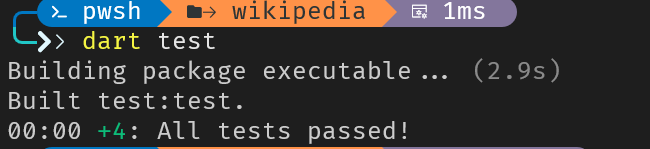
dart test.
You should see output similar to this:
00:02 +4: All tests passed!This confirms that all three tests are passing.
课后练习
group、test和expect的关系是什么
What's the relationship between
group,test, andexpectin Dart's testing library?
`group` organizes related tests, `test` defines individual test cases, `expect` asserts that values match expectations.Groups contain tests, tests contain expectations. This hierarchy keeps your test suite organized and your assertions clear.
greaterThan函数的作用是什么
In
expect(results.length, greaterThan(1)), what isgreaterThan(1)called and what does it do?
A matcher. It describes the condition the actual value should satisfy.Matchers like
greaterThan,equals,contains, andisNulldescribe expected conditions. They make test assertions readable and provide helpful failure messages.
在await了一个异步函数之后,你应该对测试函数做些什么以便让它跑起来
You write a test that calls
await File(path).readAsString(). What do you need to add to the test function for this to work?
Mark the test callback as `async`: `test('...', () async { ... })`Just like regular Dart functions, test callbacks can be
async. The test framework automatically waits for the returnedFutureto complete.
简单爬虫 Fetch data from the internet
In this chapter, you'll move beyond simple scripts and implement a proper API layer. You'll work within the
wikipediapackage to implement the API client logic, which improves your application's scalability and maintainability.
给wikipedia包加上http依赖 Add the http dependency to the wikipedia package
To make HTTP requests, you need to add the
httppackage as a dependency to thewikipediapackage.
- Open the
wikipedia/pubspec.yamlfile within your project.- Locate the
dependenciessection.- Add
http: ^1.3.0(or the latest stable version) underdependencies.
dependencies:
http: ^1.6.0 # 现在最新是1.6.0- Save the
pubspec.yamlfile. - Run
dart pub getin your terminal from thewikipediadirectory.
也可以直接:
dart pub add http这会自动在pubspec.yaml里加上导入语句,并隐式运行dart pub get:
dependencies:
  http: ^1.6.0
Dart SDK版本与pub.dev元数据不一致
╰─ dart pub get
Resolving dependencies in `F:\DartProjects\dartpedia`...
Downloading packages...
Failed to decode advisories for http from https://pub.dev.
FormatException: advisoriesUpdated must be a String
package:pub/src/source/hosted.dart 670 HostedSource._extractAdvisoryDetailsForPackage
package:pub/src/source/hosted.dart 622 HostedSource._fetchAdvisories
===== asynchronous gap ===========================练习时Dart SDK版本为3.11.5,待下载的http依赖版本为1.6.0。报错原因不明
实现wikipediaAPI调用 Implement Wikipedia APi Calls
Next, you'll create the API functions to fetch data from Wikipedia. You'll create three files:
summary.dart: This file will contain functions for retrieving article summaries.search.dart: This file will handle search queries to find articles.get_article.dart: This file will contain functions for fetching the full content of an article.
- Create the directory
wikipedia/lib/src/api.- Create the file
wikipedia/lib/src/api/summary.dart.- Add the following code to
wikipedia/lib/src/api/summary.dart:
import 'dart:convert';
import 'dart:io';

import 'package:http/http.dart' as http;

import '../model/summary.dart';

Future<Summary> getRandomArticleSummary() async {
  final http.Client client = http.Client();
  try {
    final Uri url = Uri.https(
      'en.wikipedia.org',
      '/api/rest_v1/page/random/summary',
    );
    final http.Response response = await client.get(url);
    if (response.statusCode == 200) {
      final Map<String, Object?> jsonData =
          jsonDecode(response.body) as Map<String, Object?>;
      return Summary.fromJson(jsonData);
    } else {
      throw HttpException(
        '[WikipediaDart.getRandomArticle] '
        'statusCode=${response.statusCode}, body=${response.body}',
      );
    }
  } on FormatException {
    // todo: log exceptions
    rethrow;
  } finally {
    client.close();
  }
}

Future<Summary> getArticleSummaryByTitle(String articleTitle) async {
  final http.Client client = http.Client();
  try {
    final Uri url = Uri.https(
      'en.wikipedia.org',
      '/api/rest_v1/page/summary/$articleTitle',
    );
    final http.Response response = await client.get(url);
    if (response.statusCode == 200) {
      final Map<String, Object?> jsonData =
          jsonDecode(response.body) as Map<String, Object?>;
      return Summary.fromJson(jsonData);
    } else {
      throw HttpException(
        '[WikipediaDart.getArticleSummary] '
        'statusCode=${response.statusCode}, body=${response.body}',
      );
    }
  } on FormatException {
    // todo: log exceptions
    rethrow;
  } finally {
    client.close();
  }
}
This code defines two functions:
getRandomArticleSummaryandgetArticleSummaryByTitle. Both functions use thehttppackage to make GET requests to the Wikipedia API and return aSummaryobject.getRandomArticleSummaryfetches a summary for a random article, whilegetArticleSummaryByTitlefetches a summary for a specific article title.
- Next create the file
wikipedia/lib/src/api/search.dart.- Add the following code to
wikipedia/lib/src/api/search.dart:
import 'dart:convert';
import 'dart:io';

import 'package:http/http.dart' as http;

import '../model/search_results.dart';

Future<SearchResults> search(String searchTerm) async {
  final http.Client client = http.Client();
  try {
    final Uri url = Uri.https(
      'en.wikipedia.org',
      '/w/api.php',
      <String, Object?>{
        'action': 'opensearch',
        'format': 'json',
        'search': searchTerm,
      },
    );
    final http.Response response = await client.get(url);
    if (response.statusCode == 200) {
      final List<Object?> jsonData = jsonDecode(response.body) as List<Object?>;
      return SearchResults.fromJson(jsonData);
    } else {
      throw HttpException(
        '[WikimediaApiClient.getArticleByTitle] '
        'statusCode=${response.statusCode}, '
        'body=${response.body}',
      );
    }
  } on FormatException {
    rethrow;
  } finally {
    client.close();
  }
}
This code defines the
searchfunction, which uses thehttppackage to make a GET request to the Wikipedia API'sopensearchendpoint and returns aSearchResultsobject. Theopensearchendpoint is used to search for Wikipedia articles based on a search term.
- Create the file
wikipedia/lib/src/api/get_article.dart.- Add the following code to
wikipedia/lib/src/api/get_article.dart:
import 'dart:convert';
import 'dart:io';

import 'package:http/http.dart' as http;

import '../model/article.dart';

Future<List<Article>> getArticleByTitle(String title) async {
  final http.Client client = http.Client();
  try {
    final Uri url = Uri.https(
      'en.wikipedia.org',
      '/w/api.php',
      <String, Object?>{
        // order matters - explaintext must come after prop
        'action': 'query',
        'format': 'json',
        'titles': title.trim(),
        'prop': 'extracts',
        'explaintext': '',
      },
    );
    final http.Response response = await client.get(url);
    if (response.statusCode == 200) {
      final Map<String, Object?> jsonData =
          jsonDecode(response.body) as Map<String, Object?>;
      return Article.listFromJson(jsonData);
    } else {
      throw HttpException(
        '[ApiClient.getArticleByTitle] '
        'statusCode=${response.statusCode}, '
        'body=${response.body}',
      );
    }
  } on FormatException {
    // TODO: log
    rethrow;
  } finally {
    client.close();
  }
}
提示
final jsonData = jsonDecode(response.body).cast<Map<String, Object?>>();使用cast<>()而非as会更安全 ,如果类型不对不会Panic
This code defines the
getArticleByTitlefunction, which uses thehttppackage to make a GET request to the Wikipedia API and returns aList<Article>object. This function retrieves the content of a Wikipedia article based on its title.
导出API函数 Export the API functions
Now that you've created the API functions, you need to export them from the
wikipedialibrary so that they can be used by theclipackage. You'll also export the existing models.
- Open the
wikipedia/lib/wikipedia.dartfile.- Add the following
exportstatements to the file:
export 'src/api/get_article.dart';
export 'src/api/search.dart';
export 'src/api/summary.dart';
export 'src/model/article.dart';
export 'src/model/search_results.dart';
export 'src/model/summary.dart';
export 'src/model/title_set.dart';
These
exportstatements make the API functions and models available to other packages that depend on thewikipediapackage.
运行先前的测试样例 Verify with tests
Now that you have implemented the API functions and updated the package dependencies, it's good practice to run the tests you created in the previous chapter. This will confirm that your changes have not broken the existing functionality of the
wikipediapackage.
- Open your terminal and navigate to the
wikipedia/testdirectory.- Remove the default test file by running the command
rm wikipedia_test.dart(on macOS or Linux) ordel wikipedia_test.dart(on Windows). This file was generated automatically but is not used in our project.- Open your terminal and navigate to the
wikipediadirectory.- Run the command
dart test.
You should see output similar to this, confirming all your existing tests still pass:
00:02 +3: All tests passed!
This confirms that the wikipedia package is still working as expected.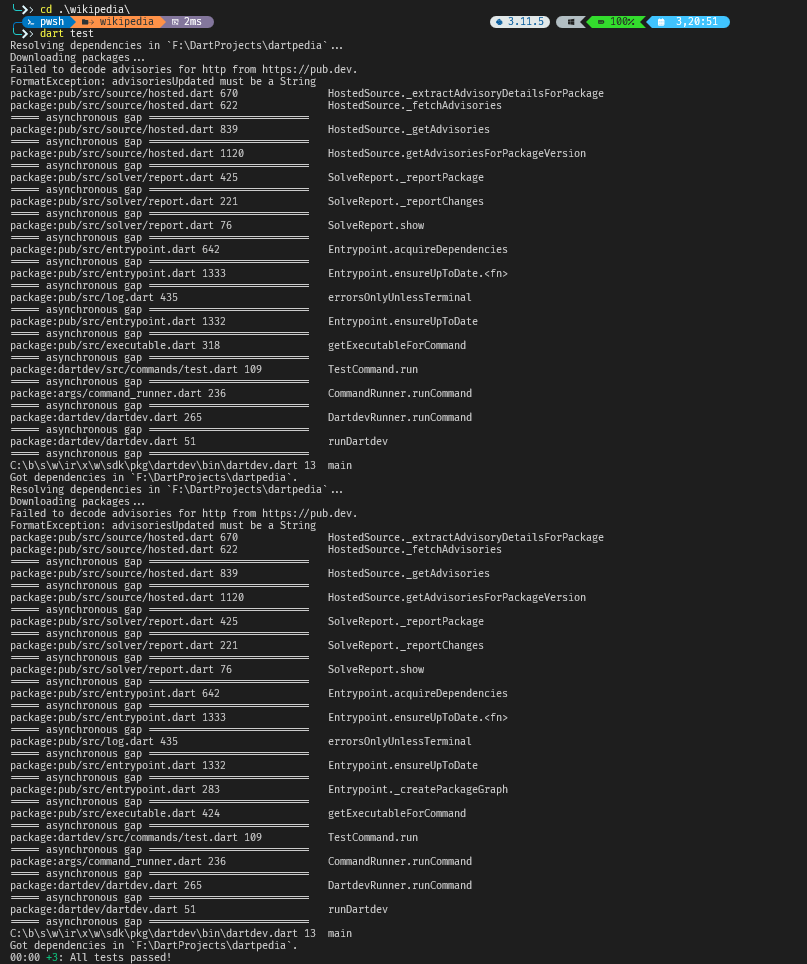
pub get的问题仍然没有解决,先凑合着用
课后练习
如何使用Uri.https构造带查询参数的URL
How do you construct a URL with query parameters using
Uri.https?
Pass them as a third argument map: `Uri.https('api.com', '/search', {'q': 'dart'})`The third parameter accepts a
Map<String, dynamic>of query parameters. Dart handles URL encoding automatically.
你该怎么知道请求是否成功呢
After calling
client.get(url), how should you check if the request was successful?
Check if `response.statusCode == 200` (or another success code).HTTP status codes indicate success (200-299) or various failures (400s, 500s). Always check before processing the response body.
为什么要在finally库里调用client.close()
The lesson's API functions use a
finallyblock to callclient.close(). Why is this important?
To ensure network resources are released even if an exception occurs.
finallyruns whether the try block succeeds or throws. This ensures the client's connections are properly closed, preventing resource leaks.
增加调试和监控日志 Add logging for debugging and monitoring
In this chapter, you'll add logging to the
dartpediaCLI application to help track errors and monitor its behavior. This will involve adding theloggingpackage, creating aLoggerinstance, and writing log messages to a file.
补充依赖 Add the logging dependency
First, add the
loggingpackage to your project's dependencies.
- Open the
cli/pubspec.yamlfile.- Locate the
dependenciessection.- Add the
loggingpackage to your dependencies:
dependencies:
  http: ^1.3.0
  command_runner:
    path: ../command_runner
  wikipedia:
    path: ../wikipedia
  # Add the following line
  logging: ^1.2.0
- Run
dart pub getin theclidirectory to fetch the new dependency.
创建并配置日志记录器 Create logger
Next, create a
Loggerinstance and configure it to write log messages to a file. This involves creating a new file for the logger and setting up the necessary imports.
- Create a new file called
cli/lib/src/logger.dart.- Add the necessary imports and define the
initFileLoggerfunction.
import 'dart:io';
import 'package:logging/logging.dart';

Logger initFileLogger(String name) {
  // Enables logging from child loggers.
  hierarchicalLoggingEnabled = true;

  // Create a logger instance with the provided name.
  final logger = Logger(name);
  final now = DateTime.now();

  // The rest of the function will be added below.
  // ...

  return logger;
}
- Add the code to find the project's root directory, create a
logsdirectory if one doesn't exist, and create a unique log file.
Logger initFileLogger(String name) {
  hierarchicalLoggingEnabled = true;
  final logger = Logger(name);
  final now = DateTime.now();

  // Get the path to the project directory from the current script.
  final scriptFile = File(Platform.script.toFilePath());
  final projectDir = scriptFile.parent.parent.path;

  // Create a 'logs' directory if it doesn't exist.
  final dir = Directory('$projectDir/logs');
  if (!dir.existsSync()) dir.createSync();

  // Create a log file with a unique name based on
  // the current date and logger name.
  final logFile = File(
    '${dir.path}/${now.year}_${now.month}_${now.day}_$name.txt',
  );

  // The rest of the function will be added below.
  // ...

  return logger;
}
- Configure the logger's level and set up a listener to write log messages to the file.
Logger initFileLogger(String name) {
  hierarchicalLoggingEnabled = true;
  final logger = Logger(name);
  final now = DateTime.now();

  final scriptFile = File(Platform.script.toFilePath());
  final projectDir = scriptFile.parent.parent.path;
  final dir = Directory('$projectDir/logs');
  if (!dir.existsSync()) dir.createSync();
  final logFile = File(
    '${dir.path}/${now.year}_${now.month}_${now.day}_$name.txt',
  );

  // Set the logger level to ALL, so it logs all messages regardless of severity.
  // Level.ALL is useful for development and debugging, but you'll likely want to
  // use a more restrictive level like Level.INFO or Level.WARNING in production.
  logger.level = Level.ALL;

  // Listen for log records and write each one to the log file.
  logger.onRecord.listen((record) {
    final msg =
        '[${record.time} - ${record.loggerName}] ${record.level.name}: ${record.message}';
    logFile.writeAsStringSync('$msg \n', mode: FileMode.append);
  });

  return logger;
}
This code does the following:
- It enables hierarchical logging using
hierarchicalLoggingEnabled = true. - It creates a
Loggerinstance with the given name. - It gets the project directory from the
Platform.script.path. - It creates a
logsdirectory if it doesn't exist. - It creates a log file with the current date and the logger name.
- It sets the logger level to
Level.ALL, meaning it will log all messages. This is useful for development and debugging, but you'll likely want to use a more restrictive level likeLevel.INFOorLevel.WARNINGin production. - It listens for log records and writes them to the log file.
- Create a new file called
cli/lib/cli.dartand exportlogger.dart. This makes theinitFileLoggeravailable to other parts of your app.
 export 'src/commands/get_article.dart';
 export 'src/commands/search.dart';
export 'src/logger.dart';在cli.dart中使用logger Use the logger in cli.dart
Now, use the
initFileLoggerfunction incli/bin/cli.dartto create a logger instance and log messages to a file.
- Open the
cli/bin/cli.dartfile.- Add the import for the logger:
import 'package:cli/cli.dart';
import 'package:command_runner/command_runner.dart';
- Modify the
mainfunction to initialize the logger and pass it to the commands:
import 'package:cli/cli.dart';
import 'package:command_runner/command_runner.dart';

void main(List<String> arguments) async {
  final errorLogger = initFileLogger('errors');
  final app =
      CommandRunner(
          onOutput: (String output) async {
            await write(output);
          },
          onError: (Object error) {
            if (error is Error) {
              errorLogger.severe(
                '[Error] ${error.toString()}\n${error.stackTrace}',
              );
              throw error;
            }
            if (error is Exception) {
              errorLogger.warning(error);
            }
          },
        )
        ..addCommand(HelpCommand())
        ..addCommand(SearchCommand(logger: errorLogger))
        ..addCommand(GetArticleCommand(logger: errorLogger));

  app.run(arguments);
}
This code does the following:
- It initializes a
Loggerinstance usinginitFileLogger('errors'). - It passes the
loggerinstance toCommandRunnerand individual commands.
编写 SearchCommand 指令 Create the SearchCommand command
The core functionality of the CLI lives in its commands. Create the
SearchCommandandGetArticleCommandfiles and add the necessary code, including the logging and error handling.
- Create a new file named
/cli/lib/src/commands/search.dart.- Add the imports and a basic class structure. This
SearchCommandclass extendsCommand, and its constructor accepts aLoggerinstance. Accepting the logger in the constructor is a common pattern called dependency injection, which allows the command to log events without needing to create its own logger.
import 'dart:async';
import 'dart:io';

import 'package:command_runner/command_runner.dart';
import 'package:logging/logging.dart';
import 'package:wikipedia/wikipedia.dart';

class SearchCommand extends Command {
  SearchCommand({required this.logger});

  final Logger logger;

  @override
  String get description => 'Search for Wikipedia articles.';

  @override
  bool get requiresArgument => true;

  @override
  String get name => 'search';

  @override
  String get valueHelp => 'STRING';

  @override
  String get help =>
      'Prints a list of links to Wikipedia articles that match the given term.';

  @override
  FutureOr<String> run(ArgResults args) async {
    // The rest of the function will be added below.
    // ...
  }
}
- Now, add the core logic to the
runmethod. This code checks for a valid argument, calls thesearch()function from thewikipediapackage, formats the results, and returns the results as a string.
import 'dart:async';
import 'dart:io';

import 'package:command_runner/command_runner.dart';
import 'package:logging/logging.dart';
import 'package:wikipedia/wikipedia.dart';

class SearchCommand extends Command {
  SearchCommand({required this.logger});

  final Logger logger;

  @override
  String get description => 'Search for Wikipedia articles.';

  @override
  bool get requiresArgument => true;

  @override
  String get name => 'search';

  @override
  String get valueHelp => 'STRING';

  @override
  String get help =>
      'Prints a list of links to Wikipedia articles that match the given term.';

  @override
  FutureOr<String> run(ArgResults args) async {
    if (requiresArgument &&
        (args.commandArg == null || args.commandArg!.isEmpty)) {
      return 'Please include a search term';
    }

    final buffer = StringBuffer('Search results:');
    final SearchResults results = await search(args.commandArg!);

    for (var result in results.results) {
      buffer.writeln('${result.title} - ${result.url}');
    }
    return buffer.toString();
  }
}
- Next, add the "I'm feeling lucky" feature by adding a flag to the constructor. Then, in the
runmethod, add the logic to check if the flag is set and, if so, get the summary of the top search result.
import 'dart:async';
import 'dart:io';

import 'package:command_runner/command_runner.dart';
import 'package:logging/logging.dart';
import 'package:wikipedia/wikipedia.dart';

class SearchCommand extends Command {
  SearchCommand({required this.logger}) {
    addFlag(
      'im-feeling-lucky',
      help:
          'If true, prints the summary of the top article that the search returns.',
    );
  }

  final Logger logger;

  @override
  String get description => 'Search for Wikipedia articles.';

  @override
  bool get requiresArgument => true;

  @override
  String get name => 'search';

  @override
  String get valueHelp => 'STRING';

  @override
  String get help =>
      'Prints a list of links to Wikipedia articles that match the given term.';

  @override
  FutureOr<String> run(ArgResults args) async {
    if (requiresArgument &&
        (args.commandArg == null || args.commandArg!.isEmpty)) {
      return 'Please include a search term';
    }

    final buffer = StringBuffer('Search results:');
    final SearchResults results = await search(args.commandArg!);

    if (args.flag('im-feeling-lucky')) {
      final title = results.results.first.title;
      final Summary article = await getArticleSummaryByTitle(title);
      buffer.writeln('Lucky you!');
      buffer.writeln(article.titles.normalized.titleText);
      if (article.description != null) {
        buffer.writeln(article.description);
      }
      buffer.writeln(article.extract);
      buffer.writeln();
      buffer.writeln('All results:');
    }

    for (var result in results.results) {
      buffer.writeln('${result.title} - ${result.url}');
    }
    return buffer.toString();
  }
}
- Finally, wrap the main logic in a
try/catchblock. This allows you to handle potential exceptions that could arise from network issues or data formatting problems. You'll use the injectedloggerto record these errors to the log file.
import 'dart:async';
import 'dart:io';

import 'package:command_runner/command_runner.dart';
import 'package:logging/logging.dart';
import 'package:wikipedia/wikipedia.dart';

class SearchCommand extends Command {
  SearchCommand({required this.logger}) {
    addFlag(
      'im-feeling-lucky',
      help:
          'If true, prints the summary of the top article that the search returns.',
    );
  }

  final Logger logger;

  @override
  String get description => 'Search for Wikipedia articles.';

  @override
  bool get requiresArgument => true;

  @override
  String get name => 'search';

  @override
  String get valueHelp => 'STRING';

  @override
  String get help =>
      'Prints a list of links to Wikipedia articles that match the given term.';

  @override
  FutureOr<String> run(ArgResults args) async {
    if (requiresArgument &&
        (args.commandArg == null || args.commandArg!.isEmpty)) {
      return 'Please include a search term';
    }

    final buffer = StringBuffer('Search results:');
    try {
      final SearchResults results = await search(args.commandArg!);

      if (args.flag('im-feeling-lucky')) {
        final title = results.results.first.title;
        final Summary article = await getArticleSummaryByTitle(title);
        buffer.writeln('Lucky you!');
        buffer.writeln(article.titles.normalized.titleText);
        if (article.description != null) {
          buffer.writeln(article.description);
        }
        buffer.writeln(article.extract);
        buffer.writeln();
        buffer.writeln('All results:');
      }

      for (var result in results.results) {
        buffer.writeln('${result.title} - ${result.url}');
      }
      return buffer.toString();
    } on HttpException catch (e) {
      logger
        ..warning(e.message)
        ..warning(e.uri)
        ..info(usage);
      return e.message;
    } on FormatException catch (e) {
      logger
        ..warning(e.message)
        ..warning(e.source)
        ..info(usage);
      return e.message;
    }
  }
}
编写 GetArticleCommand 指令 Create the GetArticleCommand command
Now, create the
GetArticleCommandfile and add the necessary code. The code is similar to the previousSearchCommand, as it also uses atry/catchblock to handle potential network or data errors.
- Create a new file named cli/lib/src/commands/get_article.dart.
- Add the following code to
get_article.dart.
import 'dart:async';
import 'dart:io';

import 'package:command_runner/command_runner.dart';
import 'package:logging/logging.dart';
import 'package:wikipedia/wikipedia.dart';

class GetArticleCommand extends Command {
  GetArticleCommand({required this.logger});

  final Logger logger;

  @override
  String get description => 'Read an article from Wikipedia';

  @override
  String get name => 'article';

  @override
  String get help => 'Gets an article by exact canonical wikipedia title.';

  @override
  String get defaultValue => 'cat';

  @override
  String get valueHelp => 'STRING';

  @override
  FutureOr<String> run(ArgResults args) async {
    try {
      var title = args.commandArg ?? defaultValue;
      final List<Article> articles = await getArticleByTitle(title);
      // API returns a list of articles, but we only care about the closest hit.
      final article = articles.first;
      final buffer = StringBuffer('\n=== ${article.title.titleText} ===\n\n');
      buffer.write(article.extract.split(' ').take(500).join(' '));
      return buffer.toString();
    } on HttpException catch (e) {
      logger
        ..warning(e.message)
        ..warning(e.uri)
        ..info(usage);
      return e.message;
    } on FormatException catch (e) {
      logger
        ..warning(e.message)
        ..warning(e.source)
        ..info(usage);
      return e.message;
    }
  }
}
Review the code you've just added. The
SearchCommandandGetArticleCommandnow:
- Import the necessary packages like
command_runner,logging, andwikipediato use their classes and functions. - Accept a
Loggerinstance through their constructor. This is a common pattern called dependency injection, which allows the command to log events without needing to create its own logger. - Implement a
runmethod that defines the command's logic. This method calls the appropriate wikipedia API and formats the output. - Include
try/catchblocks to gracefully handle network errors (HttpException) and data parsing errors (FormatException), logging them for debugging.
运行程序并检查日志 Run the application and check the logs
Now that you've added logging to your application, run it and check the log file to see the results.
- Run the application with a command that might produce an error. For example, try searching for an article that doesn't exist or that causes a
FormatException.
dart run bin/cli.dart search blahblahblahblah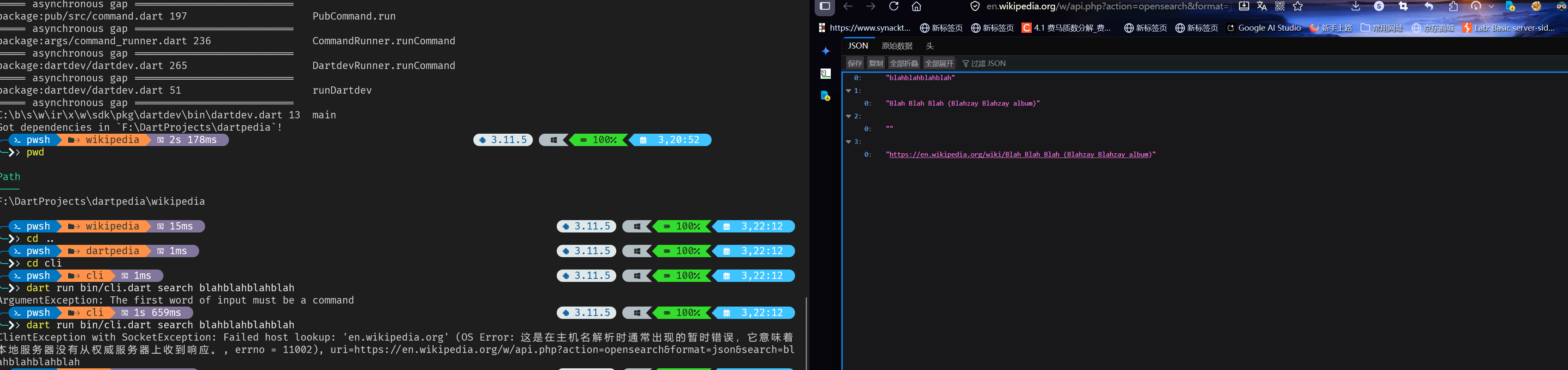
呵呵
课后练习
logging库的作用是什么
What is the purpose of the
loggingpackage in Dart?
To provide a way to record events and errors in your application.The
loggingpackage provides a flexible system for recording events, warnings, errors, and other messages during application execution.
hierarchicalLoggingEnabled = true;这行的作用是什么
What does the
hierarchicalLoggingEnabled = true;line do?\
It enables a logger to capture events from child loggers.With hierarchical logging enabled, parent loggers can receive and process events from their child loggers.
为什么日志记录器有这么多不同的日志级别?为什么不直接使用print()?
This lesson uses
logger.severe(),logger.warning(), andlogger.info(). Why use different log levels instead of justprint()?
You can filter logs by severity, showing only warnings and errors in production while seeing everything during development.Log levels let you set a threshold. In production, you might only log warnings and above, while in development you see info and debug messages too.