
Kotlin 语法(一)
参考资料
快速开始
单元测试
补全依赖
打开build.gradle.(kts)文件并检查testImplementation依赖是否存在。这个依赖允许你使用kotlin.test和JUnit进行单元测试:
   dependencies {
       // Other dependencies.
       testImplementation(kotlin("test"))
   }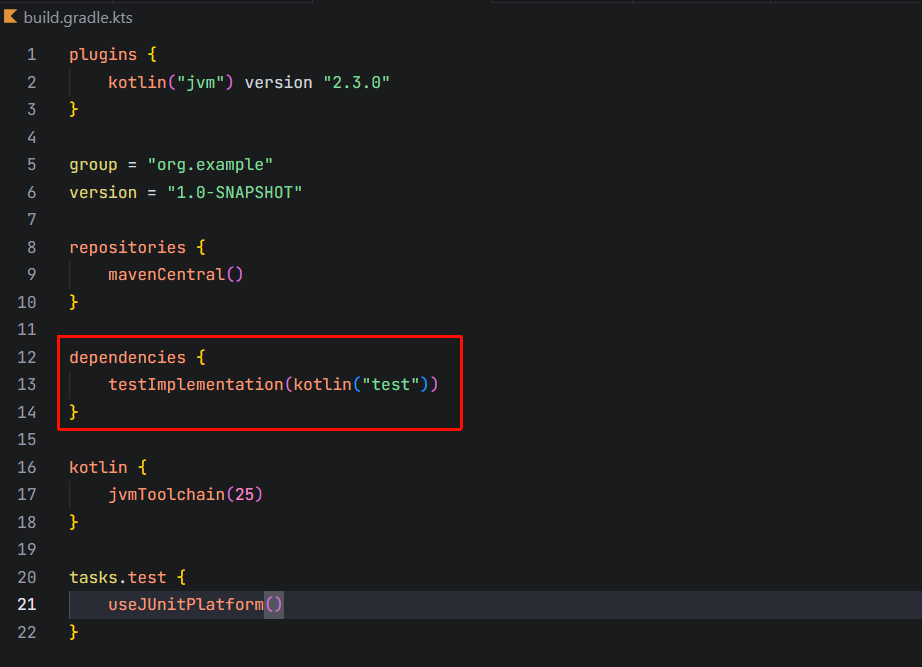
IDEA创建的项目默认就带有这个依赖
然后将test任务加入到build.gradle.(kts)中:
   tasks.test {
       useJUnitPlatform()
}完整示例build.gradle.(kts)内容如下:
plugins {
    kotlin("jvm") version "2.1.21"
}

group = "org.example"
version = "1.0-SNAPSHOT"

repositories {
    mavenCentral()
}

dependencies {
    testImplementation(kotlin("test"))
}

tasks.test {
    useJUnitPlatform()
}
添加测试样例
在Main.kt中添加Sample类,Sample实例有一个add方法,实现两数相加:
class Sample() {
    fun sum(a: Int, b: Int): Int {
        return a + b
    }
}然后用IDEA右键菜单快速生成Test Stub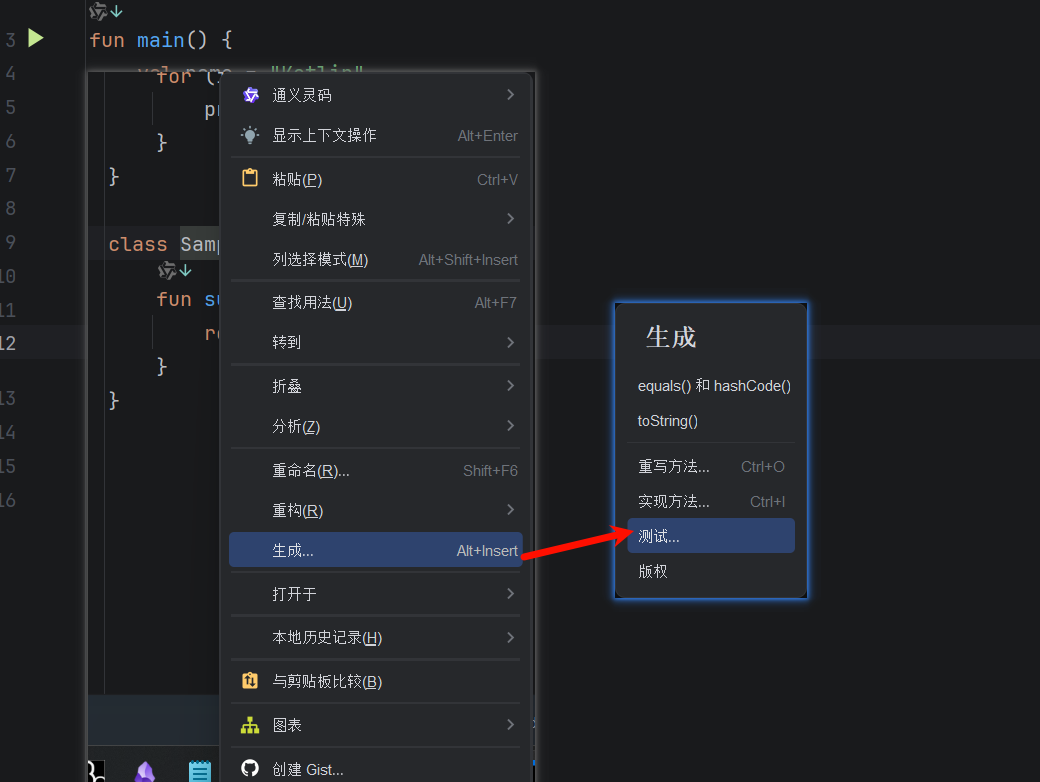
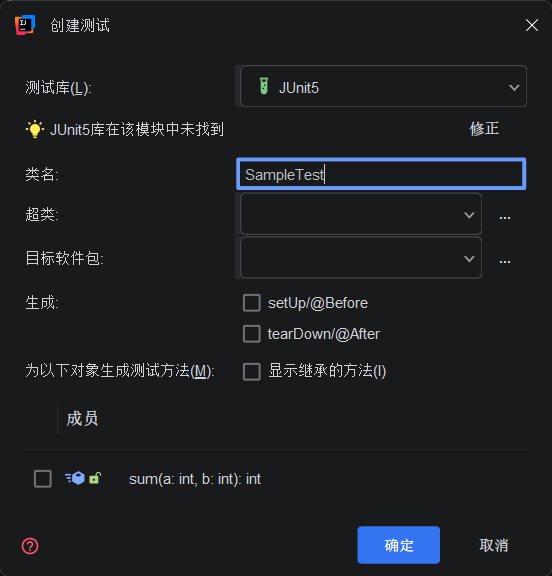
注
也可以在src/test/kotlin下创建一个*.kt文件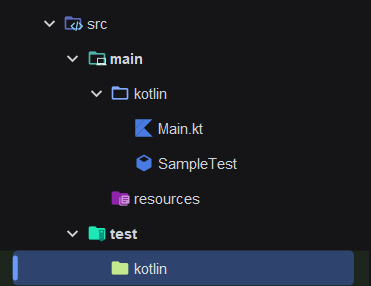
编写测试代码
编写测试代码:
- 定义
testSum()函数并使用@Test注解 - 使用
assertEquals()函数检查sum函数的返回值
import org.example.Sample
import org.junit.jupiter.api.Assertions.*
import org.junit.jupiter.api.Test

class SampleTest {
    private val sample = Sample()

    @Test
    fun testSum() {
        val expected = 3
        assertEquals(expected, sample.sum(1, 2))
    }
}
运行测试
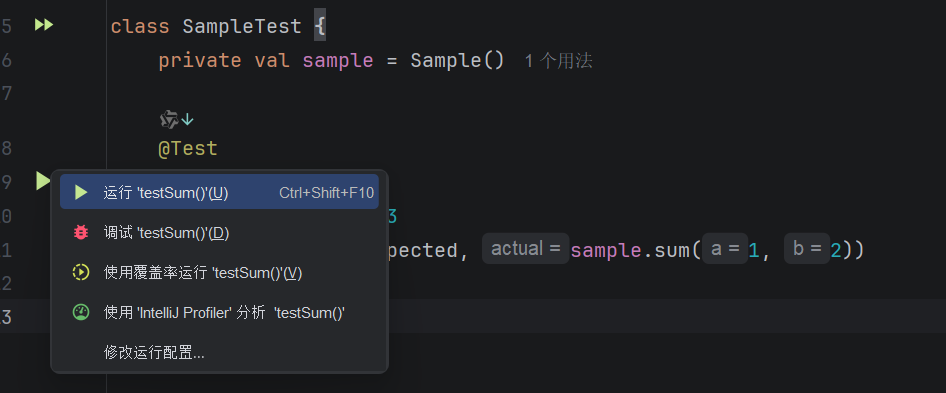
注
也可以通过运行./gradlew check来执行所有指令
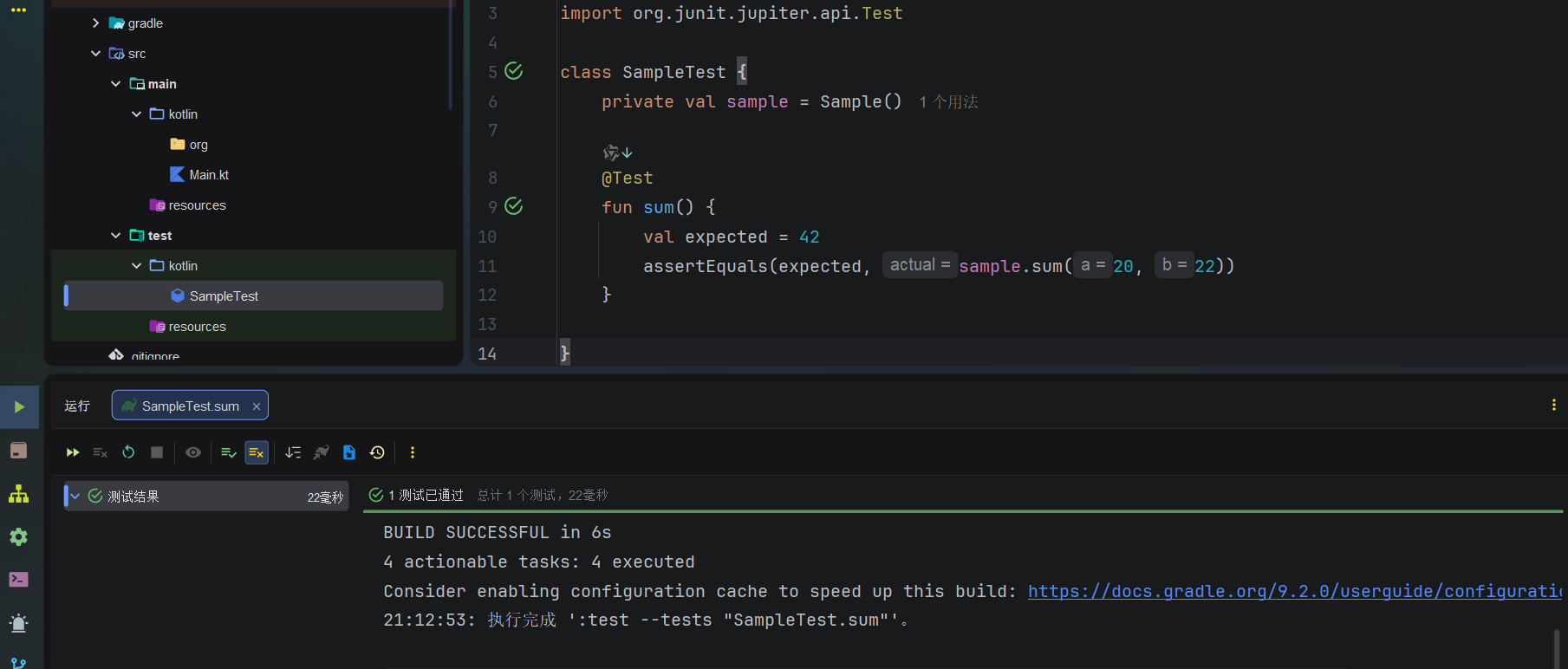
神金Kotlin
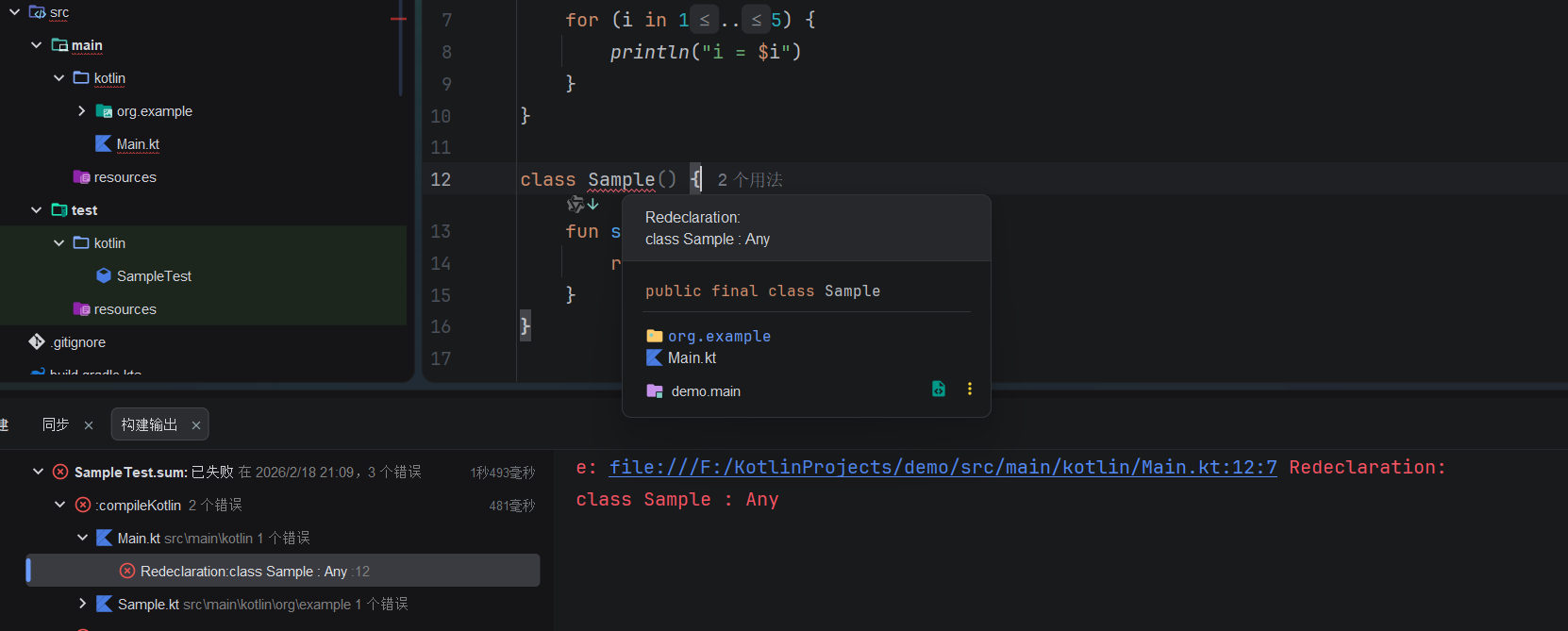
Sample的定义被导航到了SampleTest.kt里——我定义了谁,谁又定义了我???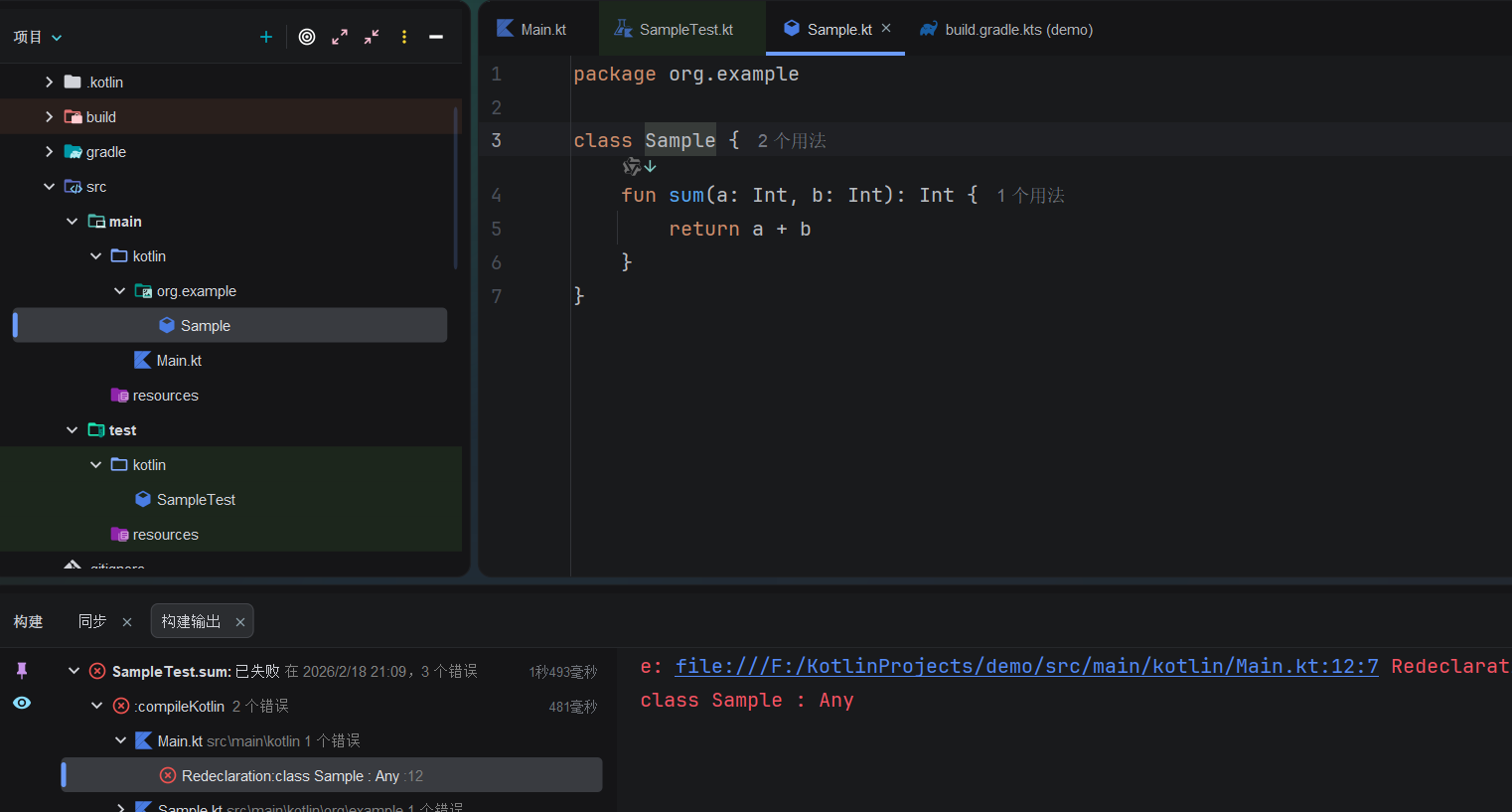
好家伙???
基本语法
Hello World
关键字
val 变量名称 : 变量类型 = 值
var 变量名称 : 变量类型 = 值val:声明不可变变量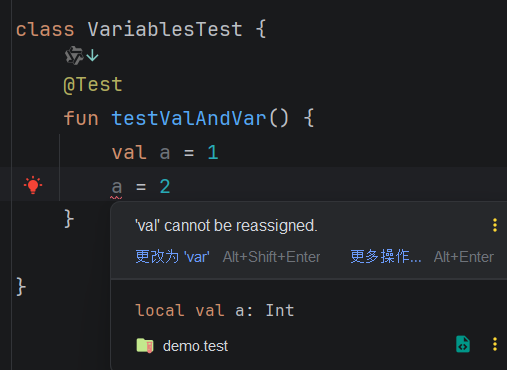
var:声明可变变量变量类型标注可选;编译器会自动进行类型推导
字符串模板
val str = "$变量"val str = "${表达式}"
val customers = 10
println("There are $customers customers")
// There are 10 customers

println("There are ${customers + 1} customers")
// There are 11 customers注
- Kotlin会自动调用对象的
toString()方法,所以字符串模板中可以任意嵌入非String类型变量 - 如果要调用对象的属性或方法,需要显式使用
{}包裹:
val s = "abc"
println("$s.length is ${s.length}")
// abc.length is 3- 在单行字符串中要想保留
$符号可以使用\,但在多行字符串中只能这样:
val price = """
${'$'}_9.99
"""
【实验性】多行模板字符串
val productName = "carrot"
val requestedData =
    $$$"""{
      "currency": "$",
      "enteredAmount": "42.45 $$",
      "$$serviceField": "none",
      "product": "$$$productName"
    }
    """

println(requestedData)
//{
//    "currency": "$",
//    "enteredAmount": "42.45 $$",
//    "$$serviceField": "none",
//    "product": "carrot"
//}- 字符串前面的
$$$用于指定引用符号为$$$,而$和$$都会被保留,不会用于变量引用
字符串格式化
// Formats an integer, adding leading zeroes to reach a length of seven characters
val integerNumber = String.format("%07d", 31416)
println(integerNumber)
// 0031416

// Formats a floating-point number to display with a + sign and four decimal places
val floatNumber = String.format("%+.4f", 3.141592)
println(floatNumber)
// +3.1416

// Formats two strings to uppercase, each taking one placeholder
val helloString = String.format("%S %S", "hello", "world")
println(helloString)
// HELLO WORLD

// Formats a negative number to be enclosed in parentheses, then repeats the same number in a different format (without parentheses) using `argument_index$`.
val negativeNumberInParentheses = String.format("%(d means %1\$d", -31416)
println(negativeNumberInParentheses)
//(31416) means -31416
基本类型
| Category | Basic types | Example code |
|---|---|---|
| 整型 | Byte, Short, Int, Long | val year: Int = 2020 |
| 无符号整型 | UByte, UShort, UInt, ULong | val score: UInt = 100u |
| 浮点型 | Float, Double | val currentTemp: Float = 24.5f, val price: Double = 19.99 |
| 布尔型 | Boolean | val isEnabled: Boolean = true |
| 字符 | Char | val separator: Char = ',' |
| 字符串 | String | val message: String = "Hello, world!" |
基本类型的属性和其他信息详情请见
要想声明变量而不赋值,请提前指定类型:
// Variable declared without initialization
val d: Int
// Variable initialized
d = 3

// Variable explicitly typed and initialized
val e: String = "hello"

// Variables can be read because they have been initialized
println(d) // 3
println(e) // hello
如果声明变量而不赋值,那么会被视为语法错误: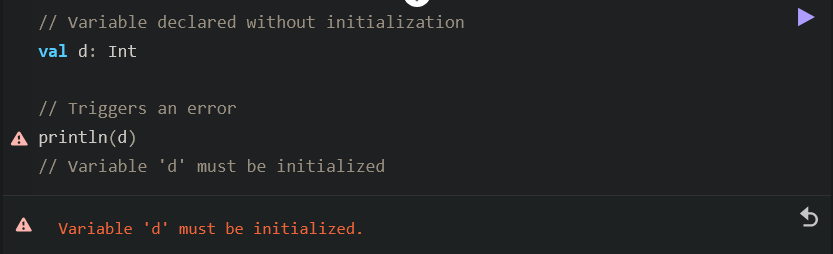
集合/Collection
| Collection type | Description |
|---|---|
| Lists | Ordered collections of items |
| Sets | Unique unordered collections of items |
| Maps | Sets of key-value pairs where keys are unique and map to only one value |
| 每一个集合类型都可为 引用不可变 与 引用可变 的(简单来说就是能否重新赋值) |
【初学可以跳过】须知
集合是否可变与val、var关键字的语义无关
可变集合(mutable collection)并不一定要赋值给 var。即使将可变集合赋值给 val,仍然可以对其进行写操作。
将可变集合赋值给 val 的好处在于,你可以保护指向该集合的引用 不被修改。随着代码量增加和逻辑复杂化,防止引用的意外篡改变得至关重要。为了代码的安全性和健壮性,请尽可能多地使用 val。如果你尝试对一个用 val 声明的集合进行重新赋值,将会产生编译错误
val numbers = mutableListOf("one", "two", "three", "four")
numbers.add("five")   // this is OK
println(numbers)
//numbers = mutableListOf("six", "seven") // compilation error引用不可变集合类型是协变的(covariant)。这意味着,如果 Rectangle 类继承自 Shape,你可以在任何需要 List<Shape> 的地方使用 List<Rectangle>。换句话说,集合类型具有与元素类型相同的子类型化关系(subtyping relationship)。Map 在其值(Value) 类型上是协变的,但在键(Key) 类型上不是。
相对地,引用可变集合类型不是协变的;否则,这将导致运行时错误。如果 MutableList<Rectangle> 是 MutableList<Shape> 的子类型,你就可以向其中插入 Shape 的其他继承者(例如 Circle),因此违反了其 Rectangle 的类型参数约束。
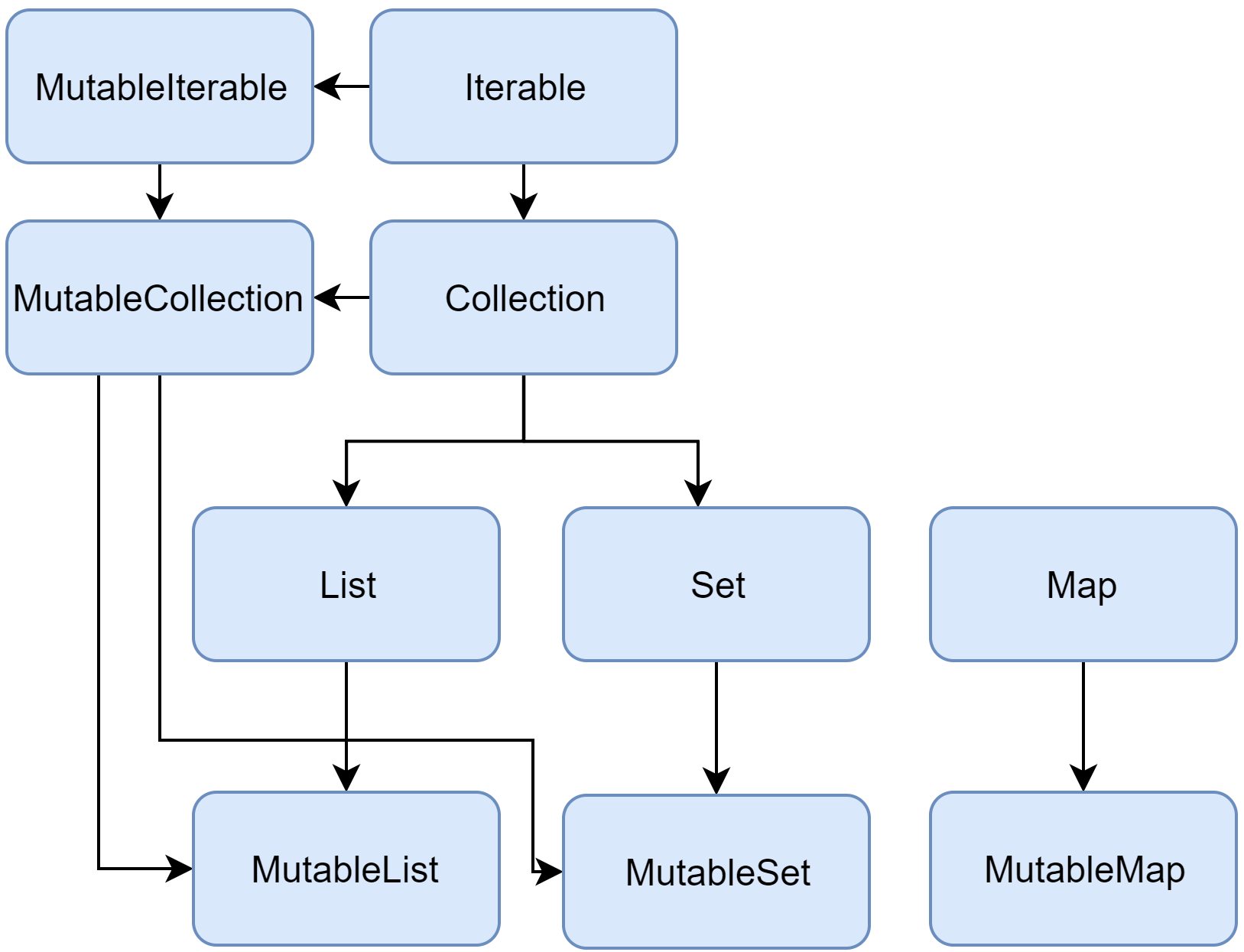
Kotlin集合类型继承关系
集合本集/Collection与引用可变集合/MutableCollection
列表/List
listOf:创建不可变列表ListmutableListOf:创建可变列表MutableList
创建列表时Kotlin会自动推导元素类型,也可以使用List<ItemT>语法显式指定元素类型:
// Read only list
val readOnlyShapes = listOf("triangle", "square", "circle")
println(readOnlyShapes)
// [triangle, square, circle]

// Mutable list with explicit type declaration
val shapes: MutableList<String> = mutableListOf("triangle", "square", "circle")
println(shapes)
// [triangle, square, circle]将MutableList转换为不可变的List
将MutableList赋值给一个List类型的变量
val shapes: MutableList<String> = mutableListOf("triangle", "square", "circle")
val shapesLocked: List<String> = shapes列表是有序的,所以可以用[]取出指定索引的元素
val readOnlyShapes = listOf("triangle", "square", "circle")
println("The first item in the list is: ${readOnlyShapes[0]}")
// The first item in the list is: triangle特别地,可以用.first()和.last()方法取出列表头部和尾部的元素
val readOnlyShapes = listOf("triangle", "square", "circle")
println("The first item in the list is: ${readOnlyShapes.first()}")
// The first item in the list is: triangle
提示
.first()和.last()被称作扩展函数,详情请见
使用.count()方法获取列表中的元素个数
val readOnlyShapes = listOf("triangle", "square", "circle")
println("This list has ${readOnlyShapes.count()} items")
// This list has 3 items使用in操作符判断列表中是否存在某个元素
val readOnlyShapes = listOf("triangle", "square", "circle")
println("circle" in readOnlyShapes)
// true使用.add()方法和.remove()方法分别向列表中添加元素和移除某个元素
val shapes: MutableList<String> = mutableListOf("triangle", "square", "circle")
// Add "pentagon" to the list
shapes.add("pentagon")
println(shapes)
// [triangle, square, circle, pentagon]

// Remove the first "pentagon" from the list
shapes.remove("pentagon")
println(shapes)
// [triangle, square, circle]
集合/Set
对比列表是有序的且允许元素重复的类型,集合是无序的且元素唯一的类型
setOf(...): 创建不可变集合SetmutableSetOf(...): 创建可变集合MutableSet
要想显式指定类型请使用<T>
// Read-only set
val readOnlyFruit = setOf("apple", "banana", "cherry", "cherry")
// Mutable set with explicit type declaration
val fruit: MutableSet<String> = mutableSetOf("apple", "banana", "cherry", "cherry")

println(readOnlyFruit)
// [apple, banana, cherry]将MutableSet转换为不可变的Set
将MutableSet赋值给一个Set类型的变量
val fruit: MutableSet<String> = mutableSetOf("apple", "banana", "cherry", "cherry")
val fruitLocked: Set<String> = fruit- 由于集合是无序的,所以不能使用
[]索引操作符 - 使用
.count()方法获取集合中的元素个数 - 使用
in操作符判断指定元素是否存在于集合中 - 使用
.add()和.remove()增加或删除元素
键值对/Map
Map将元素存储为键值对
提示
- Map的key必须是唯一的,这样Kotlin才能知道你想获取哪个值
- Map的value可以重复
- 使用
mapOf创建不可变的Map类型变量 - 使用
mutableMapOf创建可变的MutableMap类型变量
还是一样的,编译器会自动推导类型;也可以使用<keyType, valueType>显式指定类型
// Read-only map
val readOnlyJuiceMenu = mapOf("apple" to 100, "kiwi" to 190, "orange" to 100)
println(readOnlyJuiceMenu)
// {apple=100, kiwi=190, orange=100}

// Mutable map with explicit type declaration
val juiceMenu: MutableMap<String, Int> = mutableMapOf("apple" to 100, "kiwi" to 190, "orange" to 100)
println(juiceMenu)
// {apple=100, kiwi=190, orange=100}将MutableMap转换为不可变的Map
将MutableMap赋值给一个Map类型的变量
val juiceMenu: MutableMap<String, Int> = mutableMapOf("apple" to 100, "kiwi" to 190, "orange" to 100)
val juiceMenuLocked: Map<String, Int> = juiceMenu- 使用
[key: String]访问Map中的元素
// Read-only map
val readOnlyJuiceMenu = mapOf("apple" to 100, "kiwi" to 190, "orange" to 100)
println("The value of apple juice is: ${readOnlyJuiceMenu["apple"]}")
// The value of apple juice is: 100
注
如果指定key在Map中不存在,会得到一个null:
// Read-only map
val readOnlyJuiceMenu = mapOf("apple" to 100, "kiwi" to 190, "orange" to 100)
println("The value of pineapple juice is: ${readOnlyJuiceMenu["pineapple"]}")
// The value of pineapple juice is: null- 空类型安全详情请见
- 也可以通过
[key] = value来给可变Map添加一个键值对 .remove()方法用于删除一个键值对
val juiceMenu: MutableMap<String, Int> = mutableMapOf("apple" to 100, "kiwi" to 190, "orange" to 100)
juiceMenu.remove("orange")    // Remove key "orange" from the map
println(juiceMenu)
// {apple=100, kiwi=190}.count()获取元素个数
// Read-only map
val readOnlyJuiceMenu = mapOf("apple" to 100, "kiwi" to 190, "orange" to 100)
println("This map has ${readOnlyJuiceMenu.count()} key-value pairs")
// This map has 3 key-value pairs- 使用
.containKey()判断指定key在Map中是否存在
val readOnlyJuiceMenu = mapOf("apple" to 100, "kiwi" to 190, "orange" to 100)
println(readOnlyJuiceMenu.containsKey("kiwi"))
// true- 使用
.keys和.values获取Map键列表和值列表
val readOnlyJuiceMenu = mapOf("apple" to 100, "kiwi" to 190, "orange" to 100)
println(readOnlyJuiceMenu.keys)
// [apple, kiwi, orange]
println(readOnlyJuiceMenu.values)
// [100, 190, 100]
提示
.keys和.values被称作对象上的成员属性,详情请见
- 使用
in操作符判断给定key或给定值是否存在于Map中
val readOnlyJuiceMenu = mapOf("apple" to 100, "kiwi" to 190, "orange" to 100)
println("orange" in readOnlyJuiceMenu.keys)
// true

// Alternatively, you don't need to use the keys property
println("orange" in readOnlyJuiceMenu)
// true

println(200 in readOnlyJuiceMenu.values)
// false
双向数组队列/ArrayDeque
ArrayDeque<T> 是双端队列(double-ended queue)的一种实现,它允许你在队列的头部或尾部添加或删除元素。因此,在 Kotlin 中,ArrayDeque 同时也充当了栈(Stack)和队列(Queue)这两种数据结构的角色。在底层实现上,ArrayDeque 是通过一个“可调大小的数组”实现的,该数组会在需要时自动调整其容量。
fun main() {
    val deque = ArrayDeque(listOf(1, 2, 3))

    deque.addFirst(0)
    deque.addLast(4)
    println(deque) // [0, 1, 2, 3, 4]

    println(deque.first()) // 0
    println(deque.last()) // 4

    deque.removeFirst()
    deque.removeLast()
    println(deque) // [1, 2, 3]
}
数组/Arrays
数组不是Collection包的一员,详情请见
在某些方面,列表(List)与数组(Array)非常相似。然而,它们之间有一个重要的区别:数组的大小在初始化时就已经确定且无法更改;相应地,列表没有预定义的大小;列表的大小可以通过写操作(如添加、更新或删除元素)来改变
在 Kotlin 中,MutableList 的默认实现是 ArrayList,你可以将其理解为一种 长度可变的数组
详情请见
控制流
条件表达式/Conditional Expressions
If
val d: Int
val check = true

if (check) {
    d = 1
} else {
    d = 2
}

println(d)
// 1
Kotlin中没有所谓的三目表达式 condition ? then : else,但当if代码块只有一行时,可以省略掉花括号{}:
val a = 1
val b = 2

println(if (a > b) a else b) // Returns a value: 2if也可以用作表达式,此时会对代码块中的最后一行语句进行求值并赋值给变量
val heightAlice = 160
val heightBob = 175

val taller = if (heightAlice > heightBob) {
    print("Choose Alice\n")
    heightAlice
} else {
    print("Choose Bob\n")
    heightBob
}

println("Taller height is $taller")
When(多分支结构)
- 将
when用于statement,此时没有返回值:
val obj = "Hello"

when (obj) {
    // Checks whether obj equals to "1"
    "1" -> println("One")
    // Checks whether obj equals to "Hello"
    "Hello" -> println("Greeting")
    // Default statement
    else -> println("Unknown")
}
// Greeting- 因为每个分支的代码块只有一行,所以花括号
{}被省略了 - 用作语句时不需要覆盖所有可能的情况,编译时也不会发生错误
注
Kotlin会从上往下判断要走的分支,所以只有第一个分支会被触发
- 将
when用作表达式,此时有返回值:
val obj = "Hello"

val result = when (obj) {
    // If obj equals "1", sets result to "one"
    "1" -> "One"
    // If obj equals "Hello", sets result to "Greeting"
    "Hello" -> "Greeting"
    // Sets result to "Unknown" if no previous condition is satisfied
    else -> "Unknown"
}
println(result)
// Greeting- 与用作语句的情况不同,此时需要覆盖所有可能的情况
上面的例子中when都在对obj进行判断,但when也可以用来纯粹地写多分支判断结构
fun main() {
    val trafficLightState = "Red" // This can be "Green", "Yellow", or "Red"

    val trafficAction = when {
        trafficLightState == "Green" -> "Go"
        trafficLightState == "Yellow" -> "Slow down"
        trafficLightState == "Red" -> "Stop"
        else -> "Malfunction"
    }

    println(trafficAction)
    // Stop
}
等效于下面的代码
fun main() {
    val trafficLightState = "Red" // This can be "Green", "Yellow", or "Red"

    val trafficAction = when (trafficLightState) {
        "Green" -> "Go"
        "Yellow" -> "Slow down"
        "Red" -> "Stop"
        else -> "Malfunction"
    }

    println(trafficAction)
    // Stop
}用when对具体的对象进行多分支判断能提高代码的可读性和可维护性,也能帮助编译器分析when分支是否覆盖了所有 可能的情况 ,否则就得写else分支
当然,如果判断的主体是布尔类型、枚举类型、状态机 Sealed Class或它们对应的可空类型,那么不需要写else分支也能轻松覆盖可能的情况
enum class Bit {
    ZERO, ONE
}

fun getRandomBit(): Bit {
    return if (Random.nextBoolean()) Bit.ONE else Bit.ZERO
}

fun main() {
    val numericValue = when (getRandomBit()) {
        // No else branch is needed because all cases are covered
        Bit.ZERO -> 0
        Bit.ONE -> 1
    }

    println("Random bit as number: $numericValue")
    // Random bit as number: 0
特性预览
为了简化 when 表达式并减少代码重复,请尝试使用上下文敏感解析(context-sensitive resolution)(目前处于预览阶段)。
该功能允许你在已知预期类型的情况下,在 when 表达式中省略枚举项(enum entries)或密封类成员(sealed class members)的类型名称。
欲了解更多信息,请参阅《上下文敏感解析预览》或相关的 KEEP 提案。
术语补充
- Context-sensitive resolution: 这是一个编译器特性。在旧版本中,你必须写成
when(state) { State.Idle -> ... };在该特性下,你可以直接简写为when(state) { Idle -> ... },前提是编译器能从state的定义中推断出它属于State类型。 - KEEP: 全称是 Kotlin Evolution and Enhancement Process(Kotlin 演进与增强过程)。这是 Kotlin 团队用来讨论和记录新特性提案的标准流程,类似于 Python 的 PEP 或 Java 的 JEP。
更多用法
- 合并多分支为单分支
when (ticketPriority) {
    "Low", "Medium" -> print("Standard response time")
    else -> print("High-priority handling")
}- 在分支上使用表达式求值再用作分支依据
when (enteredPin) {
    // Expression
    storedPin.toInt() -> print("PIN is correct")
    else -> print("Incorrect PIN")
}- 与集合操作符配合食用
when (x) {
    in 1..10 -> print("x is in the range")
    in validNumbers -> print("x is valid")
    !in 10..20 -> print("x is outside the range")
    else -> print("none of the above")
}- 使用
is和!is判断类型
fun hasPrefix(input: Any): Boolean = when (input) {
    is String -> input.startsWith("ID-")
    else -> false
}

fun main() {
    val testInput = "ID-98345"
    println(hasPrefix(testInput))
    // true
}- 将
if - else块转化为when代码块 - 第一个为
true的分支会被执行
val x = 5
val y = 8

when {
    x.isOdd() -> print("x is odd")
    y.isEven() -> print("y is even")
    else -> print("x+y is odd")
}
// x is odd- 捕获并判断变量
- 其实就是创建了一个仅限于
when作用域的变量
fun main() {
    val message = when (val input = "yes") {
        "yes" -> "You said yes"
        "no" -> "You said no"
        else -> "Unrecognized input: $input"
    }

    println(message)
    // You said yes
}
迭代/Ranges
- 【最常用】Kotlin使用
..操作符创建一个迭代。例如,1..4等效于1, 2, 3, 4 - 左闭右开的话是
..<操作符。例如,1..<4等效于1, 2, 3 - 倒序迭代的话是
downTo(中缀函数)。例如,4 downTo 1等效于4, 3, 2, 1 - 自定义步长请使用
step。例如,1..5 step 2等效于1, 3, 5
也可以创建一个字符迭代列表:
'a'..'d'等效于'a', 'b', 'c', 'd''z' downTp 's' step 2等效于'z', 'x', 'v', 't'
循环
For
遍历Ranges区间
for (number in 1..5) {
    // number is the iterator and 1..5 is the range
    print(number)
}
// 12345集合类型也是可遍历的(集合类型继承于可迭代类型)
val cakes = listOf("carrot", "cheese", "chocolate")

for (cake in cakes) {
    println("Yummy, it's a $cake cake!")
}
// Yummy, it's a carrot cake!
// Yummy, it's a cheese cake!
// Yummy, it's a chocolate cake!
遍历数组
- 遍历数组或有索引的列表,可以通过
.indices获取数组的可迭代变量:
for (i in routineSteps.indices) {
    println(routineSteps[i])
}
// Wake up
// Brush teeth
// Make coffee- 亦或是使用来自标准库的
withIndex()方法获取带索引的迭代列表:
for ((index, value) in routineSteps.withIndex()) {
    println("The step at $index is \"$value\"")
}
// The step at 0 is "Wake up"
// The step at 1 is "Brush teeth"
// The step at 2 is "Make coffee"
while
- 普通
while循环:先判断后循环
var cakesEaten = 0
while (cakesEaten < 3) {
    println("Eat a cake")
    cakesEaten++
}
// Eat a cake
// Eat a cake
// Eat a cake这里的++是自增操作符,不是结构
do while循环:先执行后判断
var cakesEaten = 0
var cakesBaked = 0
while (cakesEaten < 3) {
    println("Eat a cake")
    cakesEaten++
}
do {
    println("Bake a cake")
    cakesBaked++
} while (cakesBaked < cakesEaten)
// Eat a cake
// Eat a cake
// Eat a cake
// Bake a cake
// Bake a cake
// Bake a cake
守卫条件/Guard Conditions (Kotlin 2.0+)
守卫条件(Guard conditions) 允许你在 when 表达式或语句的分支中包含多个条件,使复杂的控制流更加清晰且简洁。只要 when 表达式具有“主语(subject)”,你就可以使用守卫条件。
sealed interface Animal {
    data class Cat(val mouseHunter: Boolean) : Animal
    data class Dog(val breed: String) : Animal
}

fun feedDog() = println("Feeding a dog")
fun feedCat() = println("Feeding a cat")

fun feedAnimal(animal: Animal) {
    when (animal) {
        // Branch with only primary condition
        // Calls feedDog() when animal is Dog
        is Animal.Dog -> feedDog()
        // Branch with both primary and guard conditions
        // Calls feedCat() when animal is Cat and not mouseHunter
        is Animal.Cat if !animal.mouseHunter -> feedCat()
        // Prints "Unknown animal" if none of the above conditions match
        else -> println("Unknown animal")
    }
}

fun main() {
    val animals = listOf(
        Animal.Dog("Beagle"),
        Animal.Cat(mouseHunter = false),
        Animal.Cat(mouseHunter = true)
    )

    animals.forEach { feedAnimal(it) }
    // Feeding a dog
    // Feeding a cat
    // Unknown animal
}- 当你有多个使用逗号分隔的条件时不能使用守卫条件,例如:
0, 1 -> print("x == 0 or x == 1")守卫条件中的
when用作语句时无需覆盖所有情况;用作表达式时仍然需要覆盖所有情况即使是守卫条件也应当使用括号表示运算层级:
when (animal) {
    is Animal.Cat if (!animal.mouseHunter && animal.hungry) -> feedCat()
}- 守卫条件也支持混用
else if分支
when (animal) {
    // Checks if `animal` is `Dog`
    is Animal.Dog -> feedDog()
    // Guard condition that checks if `animal` is `Cat` and not `mouseHunter`
    is Animal.Cat if !animal.mouseHunter -> feedCat()
    // Calls giveLettuce() if none of the above conditions match and animal.eatsPlants is true
    else if animal.eatsPlants -> giveLettuce()
    // Prints "Unknown animal" if none of the above conditions match
    else -> println("Unknown animal")
}
迭代器/Iterator
for 循环可以遍历任何提供迭代器(iterator)的对象。集合(Collections)默认提供迭代器,而区间(ranges)和数组(arrays)在编译时会被优化为基于索引的循环。
你可以通过提供一个名为 iterator() 的成员函数或扩展函数来创建自己的迭代器,该函数需返回一个 Iterator<> 类型。iterator() 函数必须包含 next() 函数以及一个返回 Boolean 值的 hasNext() 函数。
为类创建自定义迭代器最简单的方法是继承 Iterable<T> 接口,并重写其中已有的 iterator()、next() 和 hasNext() 函数。
class Booklet(val totalPages: Int) : Iterable<Int> {
    override fun iterator(): Iterator<Int> {
        return object : Iterator<Int> {
            var current = 1
            override fun hasNext() = current <= totalPages
            override fun next() = current++
        }
    }
}

fun main() {
    val booklet = Booklet(3)
    for (page in booklet) {
        println("Reading page $page")
    }
    // Reading page 1
    // Reading page 2
    // Reading page 3
}
注
Iterates through anything that provides an iterator: 这是 Kotlin 的一个约定(Convention)。只要一个类实现了符合特征的
iterator()方法,它就能直接用在for (item in myObject)语法中。Compiled into index-based loops: 这是一个重要的性能优化。对于数组和区间,Kotlin 编译器不会真的创建一个
Iterator对象,而是将其转化为传统的for (int i = 0; i < size; i++)形式,以避免额外的对象分配开销。Member or extension function: 即使你无法修改某个第三方库的源码,你也可以通过扩展函数(Extension Function)为它添加
iterator(),从而让该类的实例支持for循环。
Alternatively, you can create the functions from scratch. In this case, add the
operatorkeyword to the functions:
另外,你也可以重载函数行为:
class Booklet(val totalPages: Int) {
    operator fun iterator(): Iterator<Int> {
        return object {
            var current = 1

            operator fun hasNext() = current <= totalPages
            operator fun next() = current++
        }.let {
            object : Iterator<Int> {
                override fun hasNext() = it.hasNext()
                override fun next() = it.next()
            }
        }
    }
}
详情请见
函数
fun 函数名称(参数列表): 返回值类型 {
	// 代码块
}- 如果是没有返回值,可以不写返回值类型和
return语句。详情请见没有return的函数
注
Kotlin建议开发者在给函数命名时,以小写字母开头,并使用驼峰式而不是短横线命名风格
具名参数/Named arguments
从代码简洁的角度考虑,你在调用函数时不需要指定参数名称。不过,把参数名称写上的话确实可以提高代码可读性。这被称作具名参数。如果你带上参数名称,你可以按照任意顺序来写函数参数
fun printMessageWithPrefix(message: String, prefix: String) {
    println("[$prefix] $message")
}

fun main() {
    // Uses named arguments with swapped parameter order
    printMessageWithPrefix(prefix = "Log", message = "Hello")
    // [Log] Hello
}
函数默认值
有默认值的参数在函数调用时可被忽略
fun printMessageWithPrefix(message: String, prefix: String = "Info") {
    println("[$prefix] $message")
}

fun main() {
    // Function called with both parameters
    printMessageWithPrefix("Hello", "Log")
    // [Log] Hello

    // Function called only with message parameter
    printMessageWithPrefix("Hello")
    // [Info] Hello

    printMessageWithPrefix(prefix = "Log", message = "Hello")
    // [Log] Hello
}
相关信息
You can skip specific parameters with default values, rather than omitting them all. However, after the first skipped parameter, you must name all subsequent parameters.
无返回值函数/Functions without return
如果函数不返回一个有效的值,那么它的返回值类型就是Unit。Unit是只有一个值 Unit的类型。你不必在函数中显式声明Unit并返回。这意味着你不需要使用return关键字或声明一个返回值类型
fun printMessage(message: String) {
    println(message)
    // `return Unit` or `return` is optional
}

fun main() {
    printMessage("Hello")
    // Hello
}
单表达式函数/Single-expression functions
如果你的函数代码块有效行数只有一行
fun sum(x: Int, y: Int): Int {
    return x + y
}

fun main() {
    println(sum(1, 2))
    // 3
}可以连大括号和return都不要了
fun sum(x: Int, y: Int) = x + y

fun main() {
    println(sum(1, 2))
    // 3
}
但出于代码可读性要求,最好还是把返回值类型补一下
提早返回的函数/Early returns in functions
// A list of registered usernames
val registeredUsernames = mutableListOf("john_doe", "jane_smith")

// A list of registered emails
val registeredEmails = mutableListOf("john@example.com", "jane@example.com")

fun registerUser(username: String, email: String): String {
    // Early return if the username is already taken
    if (username in registeredUsernames) {
        return "Username already taken. Please choose a different username."
    }

    // Early return if the email is already registered
    if (email in registeredEmails) {
        return "Email already registered. Please use a different email."
    }

    // Proceed with the registration if the username and email are not taken
    registeredUsernames.add(username)
    registeredEmails.add(email)

    return "User registered successfully: $username"
}

fun main() {
    println(registerUser("john_doe", "newjohn@example.com"))
    // Username already taken. Please choose a different username.
    println(registerUser("new_user", "newuser@example.com"))
    // User registered successfully: new_user
}
Lambda表达式
Kotlin允许你书写更加简洁的代码,比如把下面的uppercase嵌套函数封装成……
fun uppercaseString(text: String): String {
    return text.uppercase()
}
fun main() {
    println(uppercaseString("hello"))
    // HELLO
}
可以更简洁一些:
fun main() {
    val upperCaseString = { text: String -> text.uppercase() }
    println(upperCaseString("hello"))
    // HELLO
}->左边的是参数类型和名称,右边的是函数体- 如果不写参数类型和名称,那么得到的Lambda函数也无需参数
{ println("Log message") }将Lambda函数传递给其他函数
应用Lambda函数的一个很好的例子是.filter()方法
val numbers = listOf(1, -2, 3, -4, 5, -6)

val positives = numbers.filter ({ x -> x > 0 })

val isNegative = { x: Int -> x < 0 }
val negatives = numbers.filter(isNegative)

println(positives)
// [1, 3, 5]
println(negatives)
// [-2, -4, -6]
提示
如果Lambda函数是.filter()方法的唯一一个参数,你甚至可以连括号都不写:
val positives = numbers.filter { x -> x > 0 }另一个很好的例子是.map()方法,.map()用于在集合中转换参数
val numbers = listOf(1, -2, 3, -4, 5, -6)
val doubled = numbers.map { x -> x * 2 }

val isTripled = { x: Int -> x * 3 }
val tripled = numbers.map(isTripled)

println(doubled)
// [2, -4, 6, -8, 10, -12]
println(tripled)
// [3, -6, 9, -12, 15, -18]
函数类型
在从函数中返回 Lambda 表达式之前,你首先需要了解“函数类型”。
你已经学习过基础类型,但函数本身也具有类型。Kotlin 的类型推断可以根据参数类型推断出函数的类型。但在某些情况下,你可能需要显式指定函数类型。编译器需要函数类型,以便了解该函数允许和不允许的操作。
函数类型的语法包含:
- 括号 () 内的每个参数类型,并用逗号 , 分隔。
- 箭头 -> 后写的返回类型。
例如:(String) -> String 或 (Int, Int) -> Int
val upperCaseString: (String) -> String = { text -> text.uppercase() }

fun main() {
    println(upperCaseString("hello"))
    // HELLO
}如果你的Lambda函数没有参数,那括号()就得留空,比如() -> Unit
相关信息
你必须在 Lambda 表达式中或作为函数类型显式声明参数类型和返回类型。否则,编译器将无法识别你的 Lambda 表达式是什么类型。
例如,以下代码将无法运行:
val upperCaseString = { str -> str.uppercase() }返回一个函数(高阶函数)
Lambda 表达式可以作为函数的返回值。为了让编译器理解 Lambda 表达式所返回的类型,你必须声明一个函数类型。
在下面的示例中,toSeconds() 函数的函数类型为 (Int) -> Int,因为它总是返回一个接收 Int 类型参数并返回 Int 值的 Lambda 表达式。
fun toSeconds(time: String): (Int) -> Int = when (time) {
    "hour" -> { value -> value * 60 * 60 }
    "minute" -> { value -> value * 60 }
    "second" -> { value -> value }
    else -> { value -> value }
}

fun main() {
    val timesInMinutes = listOf(2, 10, 15, 1)
    val min2sec = toSeconds("minute")
    val totalTimeInSeconds = timesInMinutes.map(min2sec).sum()
    println("Total time is $totalTimeInSeconds secs")
    // Total time is 1680 secs
}
闭包执行/Invode Separately
println({ text: String -> text.uppercase() }("hello"))
// HELLO
尾部Lambda/Trailing Lambda
正如你所见,如果 Lambda 表达式是函数的唯一参数,你可以省略函数的小括号 ()。
如果 Lambda 表达式作为函数的最后一个参数传递,那么该表达式可以写在函数小括号 () 的外面。在这两种情况下,这种语法都被称为“尾随 Lambda”。
// The initial value is zero.
// The operation sums the initial value with every item in the list cumulatively.
println(listOf(1, 2, 3).fold(0, { x, item -> x + item })) // 6

// Alternatively, in the form of a trailing lambda
println(listOf(1, 2, 3).fold(0) { x, item -> x + item })  // 6
详情请见
详情请见Lambda表达式与匿名函数
类
Kotlin支持OOP语法
定义一个类,需要class关键字:
class Customer()对象属性/Properties
- 在大括号里面写完属性
class Contact(val id: Int, var email: String)- 在类代码块里补充其他属性
class Contact(val id: Int, var email: String) {
    val category: String = ""
}Kotlin建议开发者,除非一个属性在实例化之后还需要修改,否则都用val声明即可
在括号()内定义属性时可以不使用val或var,但这样的话只能在实例初始化后才可以访问这些属性
相关信息
- 括号
()内的内容被称作class header - 你可以在定义属性时使用尾随逗号
class Person(
    val firstName: String,
    val lastName: String,
    val age: Int, // trailing comma
)对象属性也可以有默认值
class Contact(val id: Int, var email: String = "example@gmail.com") {
    val category: String = "work"
}
创建实例
使用构造函数创建一个实例
Kotlin会自动为class header中的属性创建构造函数
class Contact(val id: Int, var email: String)

fun main() {
    val contact = Contact(1, "mary@gmail.com")
}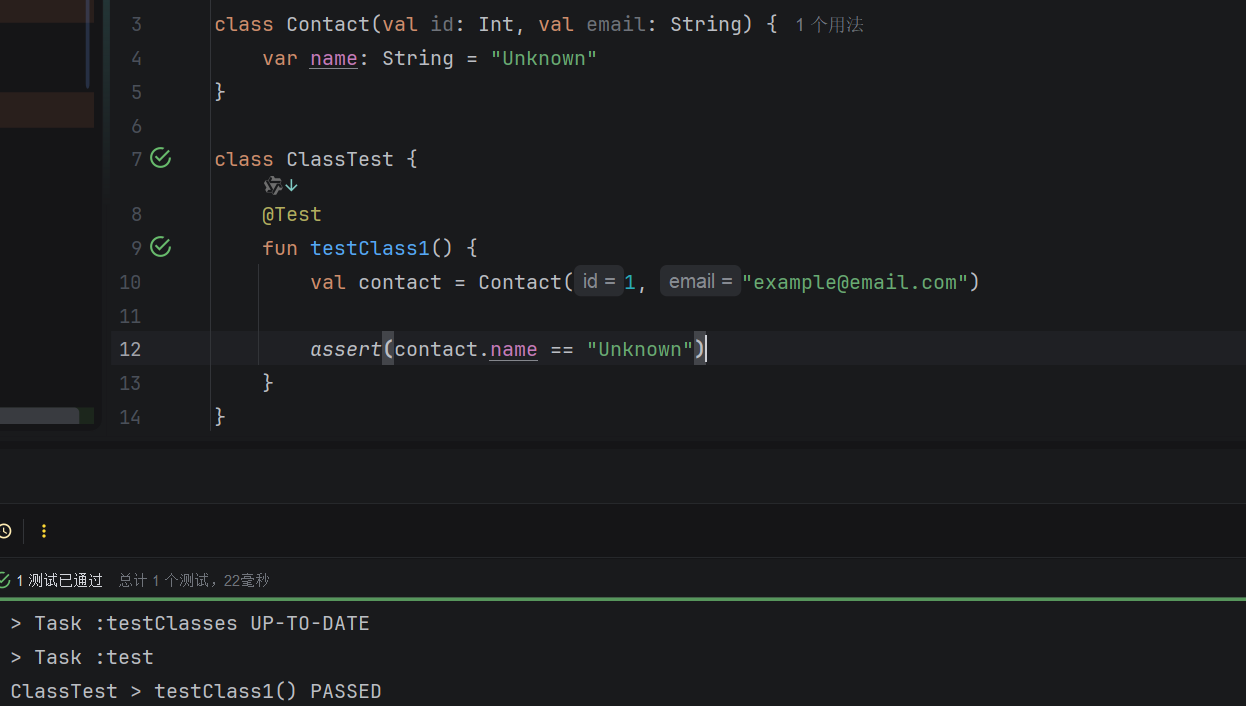
不是class header里的属性,默认的构造函数就管不着
更多关于构造函数的内容请点击这里查看
访问对象属性
class Contact(val id: Int, var email: String)

fun main() {
    val contact = Contact(1, "mary@gmail.com")

    // Prints the value of the property: email
    println(contact.email)
    // mary@gmail.com

    // Updates the value of the property: email
    contact.email = "jane@gmail.com"

    // Prints the new value of the property: email
    println(contact.email)
    // jane@gmail.com
}
成员函数/Member functions
class Contact(val id: Int, var email: String) {
    fun printId() {
        println(id)
    }
}

fun main() {
    val contact = Contact(1, "mary@gmail.com")
    // Calls member function printId()
    contact.printId()
    // 1
}
数据类/Data classes
Kotlin 拥有专门用于存储数据的数据类(data classes) 。数据类具备与普通类相同的功能,但它们会自动带有额外的成员函数。
这些成员函数允许你轻松地将实例打印为易读的输出、比较类的实例、复制实例等等。由于这些函数是自动提供的,你无需为每个类花费时间编写重复的样板代码。
使用data修饰定义一个数据类
data class User(val name: String, val id: Int)数据类自带的最有用的成员函数如下:
| Function | Description |
|---|---|
toString() | Prints a readable string of the class instance and its properties. |
equals() or == | Compares instances of a class. |
copy() | Creates a class instance by copying another, potentially with some different properties. |
val user = User("Alex", 1)

// Automatically uses toString() function so that output is easy to read
println(user)
// User(name=Alex, id=1)
val user = User("Alex", 1)
val secondUser = User("Alex", 1)
val thirdUser = User("Max", 2)
// Compares user to second user
println("user == secondUser: ${user == secondUser}")
// user == secondUser: true
// Compares user to third user
println("user == thirdUser: ${user == thirdUser}")
// user == thirdUser: falseval user = User("Alex", 1)
// Creates an exact copy of user
println(user.copy())
// User(name=Alex, id=1)
// Creates a copy of user with name: "Max"
println(user.copy("Max"))
// User(name=Max, id=1)
// Creates a copy of user with id: 3
println(user.copy(id = 3))
// User(name=Alex, id=3)创建原始实例的拷贝比直接修改实例更安全,因为任何依赖于原始实例的代码都不会被拷贝影响
更多信息请见数据类
空类型检查
导读
在 Kotlin 中,使用 null 值是允许的。当某个对象缺失或尚未设置时,Kotlin 会使用 null。在之前的集合/Collection章节中你已经看过例子:当你尝试访问 Map 中一个不存在的键值对时,Kotlin 会返回 null。
虽然这种方式很有用,但如果你的代码没有做好处理 null 的准备,就可能会遇到问题(如著名的 NullPointerException)。
为了防止程序中出现与 null 相关的问题,Kotlin 建立了空安全性(Null Safety)机制。空安全性能够在编译期而非运行时检测到潜在的 null 问题。
空安全性由一系列特性组成,允许你:
- 明确声明程序中何时允许使用
null值。 - 检查
null值。 - 对可能包含
null值的属性或函数执行安全调用(Safe Calls)。 - 声明当检测到
null值时应采取的备选操作。
术语补充
Null Safety (空安全性):Kotlin 的设计目标就是消除代码中的
NullPointerException。通过在类型系统层面区分“可空类型”和“非空类型”,编译器可以强制开发者处理潜在的空指针。Compile time vs Run time:这是关键区别。Java 通常在程序运行时崩溃,而 Kotlin 在你写代码阶段就会通过红色波浪线提醒你。
Safe Calls (安全调用):即
?.操作符。例如user?.name,如果user是null,表达式直接返回null而不会崩溃。Actions to take (备选操作):通常指 Elvis 操作符 (
?:)。例如val name = user?.name ?: "Unknown",如果左侧为null,则返回右侧的默认值。
可空类型
Kotlin的类型默认不允许出现null值,你需要在类型后面加上?来显式指定可空类型
fun main() {
    // neverNull has String type
    var neverNull: String = "This can't be null"

    // Throws a compiler error
    neverNull = null

    // nullable has nullable String type
    var nullable: String? = "You can keep a null here"

    // This is OK
    nullable = null

    // By default, null values aren't accepted
    var inferredNonNull = "The compiler assumes non-nullable"

    // Throws a compiler error
    inferredNonNull = null

    // notNull doesn't accept null values
    fun strLength(notNull: String): Int {
        return notNull.length
    }

    println(strLength(neverNull)) // 18
    println(strLength(nullable))  // Throws a compiler error
}null值检查
fun describeString(maybeString: String?): String {
    if (maybeString != null && maybeString.length > 0) {
        return "String of length ${maybeString.length}"
    } else {
        return "Empty or null string"
    }
}

fun main() {
    val nullString: String? = null
    println(describeString(nullString))
    // Empty or null string
}
安全调用
要安全地访问一个可能包含 null 值的对象属性,请使用安全调用操作符 ?.。
如果对象本身或其访问的属性链中有一个为 null,安全调用操作符将直接返回 null。如果你希望避免因 null 值的出现而触发程序错误(如 NullPointerException),这个功能将非常有用。
fun lengthString(maybeString: String?): Int? = maybeString?.length

fun main() {
    val nullString: String? = null
    println(lengthString(nullString))
    // null
}
安全链式调用
安全调用操作符可以链式使用,这样如果链上有任何一个对象的属性为空,那么整个表达式会返回null而不会抛出错误
person.company?.address?.country安全调用操作符同样可以用于安全地调用扩展函数或成员函数。
在这种情况下,程序会在函数被调用前先进行 null 检查:
- 如果检查发现对象为
null,则该调用会被直接跳过(不执行)。 - 同时,整个表达式将返回
null。
在下面的例子中,nullString为null,因此.uppercase()方法调用会被跳过,整个表达式直接返回null
fun main() {
    val nullString: String? = null
    println(nullString?.uppercase())
    // null
}
Elvis 操作符(Elvis Operator)
通过使用 Elvis 操作符 ?:,你可以为检测到 null 值的情况提供一个默认返回值。
- 在 Elvis 操作符的左侧,编写需要进行
null检查的内容。 - 在 Elvis 操作符的右侧,编写如果检测到
null值时应该返回的内容。
在下面的例子中,nullString为null,因此安全调用操作符对.length的访问结果也为null,而?:操作符则返回0
fun main() {
    val nullString: String? = null
    println(nullString?.length ?: 0)
    // 0
}
术语补充
为什么叫 Elvis?:因为将
?:旋转 90 度后,它看起来像摇滚巨星埃尔维斯·普雷斯利(Elvis Presley)的标志性发型和眼睛。逻辑等价性:
val name = user?.name ?: "Unknown"实际上等同于:
val name = if (user?.name != null) user.name else "Unknown"- 进阶用法:Elvis 操作符右侧不仅可以放常量,还可以放表达式、函数调用,甚至可以放
throw或return。例如:val s = person.name ?: throw IllegalArgumentException("Name required")
详情请见
详情请见空类型检查
空类型检查(更多内容)
导读
空安全性(Null Safety) 是 Kotlin 的一项核心特性,旨在显著降低空引用带来的风险(空引用也被称为“十亿美元错误”)。
在包括 Java 在内的许多编程语言中,最常见的陷阱之一就是访问空引用的成员,这会导致空引用异常。在 Java 中,这等同于 NullPointerException,简称为 NPE。
类型系统与编译器约束
Kotlin 将可空性(nullability) 明确纳入其类型系统中,这意味着你可以显式声明哪些变量或属性允许为 null。同时,当你声明非空变量时,编译器会强制要求这些变量不能持有 null 值,从而防止 NPE 的发生。
Kotlin 的空安全性通过在编译期而非运行时捕获潜在的空相关问题,确保了代码的安全性。这一特性通过显式表达 null 值,提升了代码的健壮性、可读性和可维护性,使代码更易于理解和管理。
Kotlin 中可能导致 NPE 的情况
尽管有空安全机制,但在以下极少数情况下,Kotlin 仍可能抛出 NPE:
- 显式调用:手动执行
throw NullPointerException()。 - 非空断言:使用了 非空断言操作符
!!。 - 初始化期间的数据不一致:
- 在构造函数中使用了尚未初始化的
this(即“this 泄露”)。 - 父类构造函数调用了一个
open成员,而该成员在子类中的实现使用了尚未初始化的状态。
- 在构造函数中使用了尚未初始化的
- Java 互操作性:
- 尝试访问 Java 平台类型(platform type) 的空引用成员。
- 泛型类型的空安全性问题。例如:一段 Java 代码向 Kotlin 的
MutableList<String>中添加了null,而这原本需要MutableList<String?>才能正确处理。 - 其他由外部 Java 代码引起的空值问题。
术语补充
The Billion-Dollar Mistake: 这一术语由图灵奖得主 Tony Hoare 提出,指他在 1965 年发明空引用所造成的巨大损失。
Platform Type (平台类型):当 Kotlin 调用 Java 代码时,由于 Java 并不总是标注
@Nullable或@NotNull,Kotlin 无法确定该类型是否可空,这种特殊的类型被称为平台类型(记作T!)。Leaking
this(this 泄露):指在对象完全构造完成之前,就将其引用暴露给了外部或父类的方法,这可能导致访问到尚未赋值的属性。
另一个由null引发的异常
除了 NPE(空指针异常)之外,另一个与空安全性相关的异常是 UninitializedPropertyAccessException(未初始化属性访问异常)。
当由于尝试访问一个尚未初始化的属性时,Kotlin 会抛出此异常。这确保了非空属性在准备就绪之前不会被误用。这种情况通常发生在使用了 lateinit 修饰符的属性上。
可空类型与不可空类型
你可以安全地调用 a 的方法或访问其属性。由于 a 是一个非空变量,系统保证不会产生 NPE。编译器确保 a 始终持有一个有效的 String 值,因此在访问其属性或方法时不存在因 null 导致的风险:
// 将一个非空字符串赋值给变量 a
val a: String = "abc"
// 返回非空变量的长度
val l = a.length
print(l)
// 输出:3
若要允许使用 null 值,需在变量类型后紧跟一个问号 ? 来声明。例如,你可以通过编写 String? 来声明一个可空字符串。这种表达式使 String 成为一个可以接受 null 的类型:
// 将一个可空字符串赋值给变量 b
var b: String? = "abc"
// 成功将 null 重新赋值给该可空变量
b = null
print(b)
// 输出:null
如果你尝试直接访问 b 的 length 属性,编译器会报错。这是因为 b 被声明为可空变量,可能持有 null 值。直接尝试访问可空对象的属性会导致 NPE:
// 将一个可空字符串赋值给变量 b
var b: String? = "abc"
// 将 null 重新赋值给该变量
b = null
// 尝试直接返回可空变量的长度
val l = b.length
// 错误提示:对于 String? 类型的可空接收者,只允许安全调用 (?.) 或非空断言调用 (!!.)
在上面的示例中,编译器要求你在访问属性或执行操作之前,必须使用安全调用来检查可空性。处理可空变量有以下几种主要方式:
- 使用
if条件语句进行 null 检查:通过传统的if (b != null)判断,编译器会自动进行智能转换(Smart Cast)。 - 安全调用操作符
?.:如果对象不为空则执行访问,否则直接返回null。 - Elvis 操作符
?::当左侧表达式结果为null时,提供一个默认的备选值。 - 非空断言操作符
!!:强制将可空类型转换为非空类型;如果对象确实为null,则会抛出NullPointerException。 - 可空接收者(Nullable receiver):可以为可空类型定义扩展函数,在函数内部处理
null逻辑。 let函数:常与安全调用结合使用(obj?.let { ... }),仅在对象不为空时执行特定的代码块。- 安全类型转换
as?:尝试进行类型转换,如果转换失败则返回null而不是抛出异常。 - 可空类型的集合:例如
List<Int?>,处理包含null元素的集合,或使用filterNotNull()过滤掉它们。