
从零开始的Fyne(八):数据绑定
数据绑定/Data Binding
Data binding is a powerful new addition to the Fyne toolkit that was introduced in version
v2.0.0. By using data binding we can avoid manually managing many standard objects likeLabels,Buttons andLists.
The builtin bindings support many primitive types (like
Int,String,Floatetc), lists (such asStringList,BoolList) as well asMapandStructbindings. Each of these types can be created using a simple constructor function. For example to create a new string binding with a zero value you can usebinding.NewString(). You can get or set the value of most data bindings usingGetandSetmethods.
It is also possible to bind to an existing value using similar functions who’s names start
Bindand they all accept a pointer to the type bound. To bind to an existingintwe could usebinding.BindInt(&myInt). By keeping a reference to a bound value instead of the original variable we can configure widgets and functions to respond to any changes automatically. If you change the external data directly, be sure to callReload() to ensure that the binding system reads the new value.
package main

import (
	"log"

	"fyne.io/fyne/v2/data/binding"
)

func main() {
	boundString := binding.NewString()
	s, _ := boundString.Get()
	log.Printf("Bound = '%s'", s)

	myInt := 5
	boundInt := binding.BindInt(&myInt)
	i, _ := boundInt.Get()
	log.Printf("Source = %d, bound = %d", myInt, i)
}
绑定简单的组件/Binding Simple Widgets
The simplest form of binding a widget is to pass it a bound item as a value instead of a static value. Many widgets provide a
WithDataconstructor that will accept a typed data binding item. To set up the binding all you need to do is pass the right type in.
Although this may not look like much of a benefit in the initial code you can then see how it ensures that the displayed content is always up to date with the source of the data. You will notice how we did not need to call
Refresh()on theLabelwidget or even keep a reference to it and yet it updates appropriately.
package main

import (
	"time"

	"fyne.io/fyne/v2/app"
	"fyne.io/fyne/v2/data/binding"
	"fyne.io/fyne/v2/widget"
)

func main() {
	myApp := app.New()
	w := myApp.NewWindow("Simple")

	str := binding.NewString()
	str.Set("Initial value")

	text := widget.NewLabelWithData(str)
	w.SetContent(text)

	go func() {
		time.Sleep(time.Second * 2)
		str.Set("A new string")
	}()

	w.ShowAndRun()
}
双向绑定/Two-Way Binding
So far we have looked at data binding as a way of keeping our user interface elements up to date. Far more common, however, is the need to update values from the UI widgets and keep the data up to date everywhere. Thankfully the bindings provided in Fyne are “two-way” which means that values can be pushed into them as well as read out. The change in data will be communicated to all connected code without any additional code.
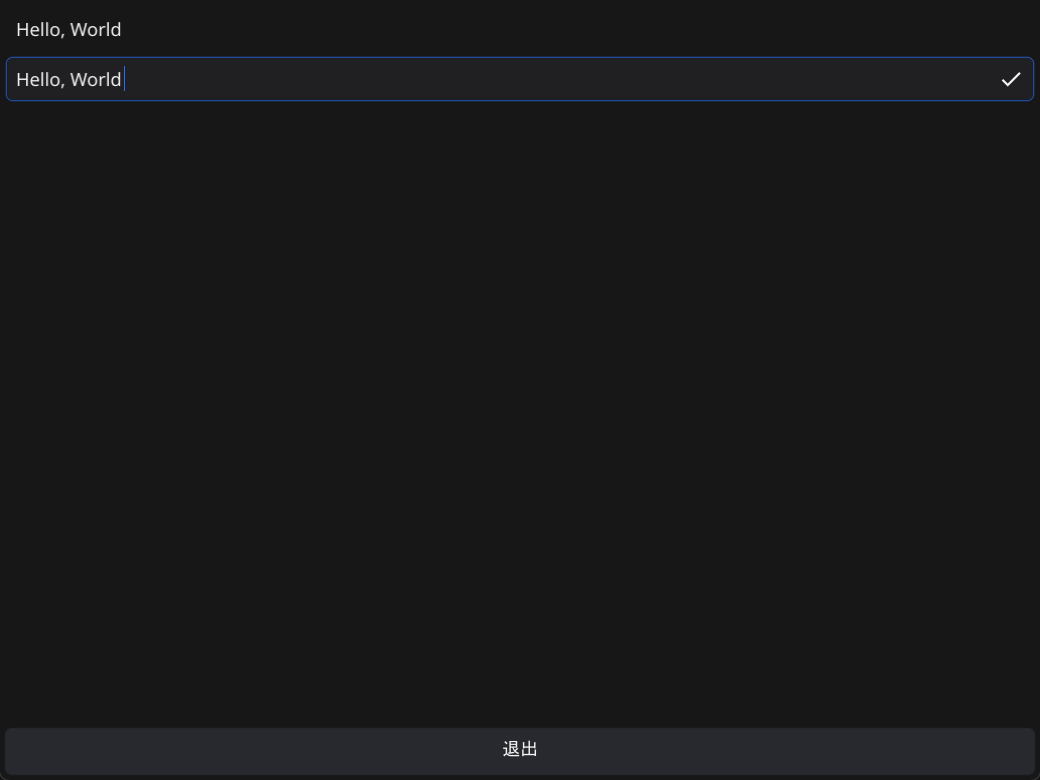
To see this in action we can update the last test app to display a
Labeland anEntrythat are bound to the same value. By setting this up you can see that editing the value through the entry will update the text in the label as well. This is all possible without calling refresh or referencing the widgets in our code.
By moving your app to use data binding you can stop saving pointers to all your widgets. By instead capturing your data as a set of bound values your user interface can be completely separate code. Cleaner to read and easier to manage.
package main

import (
	"fyne.io/fyne/v2/app"
	"fyne.io/fyne/v2/container"
	"fyne.io/fyne/v2/data/binding"
	"fyne.io/fyne/v2/widget"
)

func main() {
	myApp := app.New()
	w := myApp.NewWindow("Two Way")

	str := binding.NewString()
	str.Set("Hi!")

	w.SetContent(container.NewVBox(
		widget.NewLabelWithData(str),
		widget.NewEntryWithData(str),
	))

	w.ShowAndRun()
}
数据转换/Data Conversion
So far we have used data binding where the type of data matches the output type (for example
StringandLabelorEntry). Often it will be desirable to present data that is not already in the correct format. To do this thebindingpackage provides a number of helpful conversion functions.
Most commonly this will be used to convert different types of data into strings for displaying in
LabelorEntrywidgets. See in the code how we can convert aFloattoStringusingbinding.FloatToString. The original value can be edited by moving the slider. Each time the data changes it will run the conversion code and update any connected widgets.
It is also possible to use format strings to add more natural output for the user interface. You can see that our
shortbinding is also converting aFloattoStringbut by using aWithFormathelper we can pass a format string (similar to thefmtpackage) to provide a custom output.
package main

import (
	"fyne.io/fyne/v2/app"
	"fyne.io/fyne/v2/container"
	"fyne.io/fyne/v2/data/binding"
	"fyne.io/fyne/v2/widget"
)

func main() {
	myApp := app.New()
	w := myApp.NewWindow("Conversion")

	f := binding.NewFloat()
	str := binding.FloatToString(f)
	short := binding.FloatToStringWithFormat(f, "%0.0f%%")
	f.Set(25.0)

	w.SetContent(container.NewVBox(
		widget.NewSliderWithData(0, 100.0, f),
		widget.NewLabelWithData(str),
		widget.NewLabelWithData(short),
	))

	w.ShowAndRun()
}
列表数据/List Data
To demonstrate how more complex types can be connected we will look at the
Listwidget and how data binding can make it easier to use. Firstly we create aStringListdata binding, which is a list ofStringdata type. Once we have a data of list type we can connect this to the standardListwidget. To do so we use thewidget.NewListWithDataconstructor, much like other widgets.
Comparing this code to the list tour You will see 2 main changes, the first is that we pass the data type as the first parameter instead of a length callback function. The second change is the last parameter, our
UpdateItemcallback. The revised version takes abinding.DataItemvalue instead ofwidget.ListIndexID. When using this callback structure we shouldBindto the template label widget instead of callingSetText. This means that if any of the strings change in the data source each affected row of the table will refresh.
package main

import (
	"fmt"

	"fyne.io/fyne/v2"
	"fyne.io/fyne/v2/app"
	"fyne.io/fyne/v2/container"
	"fyne.io/fyne/v2/data/binding"
	"fyne.io/fyne/v2/widget"
)

func main() {
	myApp := app.New()
	myWindow := myApp.NewWindow("List Data")

	data := binding.BindStringList(
		&[]string{"Item 1", "Item 2", "Item 3"},
	)

	list := widget.NewListWithData(data,
		func() fyne.CanvasObject {
			return widget.NewLabel("template")
		},
		func(i binding.DataItem, o fyne.CanvasObject) {
			o.(*widget.Label).Bind(i.(binding.String))
		})

	add := widget.NewButton("Append", func() {
		val := fmt.Sprintf("Item %d", data.Length()+1)
		data.Append(val)
	})
	myWindow.SetContent(container.NewBorder(nil, add, nil, nil, list))
	myWindow.ShowAndRun()
}
In our demo code there is an “Append”
Button, when tapped it will append a new value to the data source. Doing so will automatically trigger the data change handlers and expand theListwidget to display the new data.